


Why I spent a week running Qwen locally
I spent a week running the Qwen2.5-Coder family on a midrange Apple Silicon workstation, with the goal of finding out how much of my everyday web development work could happen without sending a single request to a cloud API. The experiment was never about replacing Claude or GPT-4o. It was about the quieter class of tasks that make up most of a day: scaffolding a component, untangling a broken regex, writing a two-paragraph explanation of what a route handler does. Those are the jobs where a cloud round trip feels heavy and where privacy on proprietary client code actually matters. I wanted to know whether a model that lives entirely on my machine could carry that load.
The short answer is that it can, for the right slices of work. The honest answer is that the boundary between what the local model handles well and what it fumbles is sharper than the marketing around "open source models are now GPT-4o competitors" would suggest. This article is the full set of notes from that week: the setup that worked, the numbers that matter, and the exact tasks where I stopped reaching for the local model and pulled up a cloud one.
What Qwen2.5-Coder actually is
Before the test-drive results mean anything, it helps to be precise about the thing being tested. Qwen2.5-Coder is a code-specific family built on the Qwen2.5 architecture, released by Alibaba's Qwen team in November 2024, and it comes in six sizes from 0.5B up to 32B parameters.1 The family was trained on more than 5.5 trillion tokens of code and related text, with special tokens added to support repository-level understanding and fill-in-the-middle (FIM) completion, where the model predicts the missing middle of a code block given the surrounding prefix and suffix.2 That FIM training is what makes it genuinely useful as an autocomplete engine, not just a chatbot that happens to answer questions about code.
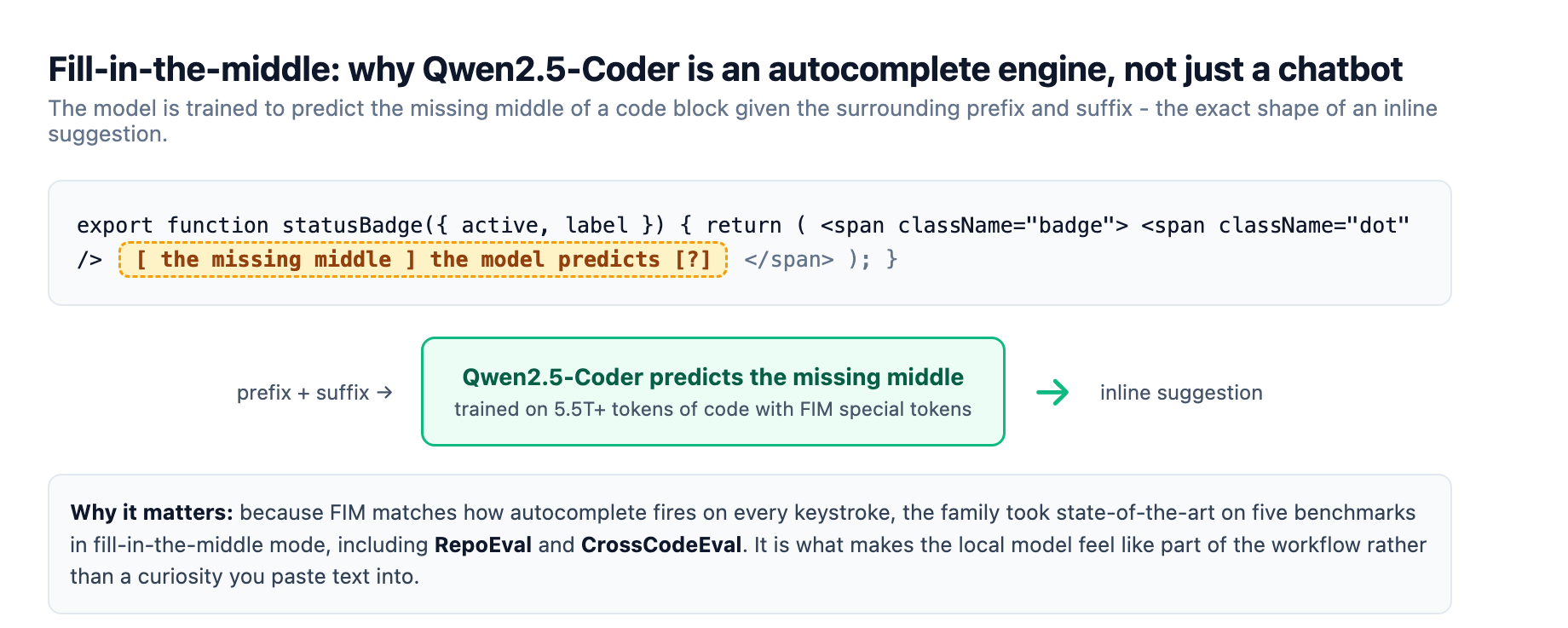
The flagship 32B-Instruct model claimed state-of-the-art results among open-weight code models at release, with the Qwen team saying it matched the coding capability of GPT-4o.1 The specific numbers are worth quoting because they anchor everything below. On Aider, a code repair benchmark, it scored 73.7, comparable to GPT-4o at the time. On McEval, a multi-language benchmark covering more than 40 programming languages, it scored 65.9. On MdEval, the multi-language code repair counterpart, it scored 75.2, first among open-source models.1 On code completion it took state-of-the-art on five benchmarks in fill-in-the-middle mode, including RepoEval and CrossCodeEval.1
Two licensing details matter for a working developer, not just a researcher. The 0.5B, 1.5B, 7B, 14B, and 32B sizes are Apache 2.0, which means you can run, modify, and redistribute them without asking permission. The 3B size sits under the Qwen Research license, which is more restrictive, so I skipped it entirely.1 The 7B, 14B, and 32B models carry a 128K context window, while the smaller three are capped at 32K.1 For most web dev work that difference barely surfaces, but it becomes relevant when you start feeding the model a whole file.
The setup that worked
I served the model with Ollama, which is the path of least resistance on macOS. brew install ollama gives you a background service with a local API on port 11434, and ollama run qwen2.5-coder:7b pulls and runs the model in one step.3 The Ollama library keeps the naming simple across the size range, so qwen2.5-coder:1.5b, :7b, :14b, and :32b all resolve to the right weights.3 I ran two sizes in parallel: the 7B as the autocomplete workhorse and the 14B for chat-style review and documentation. Both fit comfortably on a 32GB unified-memory machine.
If you want a lighter entry point, the Continue extension for VS Code and JetBrains documents Qwen2.5-Coder 1.5B and 7B as its recommended open-weight autocomplete models, wired through Ollama with a small YAML block that assigns the model the autocomplete role.4 That single integration is what makes a local model feel like a real part of the workflow rather than a curiosity you paste text into. It fires inline suggestions on every keystroke, and because the inference runs on your machine there is no rate limit and no per-token bill.
Frontend prototyping
Frontend prototyping turned out to be the local model's best showing. Give Qwen2.5-Coder a focused prompt, a sample component, and one hard constraint, and it produces genuinely usable React and TypeScript. The pattern that worked most consistently was single-file, well-scoped requests. "Here is an existing Button component and its props type. Add a loading state that disables clicks, keeps the API shape unchanged, and follows the existing design tokens." With a constraint that specific, the 14B model returned something I could paste in and wire up with only light edits.
The reasons it works are clear from the benchmarks. Component work is close to the fill-in-the-middle and code completion strengths the family was explicitly trained for, and the tasks are small enough that a 14B model's reasoning capacity is not the bottleneck.12 What matters more is prompt discipline. A vague "build me a dashboard" produces a generic result that needs rework, while a prompt that names the exact component, the existing props, and the one thing that must not change produces output that respects the surrounding code. The lesson I carried out of the week is that the local model rewards context far more than the cloud models do, because it has less raw reasoning to paper over a thin prompt.
Code review
Code review was the most surprising result, in a good way. A local Qwen model is a poor replacement for a human reviewer on a pull request that touches architecture or cross-cutting concerns. But as a first-pass mechanical reviewer it is quietly excellent. I fed it a diff between two commits and asked it to flag dead branches, unused imports, repeated logic, and places where the error handling diverged from the rest of the file. It caught the low-level issues reliably, and it explained each one in a sentence I could paste into a review comment.
The Aider score of 73.7 on code repair points at why. The model is trained to identify and fix errors in code, and single-file repair is exactly the scope where that training pays off.1 The version I ran on the 14B had the context to hold a moderately sized file and reason about it locally. What it could not do is reason across a large codebase. When I pointed it at a feature that spanned a page component, a hook, and an API route, the local model lost the thread, invented relationships between files that did not exist, and produced confident but wrong suggestions. That failure is structural, not a tuning problem, and it is the clearest line between local and cloud in the whole test.
Quick documentation
Documentation generation was the task where the local model delivered the most value for the least effort. Writing a plain-language explanation of a route handler, generating a docstring from a function signature, or summarizing what a module exports are tasks where "good enough" is genuinely good enough. The model is also safe here, because the risk of hallucinating a relationship across files is low when the input is one function or one small module.
I found the 14B comfortably fast enough for this class of work, and the output needed little editing. The one repeated annoyance was boilerplate. Given a loose instruction, the model pads explanations with filler that reads like an LLM wrote it, so I learned to add "two sentences, no preamble, mention the error path" to nearly every documentation prompt. That single habit cut my editing time roughly in half.
Where it falls over
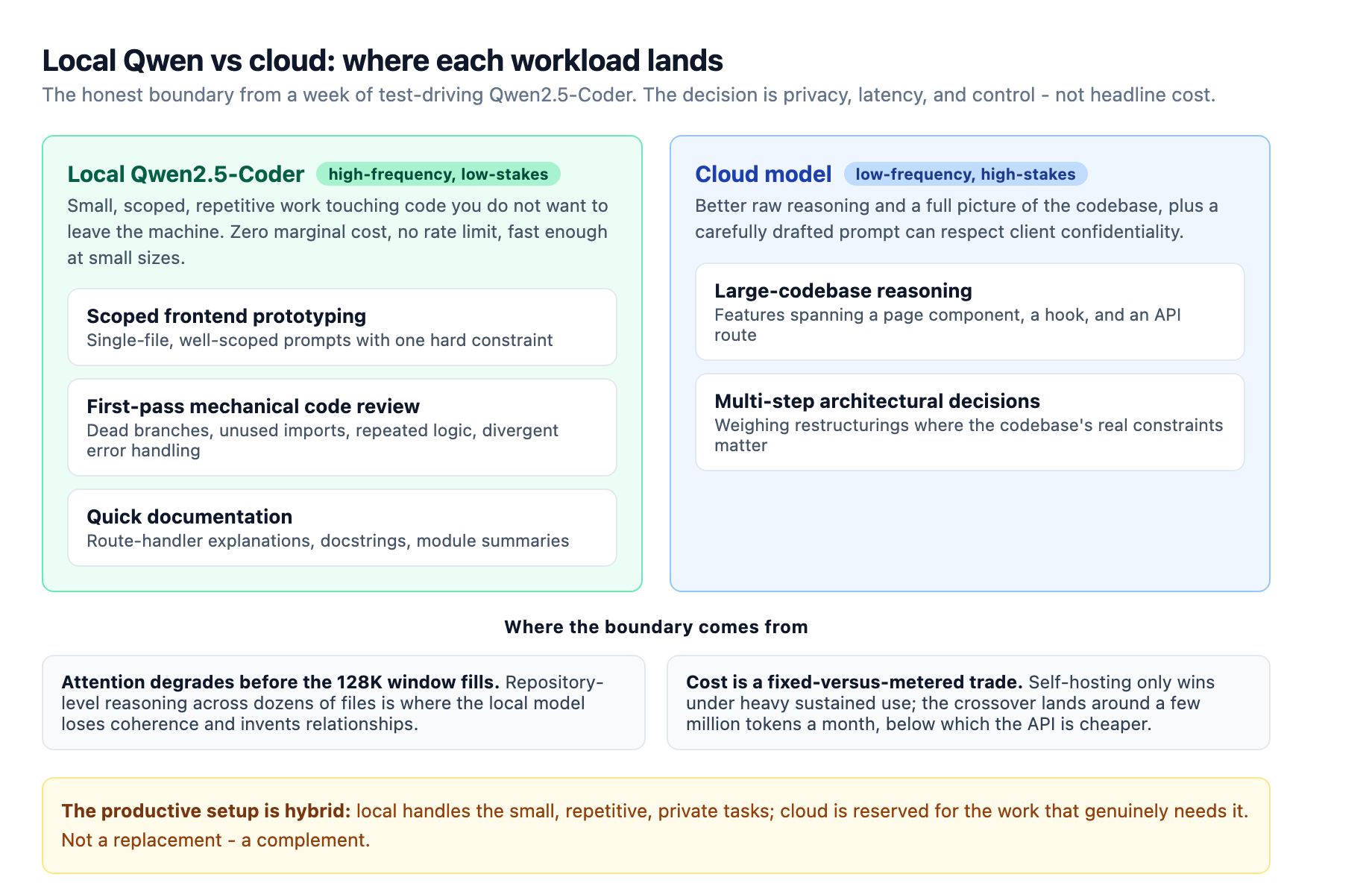
The failures clustered into three buckets. Large-codebase reasoning is the first and most important. The 128K context window on the bigger sizes is advertised as enough to hold a whole repository, but in practice the model's attention degrades long before the window fills, and repository-level reasoning across dozens of files is where it loses coherence.1 The second bucket is multi-step architectural decisions. Asked to weigh two ways to restructure a state management layer, the local model gives you a confident paragraph that misses the constraint your codebase actually imposes, because it never had the full picture.
The third bucket is latency on long-form generation, and it is worth being precise about, because the numbers vary a lot by backend and by context length. On Apple Silicon, llama.cpp with the Metal backend has been measured in the 50 to 100 plus tokens per second range on recent M-series machines for short prompts, while Ollama on the same hardware typically lands around 20 to 40 tokens per second.5 For a focused 7B autocomplete model, that is fast enough to feel responsive. For a 14B model asked to write a full function or a long explanation, the first token takes noticeably longer and the whole response can stretch into tens of seconds. That is fine for a review prompt you run and read, and wrong for anything interactive where you are waiting on the output to continue thinking.
Local versus cloud, honestly
The comparison people usually want is a headline about cost, so let me give the honest version rather than a clean winner. On one side, cloud APIs charge per token and data touches a provider's servers, which is a real problem for proprietary client code even when the vendor promises not to use it for training.6 On the other side, owning hardware is a fixed cost that only wins at volume. A rough break-even analysis for a midrange workstation put the local path ahead only under heavy sustained use, with light users generally coming out ahead on metered cloud pricing.6 A separate analysis of self-hosted models found the crossover around a few million tokens a month, below which the API is cheaper and above which self-hosting wins on marginal cost.7
So the decision is not cost, for most web devs. It is privacy, latency, and control. When I need to reason across a large private codebase, I still reach for a cloud model, because it is better and because a carefully drafted prompt can respect client confidentiality. When the task is small, repetitive, and touches code I do not want to leave the machine, the local model is the right tool and the cost math is irrelevant because the marginal cost is zero. The infrastructure judgment behind that split, when self-hosting inference genuinely pays off, is the subject of our local LLM infrastructure guide.
How to set it up
If any of this sounds like your workload, the setup is genuinely under thirty minutes. Install Ollama, pull qwen2.5-coder:7b, and add it to Continue as the autocomplete model with a short YAML block assigning it the autocomplete role.4 Keep a second, larger size like the 14B for chat-style review and documentation. Put your prompt discipline in place early: name the exact file, the exact constraints, and the one thing that must not change. Review every diff the local model produces before committing, because it is highly confident even when it is wrong across files.
The honest verdict
After a week, I keep the local Qwen setup running, and it earns its place for exactly three jobs: scoped frontend prototyping, first-pass mechanical code review, and quick documentation. It is a practical, private, low-friction tool for the many small tasks that sit between larger features. It is not a replacement for a stronger cloud model on large-codebase reasoning or architectural decisions, and the honest framing is that it never claimed to be. The 32B model matches GPT-4o on some benchmarks, but benchmarks measure isolated code generation, not the whole messy job of understanding a codebase you did not write.1 That gap is where the cloud still lives, and the productive setup for most teams is a hybrid, with the local model handling the high-frequency low-stakes work and the cloud reserved for the work that genuinely needs it.
Sources
-
Qwen Team. Qwen2.5-Coder Series: Powerful, Diverse, Practical. qwenlm.github.io ↩ ↩2 ↩3 ↩4 ↩5 ↩6 ↩7 ↩8 ↩9 ↩10
-
Ollama. qwen2.5-coder model library. ollama.com ↩ ↩2
-
Continue Docs. Autocomplete setup with Ollama and Qwen2.5-Coder. docs.continue.dev ↩ ↩2
-
Local LLM inference on Apple Silicon: llama.cpp vs Ollama token throughput. alphaxiv.org ↩
-
Local vs. Cloud LLMs: an honest cost-benefit analysis, including data-sovereignty and break-even modeling. sovereignsystemsai.ca ↩ ↩2
-
Prem AI. Self-hosted LLM guide: setup, tools and cost comparison. premai.io ↩