


A real-time feature works beautifully in a demo. Two tabs open, a message, a row insert, an order status flips, and both screens update before you finish reading the toast. That demo is the worst possible rehearsal for production, because it never has enough connections to hit a limit, it never navigates enough to leak a channel, and it never sits in a background tab long enough for presence to go stale.
The transport is rarely where a Supabase real-time app fails. We covered choosing the transport, sending binary payloads, and stopping lost writes on the write side. What almost no tutorial covers is the layer above the socket: how many subscriptions your plan allows, how those subscriptions are created and destroyed, and what actually happens when one of those limits is crossed. That is the layer where production apps fall over, and it is entirely within your control.
The read-side transport pieces (picking SSE versus WebSockets and sending binary broadcasts) decide how the message moves, and the write-side piece covers the guarded update that stops lost writes. This article is the side those three assume and none of them drills: the subscription layer that lives on top of the transport and decides whether those messages ever arrive without the plan billing you or disconnecting you.
One connection per tab, until you leak it into a limit
The mental model to hold is that a browser gets one Realtime connection per open tab, and every channel in that app shares that single connection.1 You do not open a new WebSocket for each channel. Your Supabase client is a singleton, and the channels you subscribe to are multiplexed over the one connection the client owns. This is what makes the limit on the connection count sane in the first place: a user in one tab burns one connection no matter how many rooms they listen to.
The failure appears when an app creates the Supabase client more than once, or opens channels and never closes them. A collaborator on the Supabase team fielded exactly this report: a single-user app blowing past the free plan's connection limit for no obvious reason. The cause was a new client instance inside a component that mounted over and over, each mount grabbing a fresh connection that was never torn down.1 Reload the page enough times and the "open right now" counter climbs even though you are one human.
The numbers make the wall visible. The free plan allows 200 concurrent connections, the paid Pro plan 500, and raising to 10,000 needs a no-spend-cap or Team plan or higher.2 Two hundred simultaneous open tabs is a lot of tabs, but a leak does not need two hundred users. A single automation account, a dashboard that remounts a chat component on every route change, or a headless browser polling the page can each stack connections until the limit is crossed by one actor.1 The limit is on open connections at the same time, not on connections across the day, so a burst of short-lived intervals can still trip it.
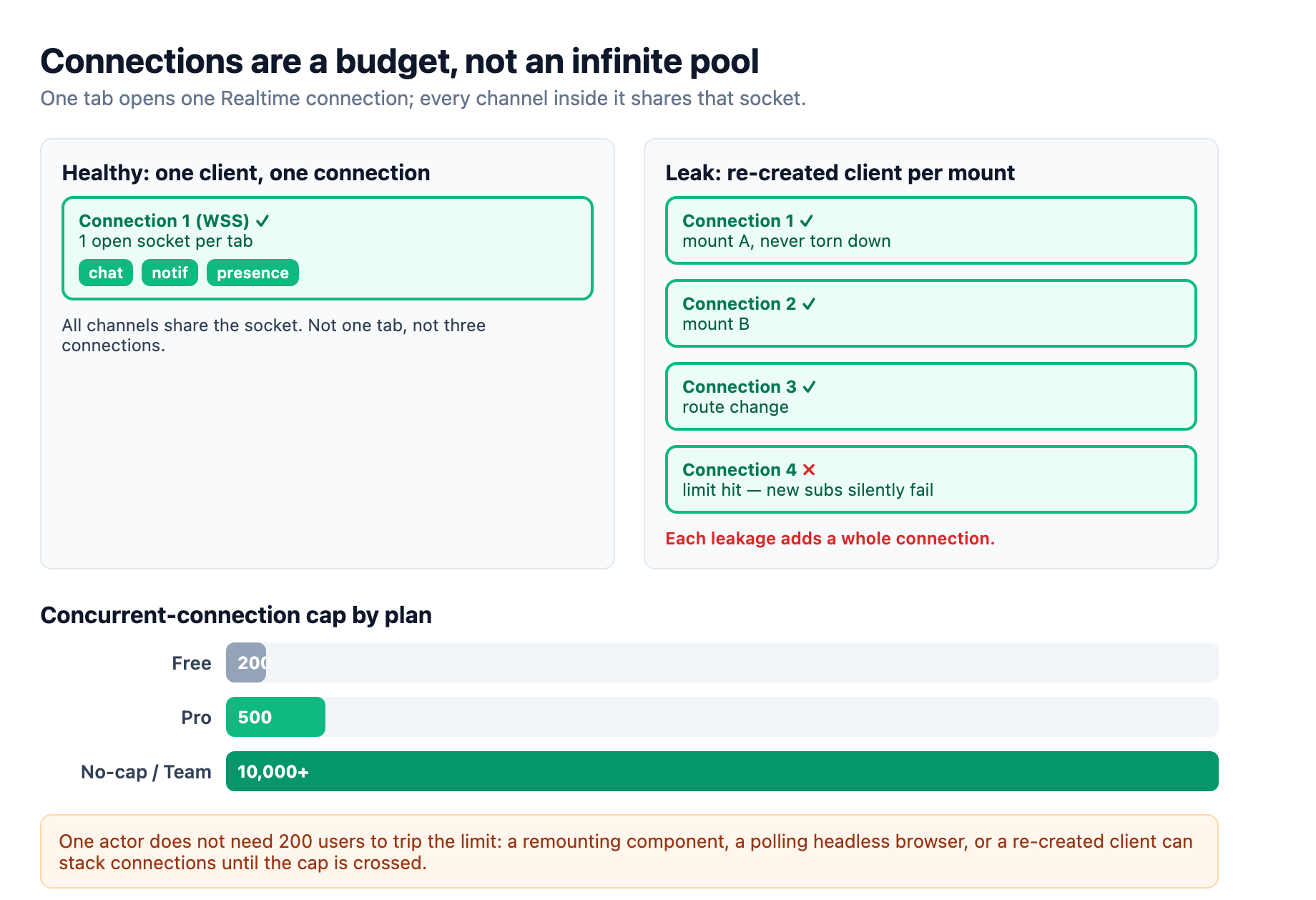
The fix is a singleton client and a disciplined teardown. Create the Supabase client once, at the app root or in a module-level export, and reuse that instance everywhere.1 When a React component subscribes, return the cleanup from its effect so removeChannel runs on unmount.3 The simplest rule that prevents the whole class: every place you call .channel(...) must have a corresponding tidy-up that fires when its owning scope goes away. A component that navigates away and leaves its channel open is accumulating state that will surface as too_many_connections later, at the worst moment.
The three modes are three different bills
Beyond the connection count, Supabase meters the other way a real-time system can fail: message throughput. The free plan allows 100 messages per second, Pro allows 500, and the unconstrained plans allow 2,500.2 If you throw every database change onto a broad table subscription, that number is easier to hit than you expect, because it counts every message delivered to every subscriber. One high-write table multiplied by many listeners can saturate the per-project cap even with a handful of users.
Choosing which of Realtime's three features you use is the single biggest lever on that bill. Postgres Changes streams committed database row changes to clients, with the latency of WAL logical replication, and it carries database impact on the read path. Broadcast sends ephemeral messages directly between clients with no database involvement, which makes it the fastest of the three. Presence tracks which users are online in a channel.3 The mode you pick changes both what your data means and how much server work each message costs.
The production rule of thumb is to match the feature to the data's lifetime. Persistent data you need to survive a reload, like a chat message or an order status, belongs in the database anyway, so Postgres Changes makes sense. High-frequency ephemeral state that nobody needs later, cursor positions, typing indicators, whiteboard strokes, game state, belongs on Broadcast. Presence is for slow-changing state: who is online, which document is open, what page a user is on.3
The costliest mistake is subscribing a Postgres Changes listener to a high-write analytics or log table. Production reports a thousand inserts per second on an unfiltered table subscription will overload Realtime, because every insert becomes a message to every subscribed client.4 That is the wrong tool for a metric sink, and it punishes both the database and the real-time path. Filter server-side with the filter option on the channel so each client only receives the changes it actually renders, rather than pulling every row change off a shared table.4 In a Next.js app, the same mode decision threads through where the subscription lives: the client bundle owns real-time channels, because a server component cannot hold an open socket, so the Supabase guide keeps the real-time subscription on the client component and merges it with server-rendered state.5
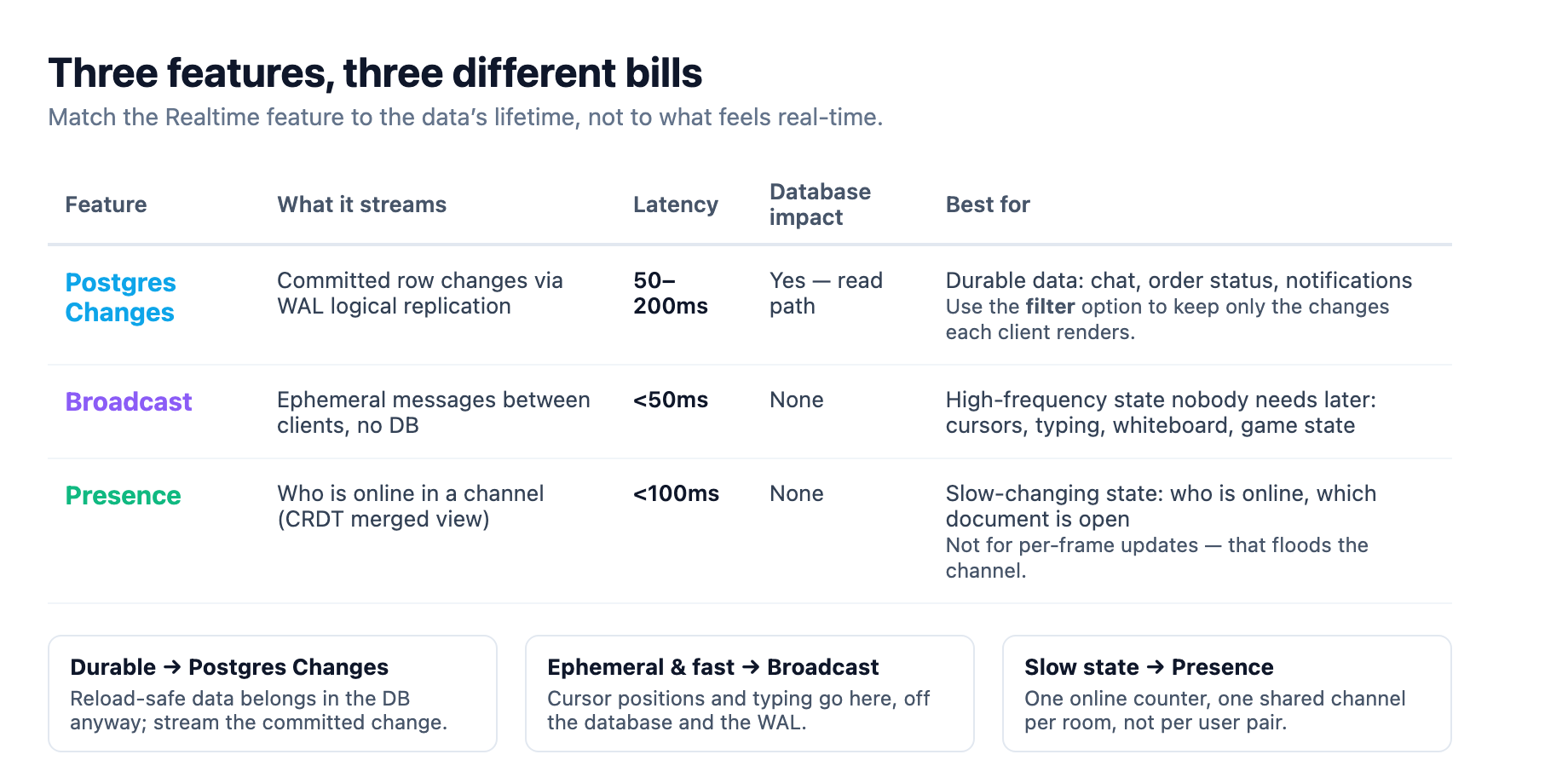
A real-time app that feeds a chat, a presence list, and a cursor layer will use all three modes at once. The chat row changes go through Postgres Changes, the cursors and typing go through Broadcast, and the online roster goes through Presence. Splitting the features this way is what keeps the per-mode limits from being each other's problem, and it is the architecture the Supabase docs themselves steer toward when they list what each feature is for.3
Presence looks simple and goes stale
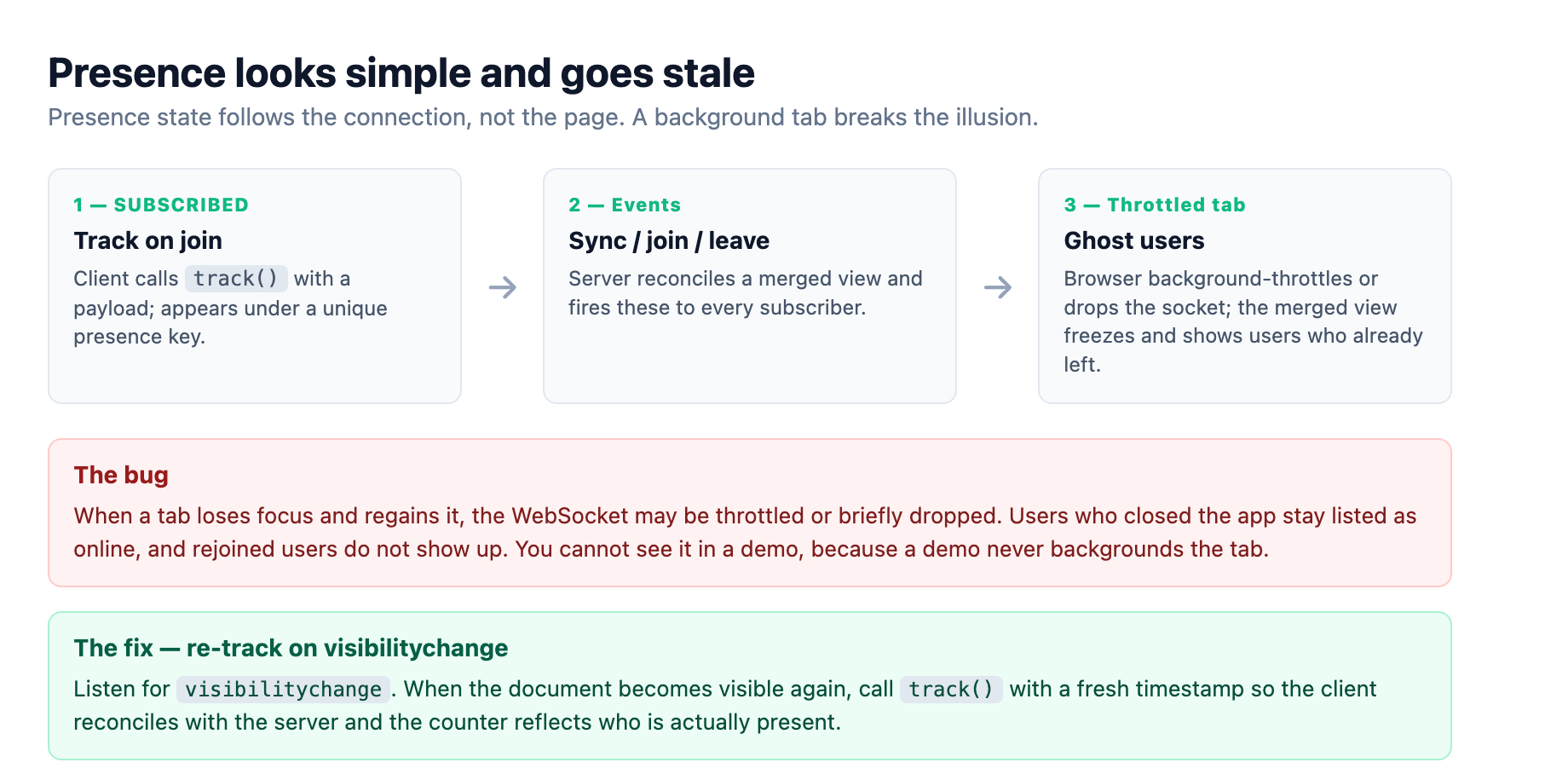
Presence is the mode that most often catches teams off guard, because its failure is not a hard error. The mechanism is simple on paper: each client publishes a small payload to a shared channel, and subscribers get a merged view keyed by a unique presence key. A client becomes visible when it starts tracking, disappears when it stops, and the library fires sync, join, and leave events as that state changes.6
The subtle part is that presence state follows the WebSocket connection, not the page. When a browser background-throttles or drops the socket, the presence state can go stale: users who already closed the app stay listed as online, or a user who rejoined does not show up. This is a documented production gotcha that affects every collaborative app, and it usually surfaces as ghost users in the "who is viewing this document" counter.4 You cannot see the bug in a demo because a demo never puts the tab in the background.
The fix is to re-track presence when the tab comes back into view. Listen for the visibilitychange event, and when the document becomes visible again, call track with a fresh timestamp to reconcile the client's state with the server.4 Wrapping that re-track in the visibility handler closes the gap that background throttling opens, so the online counter reflects who is actually present.
Two more presence details matter. First, presence is designed for slow-changing state, and calling track on every mouse move to share a cursor will flood the channel and tank performance. That high-frequency cursor data belongs on Broadcast, and the Supabase docs are explicit that presence is not built for it.6 Second, a sync event can fire join and leave handlers together even when nobody actually joined or left, because sync reconciles local state with server state. Build your UI so it derives from the full block of state, not from reacting to each individual join or leave, and you will not paint phantom events as real movement.6
The production checklist is a small set of habits
The most useful part of the limits documentation is the error vocabulary, because it tells you exactly which habit you skipped. Realtime replies to a refused channel join with one of four WebSocket messages: too_many_channels, meaning a single connection has joined more than its 100 channel cap; too_many_connections, meaning the project has hit its total concurrent-connection limit; too_many_joins, meaning the client is opening channels faster than the per-second join rate; and tenant_events, meaning the whole project is generating more messages per second than the plan allows.2
Read those four in plain English and they are a checklist. too_many_channels says you have over-joined a single connection, so consolidate or reuse channels. too_many_connections says you are leaking or re-creating clients, so audit the singleton and the unmount cleanup. too_many_joins says you are opening channels in a tight loop, often a re-render doing channel work, so hoist the subscribe outside the render path. tenant_events says you subscribed the wrong thing at the wrong rate, so filter server-side and move high-frequency data to Broadcast.2 When the message-throughput cap trips, Supabase disconnects the connection and the client reconnects automatically once rates drop below the limit, which means your monitoring has to watch for the churn, not assume the app is fine.2
None of these limits is a reason to avoid Realtime. The platform's managed cluster runs on the same Elixir-and-Phoenix foundation that carries truly massive concurrent workloads, and with a no-spend-cap or enterprise plan the working limits scale to 10,000 connections and beyond.24 The discipline is about not defeating the shared infrastructure with the four habits above: one client per tab, closed channels on unmount, filtered and correctly-picked subscriptions, and presence that re-syncs when the user returns. Ship those four and a real-time feature that survived the demo will survive a real user base, because you will be hitting the walls on purpose, in a staging environment, instead of meeting them for the first time in front of a client.
Sources
-
Supabase engineering discussion on real-time connection best practices: one connection per browser tab, all channels sharing that connection, a single application-level client instance, and the concurrent-open-connection limit being the constraint. github.com ↩ ↩2 ↩3 ↩4
-
Supabase Realtime limits by plan and the limit error codes: concurrent connections, messages per second, channel joins, channels per connection, presence limits, and the
too_many_channels,too_many_connections,too_many_joins, andtenant_eventsWebSocket messages, plus the automatic reconnect ontenant_events. supabase.com ↩ ↩2 ↩3 ↩4 ↩5 ↩6 -
Supabase Realtime getting-started guide on channels, private channels, naming conventions, cleanup on unmount, and when to use Broadcast versus Presence versus Postgres Changes. supabase.com ↩ ↩2 ↩3 ↩4
-
AgileSoftLabs, "Supabase Realtime in Production: Limits & Fixes (2026)": leaked channels as the most common cause of hitting connection limits, server-side filters, high-write table overload, presence going stale after tab visibility changes and the re-track fix, and the Elixir/Phoenix foundation. agilesoftlabs.com ↩ ↩2 ↩3 ↩4 ↩5
-
Supabase Realtime with Next.js guide on the client and server component options for receiving real-time changes. supabase.com ↩
-
Supabase Realtime Presence reference on how presence works, the
sync,join, andleaveevents, tracking and untracking state, and the warning that presence is not for high-frequency updates. supabase.com ↩ ↩2 ↩3