


The fastest way to make a slow pipeline slow again is to add it as a build step in the wrong place, and the fastest way to make it fast permanently is a cache. Most teams know this. What most teams get wrong is that a CI cache is not a free, inert, private place to park compiled output. It is stateful infrastructure with a metered storage budget, a time-based eviction policy, a branch-based access scope, and a security boundary an attacker can cross. When you treat it like a black box, it costs you in three ways at once: builds thrash on evictions, stale caches replay the wrong dependencies, and poisoned caches become a supply-chain landing zone. Treat it like the system it is and it stays the single cheapest lever in delivery.
This is a different story class from the CI guardrails we covered for AI-generated code and the merge-queue mechanics for trunk-based delivery. Those are about catching bad code. This is about one specific, boring, high-value artifact: the cache that holds your dependencies and build output, and how to stop under-managing it.
The cache is the cheapest speedup you are leaving on the table
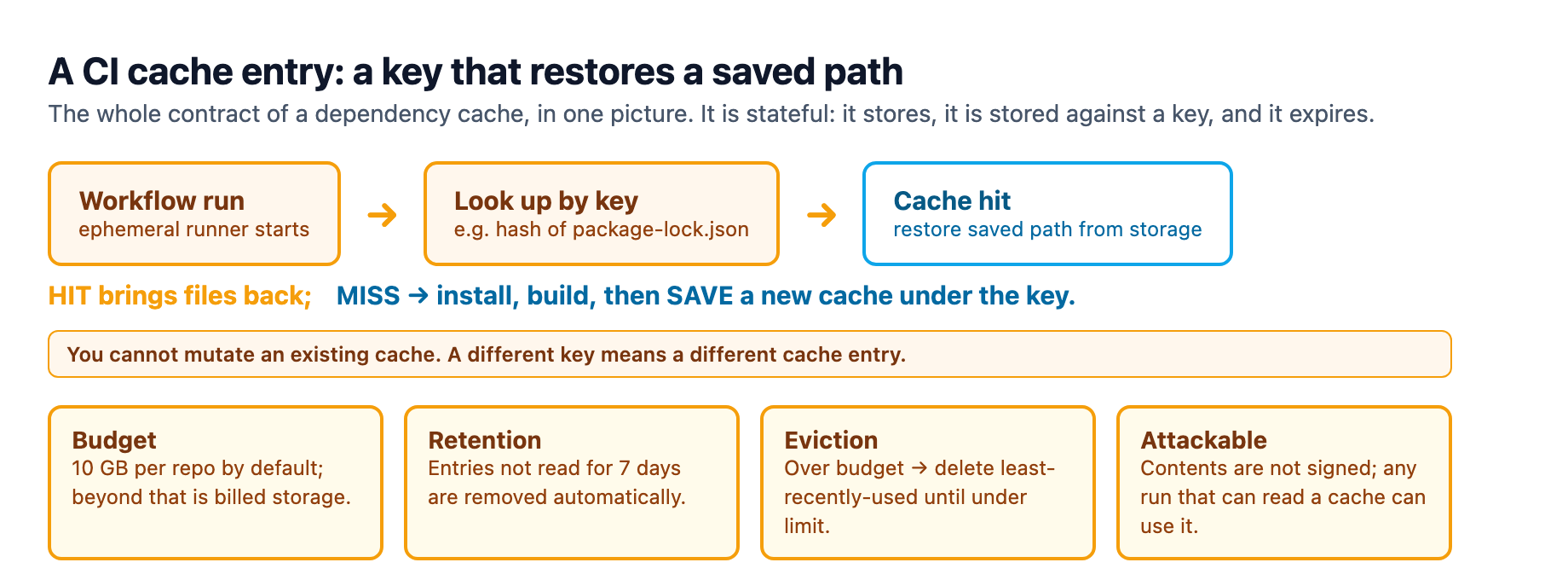
A dependency cache stores a compiled or downloaded result under a key and replays it when the key matches again. That is the whole mechanic: look up by key, restore on a hit, rebuild and save on a miss. It works because most of a CI run repeats work another run already did, and the network round-trips to package registries are the slow, flaky part.
The thing to internalize is that the runner is ephemeral but the cache is not. Every job starts on a clean machine, so the cache is the only durable state a build carries between runs. Call it a cache and you think of a scrutable bucket. Call it what it is, a small content-addressable store shared across your pipeline, and you start asking the right questions: how big is it, how long does it live, who can read it, and is what I stored under this key the thing I want to replay.
A cache has a budget and an eviction policy
Start with the number most teams never look up. On GitHub Actions, the default cache budget is 10 GB per repository1. That is the total for every cache in the repo, not per workflow and not per branch. Once a repo is over its limit, GitHub evicts entries by last access date, oldest first, until total size is back under the limit1. Independently of that, any cache entry not read for more than seven days is deleted1. Two clocks run at once: a size clock with a least-recently-used policy, and a freshness clock with a hard seven-day expiry.
The reason to learn these numbers is that they are not free headroom. Anything beyond the 10 GB default is billed storage through the Actions Cache Storage SKU, and the cost table is concrete enough to take literally: a fully-utilized 50 GB cache costs about $2.80 a month, 200 GB costs about $13.30, and 1 TB costs about $69.301. Those are small numbers next to developer salaries, which is exactly why a cache is the cheapest speedup you have. But it is also why you should spend a button-press on the math rather than assume the cache is free.
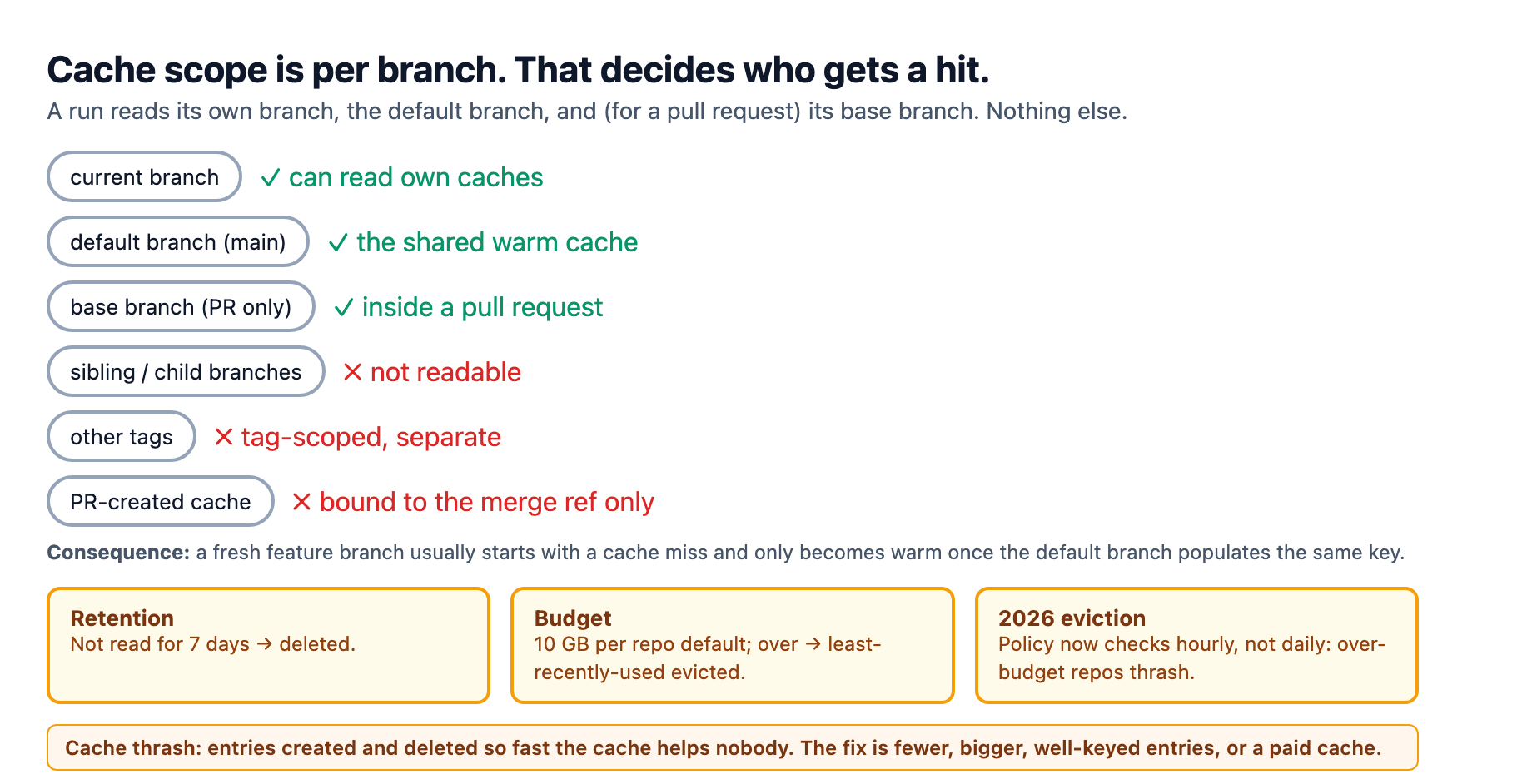
The second reason to care about the eviction clock is that GitHub tightened it in late 2025. Eviction used to be checked once a day; the policy now checks every hour2. For repos sitting at or over the 10 GB line, a more frequent check means more aggressive eviction, which can cause cache thrashing, where entries are created and deleted so quickly that hits barely outrun misses and the cache stops helping at all2. That is the signature of a cache treated as a free bucket: it exists, and it is useless.
Content-hashed keys are the tool that keeps eviction honest here, because they force each dependency set to occupy exactly the entry it deserves instead of churning the whole budget. GitHub evaluates an expression like npm-${{ hashFiles('package-lock.json') }} into a concrete key such as npm-d5ea07501. When the lockfile changes, the key changes, a new cache entry is created, and the old one ages out naturally.
Key discipline: content-address or you replay a stale build
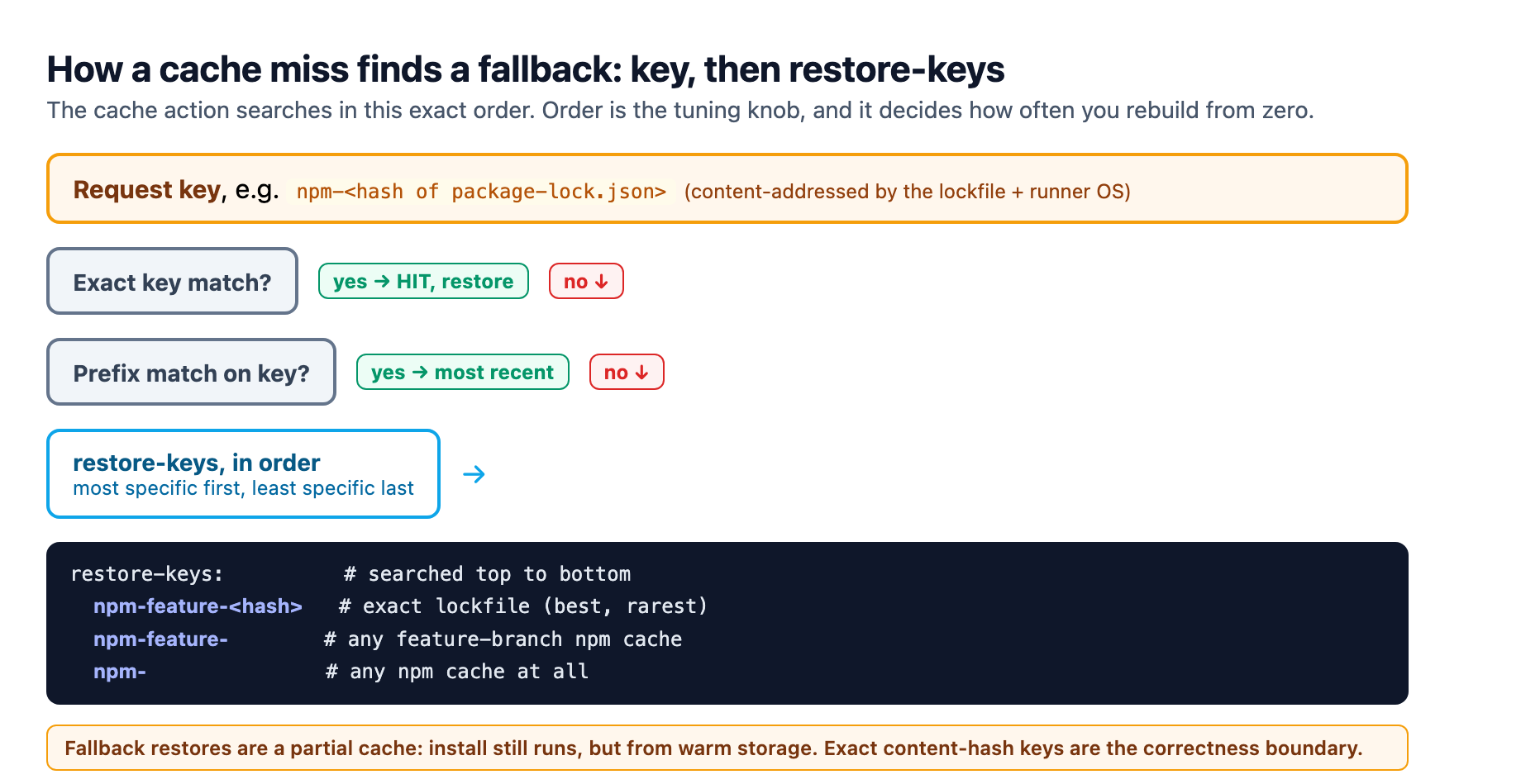
The cache action looks up a key in a strict order: an exact match first, then a prefix match on the key, then each restore-key in the order you list them, from most specific to least1. A restore-key hit is a partial cache: it restores files that are close but not identical, which is exactly the tool for the common case where a lockfile changed in a way that should still reuse most of an old cache.
The correctness trap lives in that fallback. A restore-key like npm- matches every npm cache the repo has ever made, and the action restores the most recent one1. If that fallback fires when the lockfile actually changed, you install from a warm but wrong dependency set and your build passes against versions the lockfile no longer pins. That is not a cache failure, it is a keying failure, and it is the most common way a cache turns a health check into a lie. The fix is to make the exact key carry the lockfile hash and the runner OS, and to keep restore-keys as a deliberate, most-specific-first ladder instead of a wide net.
Two more rules from the reference are worth hard-coding into your review. First, you cannot mutate an existing cache; a changed key means a new cache entry, so there is no fixing a bad one in place, only creating a replacement and letting the old one age out1. Second, keys max out at 512 characters, which is plenty if the key is a short prefix plus a hash and too little if you are stuffing them with environment blocks1.
The practical pattern most teams land on is to cache the package manager's download cache, not node_modules, because a warm package cache lets the lockfile exact-match restore quickly while the install still runs under the lockfile's discipline3. Manual setup goes in actions/cache, but the setup-node, setup-python, and setup-java actions accept a cache: input and wire this up for you, which removes the most common source of key drift3.
Branch scope decides who gets a hit
Caches are scoped by branch, and that scope is a feature and a frustration. A workflow run can read caches created on its own branch, on the default branch, and, inside a pull request, on the base branch. It cannot read caches from sibling branches, child branches, or different tags1. A cache created by a pull request run is bound to the pull request's merge ref and can only be restored by re-runs of that pull request, not by other PRs or the base branch1.
That scoping explains a familiar symptom: a fresh feature branch starts cold. It cannot see the caches other feature branches built, so it misses until it shares a key with a cache the default branch populated3. If you see a new branch reporting a cache miss while older branches hit, that is not a bug, it is the isolation model working as designed, and the fix is not to widen scope, it is to ensure the default branch has a trusted workflow writing the caches everyone else restores.
The trust boundary: a cache can be poisoned
The security posture of a cache is the part most teams have never been told, and it is the most important technical fact in this article. A cached path is not signed or verified, and any workflow run that can read a cache can extract its contents, and extracted contents can include files that get executed later in a run1. Anyone who can open a pull request against your repository can read the contents of a cache in the base branch1. That turns the "just cache it" reflex into a supply-chain surface, and it is why the guidance is blunt: never write secrets, tokens, or credentials into a cached path1.
The attack class has a name, cache poisoning. It works by getting an untrusted event, like a pull request from a fork or an issue comment, to run in a context that can write a cache in the default branch's scope, then planting a malicious entry that a later, more privileged workflow restores and trusts1. The pull_request_target and workflow_run triggers are the dangerous ones here because they run with main-branch context, share the main branch's cache, and can hold secrets, which turns an untrusted PR into a path to repository takeover45.
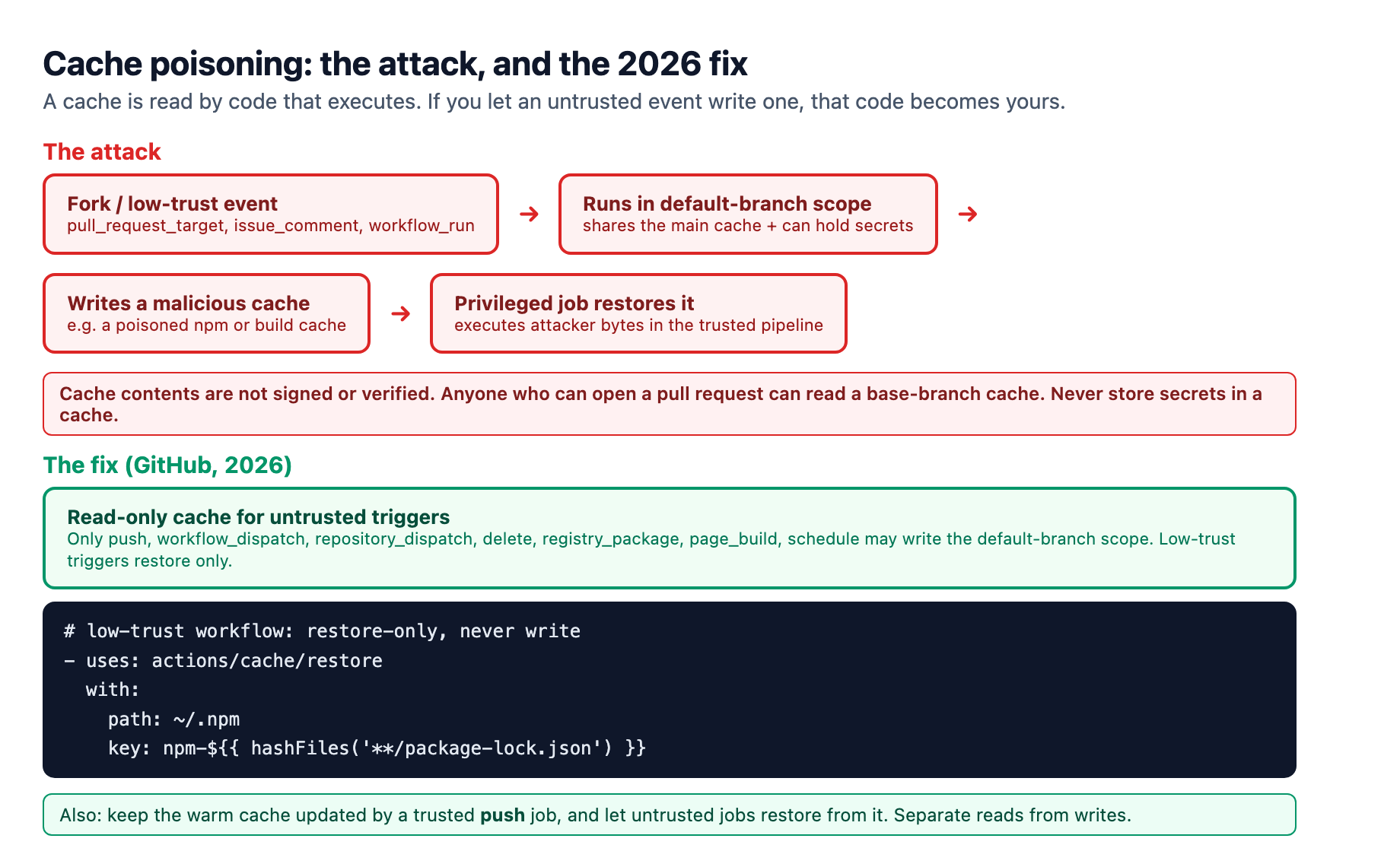
The fix landed inside GitHub in 2026, and it is worth updating your mental model to match. Only a trusted set of triggers can now create or overwrite caches in the default branch's scope: push, workflow_dispatch, repository_dispatch, delete, registry_package, page_build, and schedule1. Untrusted triggers like pull_request_target, issue_comment, and workflow_run are given read-only access to the cache: they can restore existing entries but cannot create or overwrite them1. GitHub shipped this as the read-only Actions cache for untrusted triggers in June 20265. On a read-only run, a cache save fails as a warning and the job continues, so the clean pattern is to make low-trust workflows restore-only by using actions/cache/restore explicitly, and to keep the warm caches updated by a trusted push-triggered job that untrusted jobs restore from1.
We hit this exact seam in our own delivery pipeline. Adroit runs a fleet of worker profiles that ship changes on weekly schedules, and for a long stretch every worker used one over-broad restore-key fallback. A change to a shared config looked inert in review, then a later run restored a warm but outdated dependency set and a build inspected by a downstream job ended up a version behind. Nothing sat in a cached path that an attacker could have reached, and the 2026 read-only controls apply to us the same way they apply to you, but the incident taught the lesson without any malicious actor: an over-broad key is a trust failure with the same shape as an attack, because it makes the cache replay a thing you did not choose. We now content-hash every key, ladder restore-keys most-specific-first, and keep cache writes on trusted triggers only. Make the habit on day one and you never learn it in an incident.
Share it across the team, then watch the same rules
Once your keys are content-addressed and your writes are trusted, the real speedup is sharing the cache across machines, not just across runs on one machine. A local cache only helps the runner that built it; a remote cache is shared and replayed by every developer and CI runner in the team.
Vercel's Remote Cache is the clearest example because the numbers are public. It is available on all plans and shares build artifacts across the entire team and across external CI and Vercel builds6. Turborepo is the first build tool wired to it, and the Remote Cache SDK brings the same interface to Nx and Rush6. Turborepo hashes the inputs of a task, including your source, its dependency graph, and the environment variables you explicitly allow, so an unchanged task replays from the remote cache instead of recompiling6. The fair-use limits are spelled out: 100 GB a month of uploads for Hobby, 1 TB for Pro, 4 TB for Enterprise, with artifact request limits per minute6. Two governance details matter: only team owners can clear the cache, which is the escape hatch if you ever suspect a poisoned artifact sits in it6, and external CI authenticates to the remote cache over OIDC or a personal access token, which lands you back on the trust discussion6.
If you stay on the self-hosted or per-platform cache path, the same three disciplines apply. Cache the artifacts that are slow to regenerate and change rarely, and skip build outputs that vary run to run3. For container images, use Buildx layer caching with a backend you control, choosing between the GitHub, registry, inline, and local options depending on whether you want the cache in GitHub storage, in the registry, in memory, or on disk3. Layer caching is exactly where infrastructure and model-serving pipelines cross over, because multi-gigabyte base images and model weights are the largest, least-changing artifacts a pipeline carries, and the ones with the most minutes to reclaim.
Start with a budget, a scope, and a verification
You do not need a cache platform to begin; you need to change how you treat the one you have. Concretely: check your repository cache usage and confirm you are not perched at the 10 GB line where the hourly eviction policy starts thrashing12. Look at every cache key in your workflows and confirm it content-hashes the lockfile and pins the runner OS. Reduce each restore-key ladder to most-specific-first and delete the ones that are pure fall nets. Move every low-trust workflow to a restore-only cache step and confirm only your trusted push-triggered jobs write the default scope. Grep your cached paths to be sure no secret ever lands in one1. That audit is an afternoon, and it converts a silently-drifting bucket into a bounded, trusted, shared piece of infrastructure.
The summary is the three words in the title. Budget it, because a metered store you size beats a nominally-free store you cannot see into. Scope it, because isolation is what makes a read safe. Verify it, because an unsigned store you trust blindly is how a cache becomes an incident.
Sources
-
GitHub, "Dependency caching reference": cache mechanics, 10 GB default budget, seven-day retention and LRU eviction, content-hashed keys, 512-character key limit, branch scoping, cache-poisoning controls, Actions Cache Storage SKU costs. docs.github.com ↩ ↩2 ↩3 ↩4 ↩5 ↩6 ↩7 ↩8 ↩9 ↩10 ↩11 ↩12 ↩13 ↩14 ↩15 ↩16 ↩17 ↩18 ↩19 ↩20
-
GitHub Changelog, "New date for enforcement of cache eviction policy": eviction interval changed from daily to hourly. github.blog ↩ ↩2 ↩3
-
RunsOn, "Using caching to speed up GitHub Actions workflows": default budget, branch scope, cache dependencies rather than build outputs, setup-action cache input, Docker Buildx layer-caching backends. runs-on.com ↩ ↩2 ↩3 ↩4 ↩5
-
GitHub, "Secure use reference": script injection, least privilege for GITHUB_TOKEN, pwn-request risk for pull_request_target and workflow_run. docs.github.com ↩
-
GitHub Changelog, "Read-only Actions cache for untrusted triggers" (June 2026). github.blog ↩ ↩2
-
Vercel, "Remote Caching": team-shared cache, Turborepo and Remote Cache SDK, fair-use limits, clear-remote-cache control, OIDC authentication. vercel.com ↩ ↩2 ↩3 ↩4 ↩5 ↩6