

In June 2025, Figma shipped a beta of its MCP server, and the design-to-code handoff stopped being a screenshot problem. One year later, the shift is measurable: Affirm's product teams told Figma the server speeds up development "by orders of magnitude," rebuilding major product flows in fewer than two days 1. The counterweight matters just as much: Figma's 2025 AI report found 68% of developers are using AI to write code, but only 32% of designers and developers trust the output 2.
The gap between those two numbers is the design system. This article is a field guide to what the Figma MCP server actually changed, why pasting a Figma link into Cursor still produces code that ignores your system, and the layered fix that teams like monday.com run in production.
What the MCP Server Actually Is (and Is Not)
The Figma MCP server does not generate code. It is a context provider: it exposes structured design data to coding agents over the Model Context Protocol, the open standard for how applications hand context to LLMs 3. Where older tools handed a model a screenshot and let it guess, the MCP server passes node hierarchy, auto layout settings, variables and tokens by name, typography, effects, and component variants. Screenshots still earn a place as a supplement; Figma's testing found a screenshot combined with its code outputs performs better than either alone 3.
Two connection modes exist. The remote server, hosted at mcp.figma.com/mcp, is the preferred path and is available on all seats and plans. The desktop server runs through the Figma app and requires a Dev or Full seat on a paid plan 4. Clients span Claude Code, Cursor, Codex, VS Code, Gemini CLI, Android Studio, and Xcode in beta 1. As of February 2026 the official server exposes 14 tools, from get_design_context and get_variable_defs to create_design_system_rules and get_code_connect_map 5.
Two caveats frame everything below. First, the server is still in beta, and Figma says agentic access "will eventually be a usage-based paid feature" that is currently free 4. Second, the server cannot read prototype interactions, image pixels, or design discussion comments; interaction behavior still has to be communicated explicitly 5.
Why Pasting a Figma Link Fails
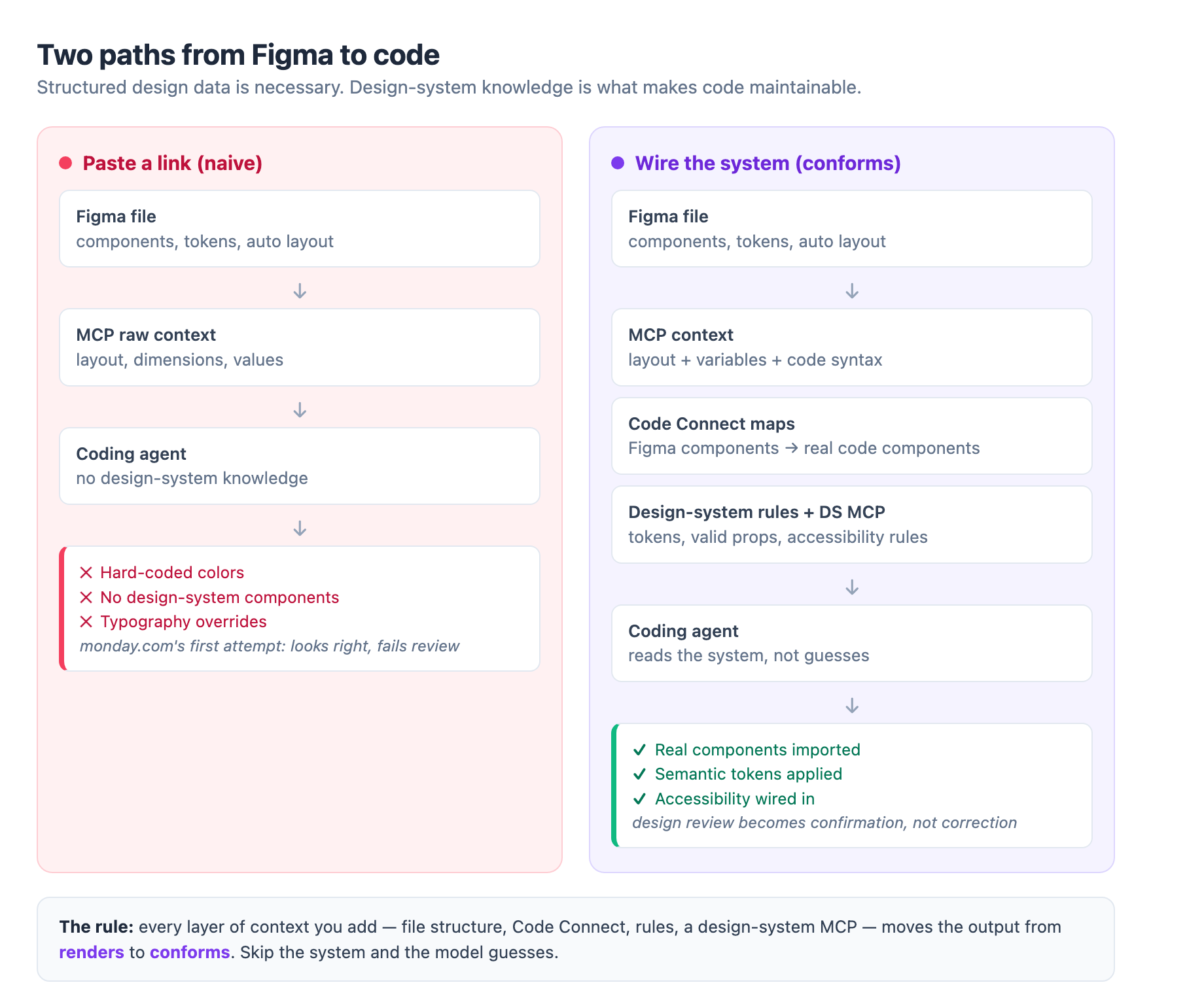
monday.com's engineering team documented exactly what happens when you skip the design system. Their first attempt was the obvious one: paste a Figma link into Cursor, let it run with the Figma MCP, ship the result. The code "looked fine at first glance." Then the cracks appeared: the output did not use design system components, colors were hard-coded, typography overrode system defaults, and CSS appeared in places it should never exist 6.
The root cause was not a weak model. As monday.com put it, "the model had no understanding of what the design system actually was." It did not know which components existed, which props were valid, which tokens were mandatory, or which accessibility rules were non-negotiable. Without that context, it guessed 6.
The same conclusion arrives from a different direction. Managed Code's 2026 evaluation of design-to-code tools found the single biggest predictor of output quality is not the tool at all; it is the structure of your Figma file. A clean, componentized file produces code you refine in one pass. A messy file produces a mess, because the tools inherit design problems, they do not fix them 7.
The lesson generalizes: structured layout data is necessary but not sufficient. Design-system knowledge is what turns accurate layout into maintainable code. Everything that follows is about making that knowledge readable by machines.
Layer One: The File, Code Connect, and System Rules
Start with the file. Real components, auto layout, and named tokens give the agent enough context to map hierarchy to real components; on a clean file, one refactoring pass can get generated code to roughly 80% production-ready 7.
Then map the design system to code with Code Connect. Code Connect links a Figma component to the actual code component behind it, and Figma's documentation is blunt about why it matters: it is "the #1 way to get consistent component reuse in code," and without it, "the model is guessing" 5. With a mapping in place, the agent imports your real Button instead of synthesizing a new one from scratch. Code Connect gained an in-app mapping experience in September 2025, so you can browse components inside Figma and see at a glance which are linked and which are missing 1.
Variables get the same treatment. If you define code syntax on a variable in Figma, the MCP server hands the agent the exact code representation, so a red rectangle resolves to your semantic token rather than an arbitrary hex value 3. For teams that want system-level guardrails without mapping every component by hand, the create_design_system_rules tool scans the codebase and emits a structured rules file covering token definitions, component libraries, style hierarchies, and naming conventions 2. That file is effectively the agent's onboarding manual.
Budget note: Code Connect requires Figma Organization or Enterprise plans, and the desktop server needs a Dev or Full seat, so the full stack carries a price tag 5. Token-first teams will recognize the pattern: this is the same infrastructure discipline covered in our token-first design systems guide, applied to the AI handoff.
Layer Two: The Design-System MCP Pattern
This is where the interesting engineering starts. monday.com concluded that even Code Connect-style context was not enough at their scale, and built what is currently the best-documented reference architecture for system-aware design-to-code.
First, a design-system MCP. They built an MCP server that represents the design system as structured, machine-readable knowledge: what components exist, how they compose, which props are valid, how tokens should be applied, and which accessibility rules are non-negotiable, plus real usage examples 6. The critical decision is where that data comes from: it is derived from the real sources of truth, component code, TypeScript types, configuration files, token definitions, and existing accessibility enforcement. There is no parallel system to maintain 6.
Second, an agentic workflow. Design-to-code is not a single decision; it is a chain of dependent ones, so they built an 11-node graph with LangGraph. The workflow pulls raw design data from the Figma MCP, then runs several steps in parallel: a translation detector flags strings for localization keys, a layout analyzer infers flex and grid structure, a token fetcher resolves raw values into semantic tokens, and a component identifier separates system components from custom ones. Later steps pull usage examples and accessibility guidelines, and an implementation planner assembles imports, component structure, localization keys, and accessibility wiring into one LLM-friendly context object 6.
Third, return context, not code. monday.com runs hundreds of microfrontends on different React and design-system versions, and forcing one generated code style would break ownership. So the agent hands the coding model a structured context, and the model formats output to the conventions of the repository it is running in 6.
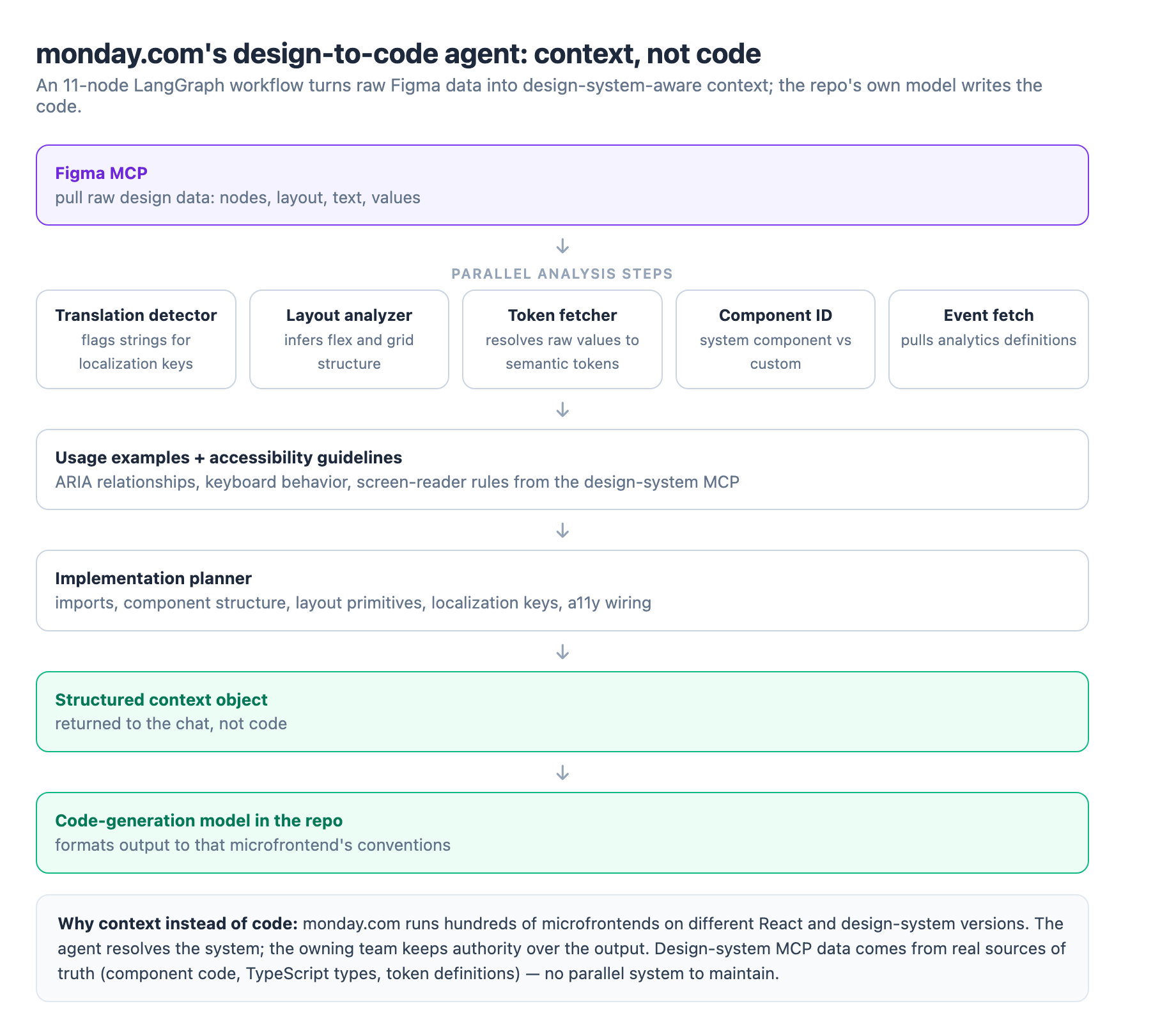
The reported results match what the intro's numbers predict: developers spend far less time translating designs into implementation details, fewer review comments come back about wrong components or props, and late accessibility fixes mostly disappear. Design reviews become confirmation instead of correction 6.
The Reverse Direction: Code to Canvas
Through 2026 the MCP server became a two-way bridge. The remote server can write to the canvas, creating and modifying frames, components, and variables using your design system as the source of truth 4.
Pre-installed skills make this practical. The prototype-to-figma skill captures the screens of a running prototype onto the canvas as connected design frames 8. The figma-generate-design and figma-generate-library skills bring a code-built design, like a dark mode built with color variables, into Figma and create a matching variable collection; you refine tokens on the canvas, then push them back to code 8.
Why this matters: design work that happens in code, during hack weeks or AI-assisted sprints, no longer strands in the repository. The design system stays in sync because the bridge runs in both directions, and reviewing token decisions on the canvas catches issues, like oversaturated accent colors in dark mode, that are hard to see in a running app 8.
Honest Limits and Decision Rules
None of this changes what still needs a human. The consistent gap across every tool is the same: accessibility, semantics, design-system conformance, and state. Generated code reliably scaffolds layout and reliably falls short on the parts that decide whether code is maintainable rather than merely rendering 7. That is why the accessibility work we wrote about in our EAA compliance guide still has to be engineered, not generated.
The speed numbers are real but bounded. Tools cut initial build time by 30-60% 7, and teams with a mature design system can see 50-70% cuts while holding to conventions 7. Budget the refactoring pass; it is part of the workflow, not a failure mode.
The adoption logic is simple. If you do not have real components, tokens, and conventions, fix the file structure first; MCP multiplies whatever exists in the source. If you have a mature system, start with Code Connect on your twenty most-used components, generate the rules file, and measure the diff. Only when component mapping is in place does the monday.com pattern, a custom design-system MCP plus an agent graph, earn its build cost.
What to Do on Monday
One year in, the story of design-to-code is not magic; it is context. Structured data replaced screenshots, and the design system became the thing that separates code that renders from code that conforms. The teams winning with this stack treated the machine as a new consumer of their design system, then wired the system so the machine could actually read it. Start with the file, map the components, generate the rules, and let the agent prove where the gaps really are.
Sources
-
Figma: Design context, everywhere you build. figma.com ↩ ↩2 ↩3
-
Figma: Design systems and AI: Why MCP servers are the unlock. figma.com ↩ ↩2
-
Figma Learn: Guide to the Figma MCP server. help.figma.com ↩ ↩2 ↩3
-
Alex Bobes: Figma MCP: The CTO's Guide to Design-to-Code in 2026. alexbobes.com ↩ ↩2 ↩3 ↩4
-
monday.com engineering: How We Use AI to Turn Figma Designs into Production Code. engineering.monday.com ↩ ↩2 ↩3 ↩4 ↩5 ↩6 ↩7
-
Managed Code: Design-to-code in 2026: an honest evaluation of the AI tools. managed-code.com ↩ ↩2 ↩3 ↩4 ↩5
-
Figma Learn: Workflow lab: Code to canvas. help.figma.com ↩ ↩2 ↩3