


The single most common complaint about Next.js with Server Components is also the simplest: navigations feel slow.
You click a link. Nothing happens. Then the server responds and the page appears. That gap, the 100ms to 1,000ms where the browser waits for the network, is why apps like Linear went client-heavy in the first place. A single-page app puts something on screen immediately, then fills in data. A server-rendered app waits.
Next.js 16.3, shipping stable on August 3, 2026, is the framework's biggest change since Next.js 16.0 introduced Cache Components last November. It is an opt-in suite of tools: Instant Navigations, Cache Components, Partial Prefetching, and Instant Insights. Together they give you the server's benefits (less JavaScript, better SEO, direct database access) and SPA-quality responsiveness.
And it will become the default in a future major version. This is not an optional feature you can ignore. It is the direction of the framework.
The Problem: Server-Driven Navigations Have a Gap
Before 16.3, a navigation in a Next.js App Router app followed this sequence:
- You click a Link.
- Next.js fires a prefetch request to the server (and it fires one for every link in the viewport; a sidebar with twenty items means twenty requests).
- The server computes the RSC payload and sends it back.
- The client reconciles and paints the new page.
Steps 2 and 3 are the gap. On a fast connection with a warm server, that is maybe 100ms. On a mobile connection hitting a cold server rendering a dashboard with five database queries, it is closer to a second. And the browser does nothing visible during that time: no loading state, no shell, just a frozen page.
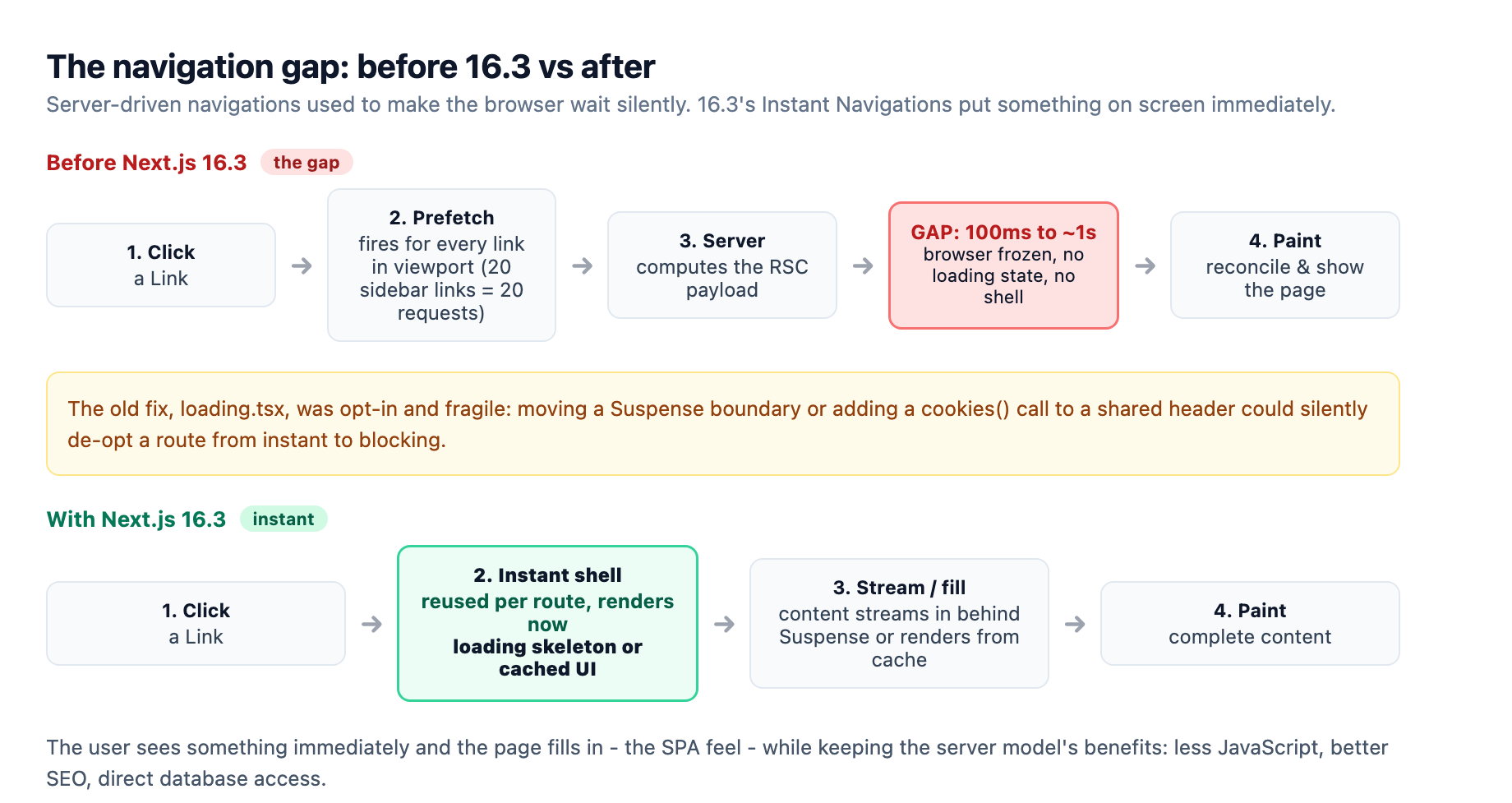
The previous fix was loading.tsx, a static shell per route segment. It worked when you remembered to write one, but it was opt-in and fragile. A refactor that moved a Suspense boundary or added a cookies() call to a shared header could silently de-opt a route from instant to blocking, and nobody would notice until a user complained.
The Fix: Stream, Cache, or Block
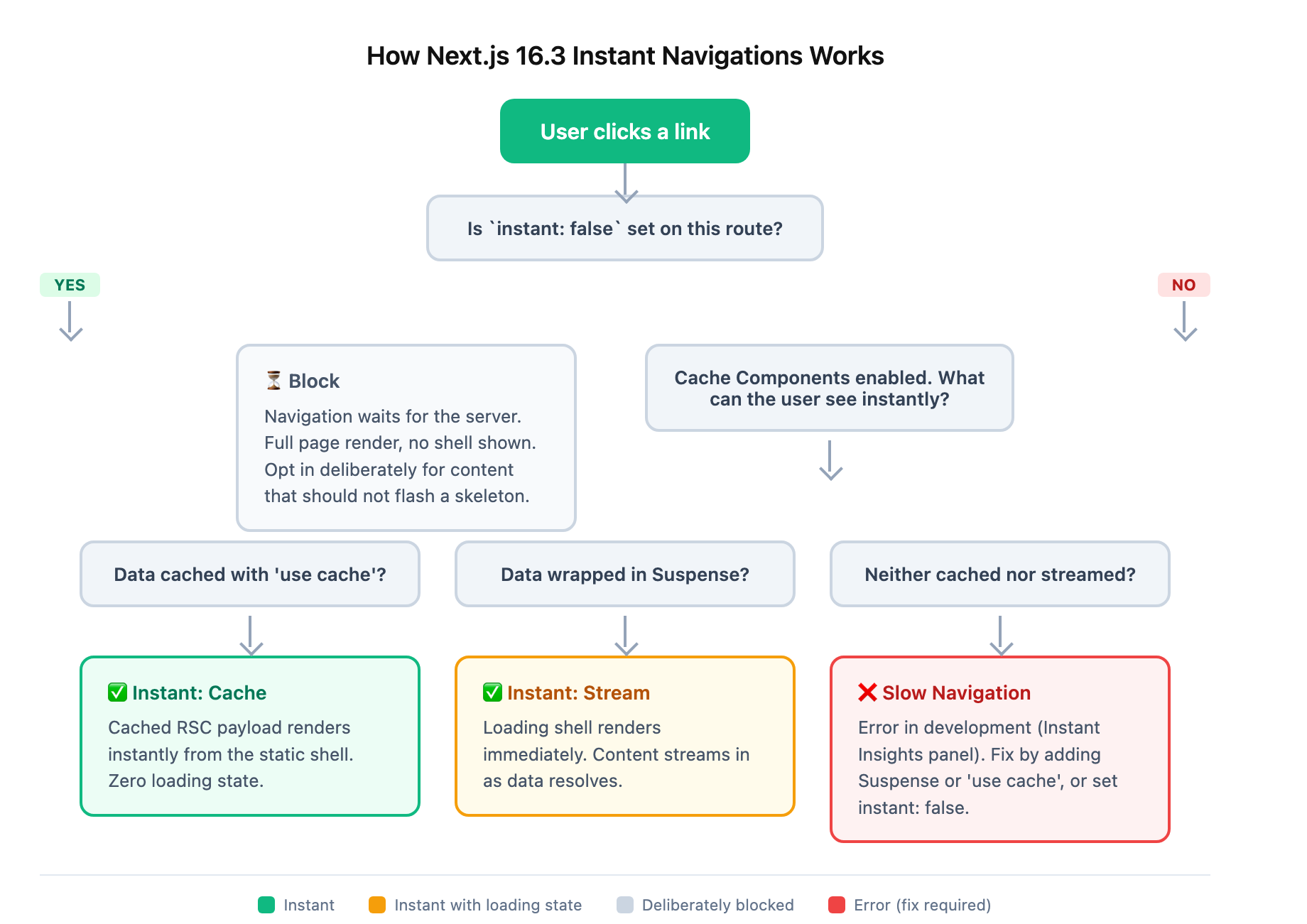
Next.js 16.3 introduces a model so simple it fits on a whiteboard. Every route has to answer one question: what can the user see immediately when they navigate here?
Three answers are valid.
Stream: Wrap slow data in Suspense
The user gets an instant loading shell (reused per route, not per link), and content streams in as the server finishes. This is the SPA feel: click, see a skeleton, watch it fill. Deciding which parts of your app belong on the client at all is the harder architectural question, and Building Scalable React Apps covers exactly where that boundary should sit.
Any component that reads uncached data (cookies(), headers(), a database query without 'use cache') belongs inside a Suspense boundary. The Instant Insights panel (more on this below) tells you exactly which component is blocking your route.
Cache: Mark data fetches with 'use cache'
The user gets previously cached UI with zero loading state. The navigation renders instantly from a cached RSC payload.
// 'use cache' tells Next.js to include this component's output
// in the static shell, so it renders instantly on navigation.
async function getPopularProducts() {
  'use cache';
  return await db.query.products.findMany({
    where: eq(products.popular, true),
  });
}
Next.js caches the rendered output of this component and includes it in the static shell. The cache is per-session on the client and persists across navigations. Visit /products, navigate to /dashboard, come back to /products, and the shell renders instantly from cache.
There is also 'use cache: private' for personalized content (a username, a cart count). It caches in the visitor's browser only, never on the shared server cache, and pairs with Runtime Prefetching to keep it instant.
Block: export const instant = false
Some routes should wait. A blog post that shows a skeleton for 300ms and then flashes to the full article is worse than a blank beat followed by the complete content. For those routes, you opt out:
// app/blog/[slug]/page.tsx
export const instant = false;
This tells Next.js: this route is intentionally server-bound. The Instant Insights panel stops flagging it, and the navigation blocks on the server as before. Blocking is a deliberate choice, not a default you accidentally fall into.
Partial Prefetching: One Shell Per Route
The old prefetch model had a problem that even the Next.js team admitted was bad: every Link in the viewport fired its own prefetch request. A sidebar with twenty chat room links meant twenty requests, all for the same dynamic route.
16.3's Partial Prefetching fixes this with a smarter approach. Next.js generates one reusable App Shell per route. The shell is the minimal UI that can render before data arrives: typically layout chrome plus Suspense fallbacks. It is prefetched once and cached for the session.
Click any of the twenty chat links and the shell renders immediately while that chat's data streams in behind the Suspense boundaries. No duplicate prefetch requests.
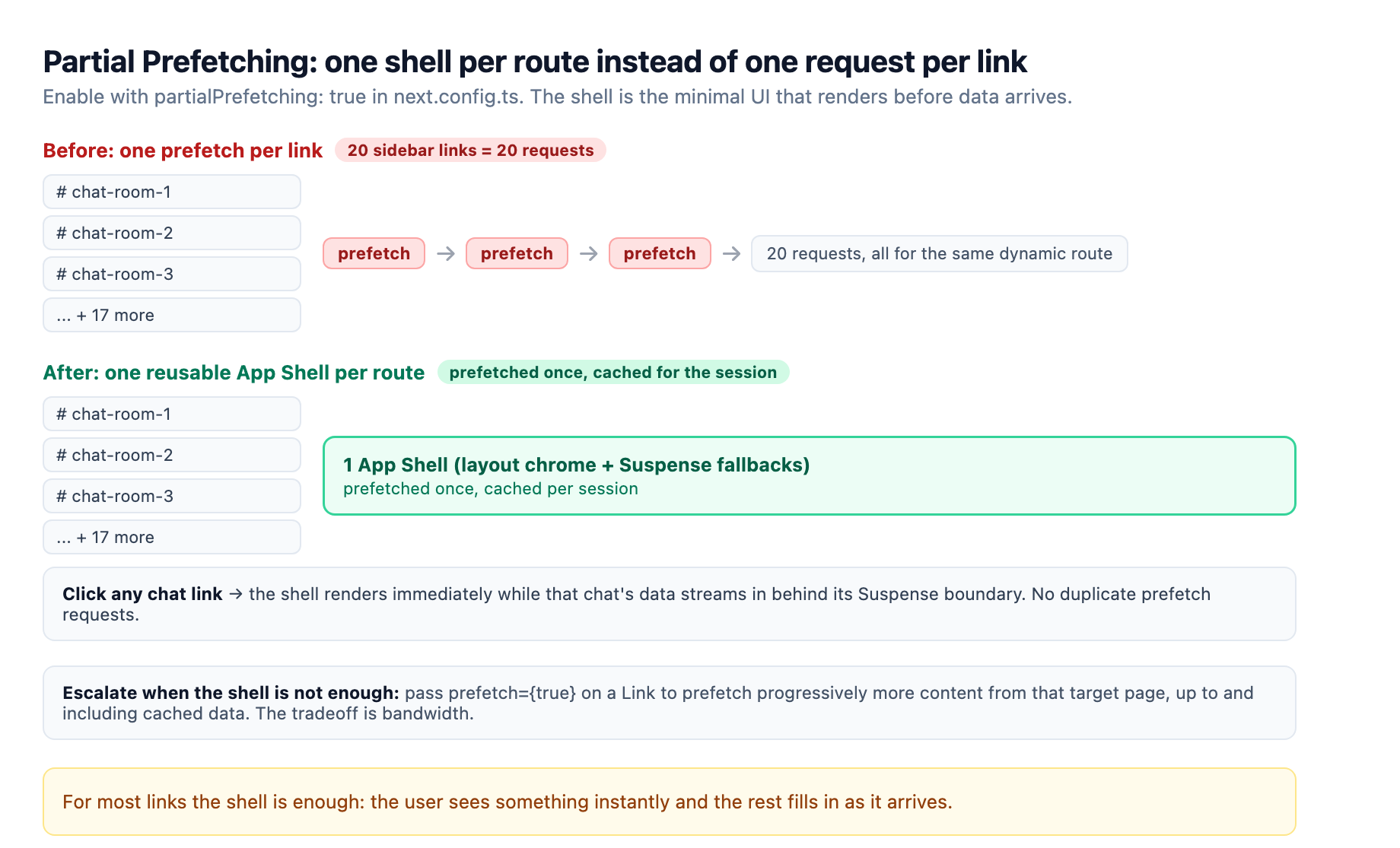
If the shell is not enough (say you want the chat header with the recipient's name to arrive with real content), you escalate per link by passing prefetch={true} to the Link component:
This prefetches progressively more content from the target page, up to and including cached data. The tradeoff is bandwidth: one deep prefetch per link you escalate, instead of one shallow shell per route. For most links, the shell is enough: the user sees something instantly and the rest fills in as it arrives.
Enable it with a second config flag:
// next.config.ts
const nextConfig: NextConfig = {
  cacheComponents: true,
  partialPrefetching: true,
};
Instant Insights: Slow Navigations Become Development Errors
This is the feature that changes team behavior. With cacheComponents: true enabled, Next.js validates in development whether every navigation is instant. A route that blocks, any component that renders without Suspense or 'use cache', surfaces a red error in the new Instant Insights panel in the Next.js DevTools.
It does not just tell you that a route is slow. It tells you which component is blocking and offers a fix prompt you can delegate to a coding agent.
The team at Roboto Studio, who ran the 16.3 preview in production for weeks, described the effect:
"Slow navigations stop being something users find in production and become something the framework flags at dev time."
For teams shipping changes daily, this is the most valuable part. A refactor that moves a cookies() call into a shared layout, silently de-optimizing a route that used to be instant, gets caught on next dev before the PR is even submitted.
Locking It in CI
The @next/playwright package ships an instant() test helper that enforces instant navigation behavior in end-to-end tests:
import { expect, test } from '@playwright/test';
import { instant } from '@next/playwright';

test('product title is available immediately', async ({ page }) => {
  await page.goto('/products/shoes');

  await instant(page, async () => {
    await page.click('a[href="/products/hats"]');
    await expect(page.locator('h1')).toContainText('Baseball Cap');
    await expect(page.getByText('Checking inventory...')).toBeVisible();
  });

  await expect(page.getByText('12 in stock')).toBeVisible();
});
Assertions inside the instant() block must pass without any network roundtrip. If a refactor makes the heading wait for data that used to be in the shell, the test fails. This catches regressions at CI time instead of production.
The Rust React Compiler: Experimental but Worth Knowing
Alongside the navigation changes, 16.3 ships an experimental Rust port of the React Compiler. The standard compiler ran through Babel in Node.js; the Rust version runs natively inside Turbopack, skipping the Babel pipeline entirely.
Enable it alongside the existing React Compiler flag:
// next.config.ts
const nextConfig: NextConfig = {
  reactCompiler: true,
  experimental: {
    turbopackRustReactCompiler: true,
  },
};
The performance numbers, tested against v0.app, are significant:
- Cold build: 34% faster
next devto a ready page - Warm build: 46% faster
The caveat: the Rust compiler only helps if you are off Babel entirely. If you still run Babel for other transforms (styled-components, Emotion, custom plugins), the gain is smaller because Babel remains a bottleneck. For projects already on Turbopack-only builds, this is a free speedup. This option requires reactCompiler to be enabled; it selects which implementation runs rather than turning the compiler on by itself.
This does not need to ship today (it is experimental), but it signals the direction: React compilation is moving from JavaScript to native code, the same path TypeScript took with its Go-native compiler in v7.0.
Migration: What to Do Today
You can adopt Instant Navigations incrementally. The framework gives you escape hatches at every step.
Step 1: Upgrade and enable the flags
npm install next@latest
Then flip both flags in next.config.ts:
const nextConfig: NextConfig = {
  cacheComponents: true,
  partialPrefetching: true,
};
Step 2: Opt out routes that are not ready
When you start the dev server, the Instant Insights panel will flag routes that block. For any route you are not ready to fix yet, add:
export const instant = false;
Next.js provides a codemod to do this across your entire app in one pass:
npx @next/codemod@canary cache-components-instant-false ./app
This adds instant = false to every page, layout, and default export that does not already declare it (pass ./src/app instead if your project uses a src/ directory). The app keeps building and serving, and you convert routes one at a time.
Step 3: Convert one route at a time
Drop instant = false from a route, start the dev server, and follow the Instant Insights errors. Each one tells you what to fix: wrap a component in Suspense or add 'use cache'. No config guessing.
Step 4: Hold the line with tests
Once a route navigates instantly, lock it in with an instant() Playwright test. This prevents regressions when the route changes later.
The Bottom Line
Next.js 16.3 resolves the longest-standing tension in the framework. You no longer choose between the server model (less JavaScript, better SEO, no waterfalls) and the SPA feel (instant navigation, loading shells, responsive). The Stream/Cache/Block model gives you both.
The Instant Insights panel makes performance a first-class development concern: not a production surprise, not a Lighthouse score to optimize after shipping, but a development error when a navigation is slow.
If you maintain a Next.js app, upgrade to 16.3 today. Enable the flags in development first, see which routes are slow, and fix them one at a time. The flags will become defaults in a future major version; adopting them now means you control the migration pace instead of catching up when the framework forces the change.
The days of "it's a server-rendered framework, it's supposed to feel like a website" are ending. With 16.3, that excuse no longer holds.
Sources
-
Next.js 16.3 Announcement. nextjs.org ↩ ↩2 ↩3 ↩4
-
Next.js 16.3: Instant Navigations. nextjs.org ↩ ↩2
-
Instant Navigation Guide. nextjs.org ↩
-
Partial Prefetching Guide. nextjs.org ↩
-
Next.js 16.3 for Dummies (Roboto Studio). robotostudio.com ↩
-
Rust React Compiler Config. nextjs.org ↩
-
Migrating to Cache Components Guide. nextjs.org ↩