

Every Agentforce pilot follows the same arc. The demo works, the stakeholders nod, and then the agent meets real customers, real data, and real edge cases, and the demo falls apart. The reason is structural: agents are non-deterministic, so the same utterance can route differently tomorrow. The test-once-then-ship habits of the classic Salesforce lifecycle do not apply. Salesforce has now published the pattern language for this: an agent taxonomy, implementation patterns, and an Agent Development Lifecycle (ADLC) that runs from ideation through continuous tuning 1. This article is the production path through that material: which pattern to pick, the anatomy every agent shares, how grounding in Data 360 makes or breaks it, guardrails, evaluation, and rollout. It assumes you have already read our Agentforce overview and our Flow-orchestrates-Agentforce guide; this is the how that follows the what.
Pick the right agent pattern first
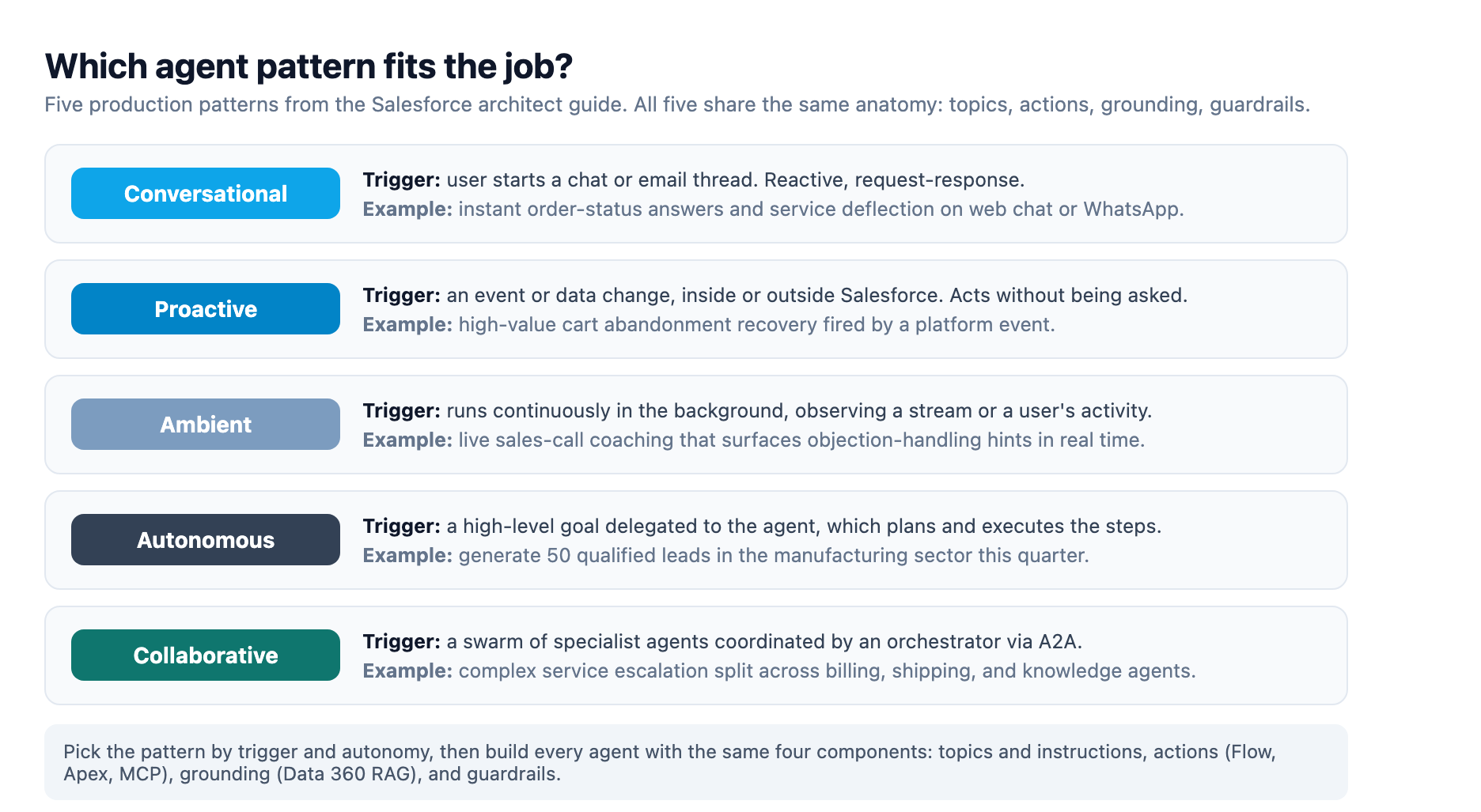
Salesforce's architect guide defines five agent types, each with its own trigger, and the first production decision is which one you are actually building 2. Conversational agents are the familiar front door: reactive, request-response, measured by resolution speed. The guide's canonical example is an instant order-status agent that deflects service volume. Proactive agents act without being asked, triggered by events or data changes, like the high-value cart-abandonment agent that fires on a platform event. Ambient agents observe continuously in the background, like the sales-call assistant that listens to a live call and surfaces objection-handling hints. Autonomous agents get a goal and plan their own execution, the guide's example being a regional lead-generation agent tasked with producing 50 qualified leads in a quarter. Collaborative agents are swarms: an orchestrator decomposes work and delegates to specialist agents over Agent2Agent (A2A) communication, the pattern for complex service escalations that span billing, shipping, and knowledge domains 2.
The pattern choice is a trade-off, not a ladder. The guide's autonomy analysis is blunt: autonomous execution is fast and scalable, but intervention during execution is limited and costly, and remediation is expensive when errors are not caught immediately 2. Start conversational or proactive, and graduate to autonomous only when the workflow is stable and the evaluation loop is mature.
The anatomy every production agent shares
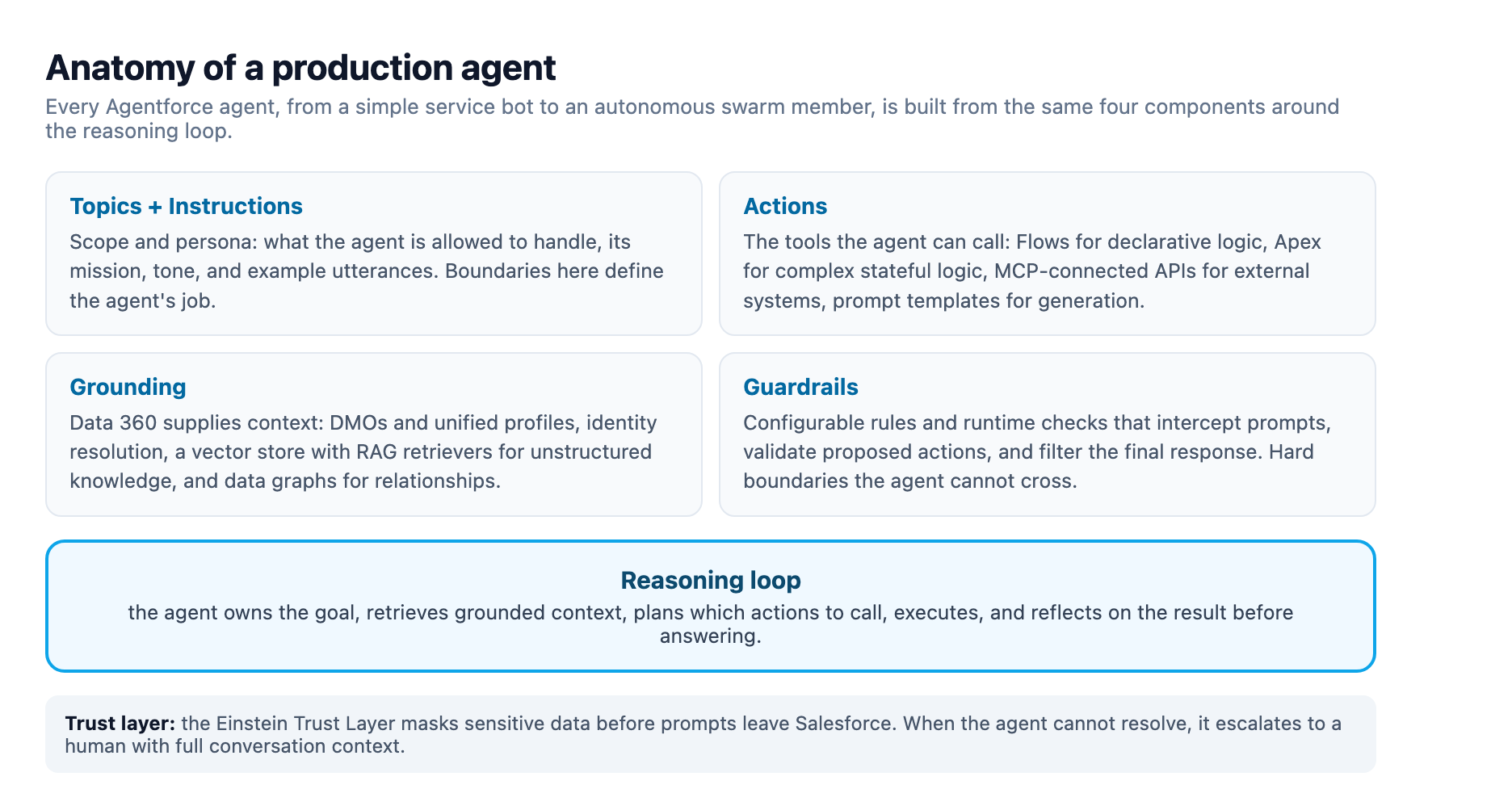
Whatever pattern you pick, the components are the same. Topics and instructions define scope and persona: what the agent may handle, its tone, and example utterances that anchor its behavior. Actions are the tools it may call: Flows for declarative logic, Apex for complex or stateful logic, MCP-connected APIs for external systems, and prompt templates for generation with live CRM data merged in. Guardrails are the configurable rules and runtime checks that intercept prompts, validate proposed actions, and filter final responses. Grounding is where the agent gets context, covered in the next section 2.
Salesforce's platform guidance assigns each layer a tool. Flow is the primary declarative tool for agent logic. Apex supplies the power for complex logic and state management. Platform events are the nervous system for proactive and collaborative agents, serving as the transport for A2A. Data 360 is the unified long-term memory. MuleSoft is the bridge to outside systems via MCP. Slack and the Agentforce Chat Client are the human surfaces 2.
The ADLC best-practices list is where most teams stumble 1. Avoid topic sprawl: too many overlapping topics confuse the agent. Keep instructions concise and include example utterances. Keep action outputs small, because longer outputs burn context and slow responses. Write scope descriptions that stop the agent from calling RAG for out-of-scope questions. And use hybrid search sparingly, because it adds latency. These read like style tips; they are the difference between a demo and a deployment.
Grounding is the differentiator
The agent's intelligence comes from the data it can reach, and Salesforce positions Data 360 as the foundation for retrieval-augmented generation behind every agent 2. The RAG recipe the architect guide documents is the load-bearing pattern: crawl and ingest sources, harmonize raw data into Data Model Objects (DMOs), run identity resolution to consolidate duplicate profiles, then embed content into a vector store. At query time the agent embeds the question, runs semantic search against the vector store, and the retrieved chunks become context for a grounded, citable answer 2. For relationship-heavy questions, data graphs connect DMOs so the agent can traverse a customer's cases, orders, and products in one query, enriched with calculated insights 2.
The architectural decision is ingestion versus zero-copy federation, and the Data 360 decision guide is explicit about the trade-offs 3. Ingest data that must be governed and unified: the Customer 360 profile, identity resolution, regulated records. Federate the rest. Live query gives maximum freshness but costs spike at high query rates. Accelerated query caches federated data for 15 minutes to 7 days and suits frequent reads of slowly changing data. File federation reads object stores for batch and ML workloads without moving data. The guide's own numbers make the point: a dashboard over 1M records viewed 20 times a day costs about 600 credits a month accelerated versus 4,200 live, while segments published 20 times a day on data that changes every 30 minutes flip the math, 4,200 live versus 28,800 accelerated 3. For most orgs the answer is hybrid: govern the core, federate the edge.
The pro-code path just got easier. In May 2026 Salesforce shipped the Data 360 MCP server as an open-source developer preview, exposing roughly 200 REST API operations through three facade tools, search, payload_examples, and execute, so a coding assistant like Claude Code or Cursor can discover, shape, and run Data 360 calls over stdio without blowing up its context window 4. That matters for grounding because it makes identity resolution, RAG retrievers, and activation programmable instead of click-ops.
Guardrails are the trust layer
The guardrail definition from the architect guide is the contract: configurable rules and runtime checks that intercept prompts, validate the agent's proposed actions, and filter its final response to prevent harmful content and enforce business rules 2. In practice that means topics are hard boundaries, out-of-scope requests get a rejection message instead of a guess, and every action the agent proposes passes a check before it executes. The Einstein Trust Layer masks sensitive data before prompts leave Salesforce, so the LLM never sees raw PII 2.
Field security guidance adds three disciplines 5. Enforce authentication on every action rather than trusting the agent's identity alone. Align agent scope with data classification so high-sensitivity fields never enter prompts. And log every agent action, with a defined escalation path and abuse monitoring. Guardrails are not a checkbox; they are the mechanism that lets you raise autonomy without raising risk.
Evaluation: the shift-left that makes agents shippable
Because agents are non-deterministic, the ADLC reframes testing: you are not validating a single right answer, you are checking that behavior stays aligned across a spectrum of acceptable outcomes 1. The lifecycle guide layers the tests: unit tests for deterministic components, end-to-end tests for realistic scenarios, adversarial and robustness tests with malicious prompts, human-in-the-loop evaluation for tone and flow, and performance and scale tests 1.
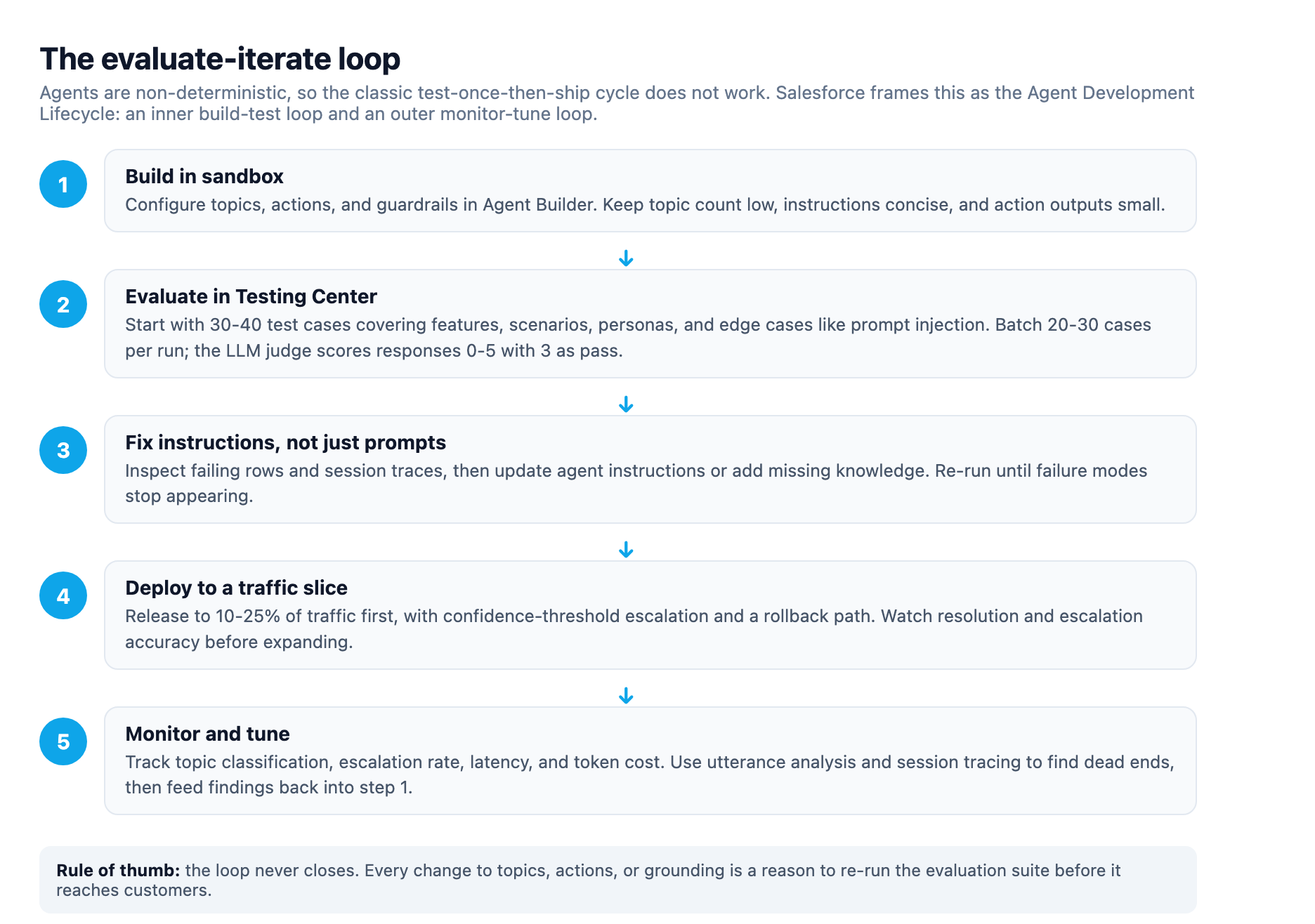
The Agentforce Testing Center operationalizes this in sandbox, and its details are the practical meat. It is automatically enabled for Agentforce customers in sandbox orgs, needs no additional license, and Salesforce explicitly recommends against enabling it in production orgs because it can affect production data 6. Test runs also consume requests and credits, another reason to keep the loop in sandbox 7. The evaluation metrics cover topic classification with exact match, action sequences, response quality scored by an LLM judge on a 0-5 scale with 3 as the pass bar, text quality, citation support, instruction adherence, and latency 6. The limits shape how you run it: 500 test cases per job, 10 jobs per hour, a recommended batch of 20-30 cases per evaluation, and roughly 5 seconds per case. The help guidance is to start with 30-40 test cases and generate more until you stop seeing new failure modes, covering features, scenarios, personas, and edge cases, prompt injection included 6. You can upload a CSV, let the tool generate cases from the agent configuration, or import real conversations from Agent Builder, and the evaluation metrics are configurable per run, so your success criteria are yours to define rather than a fixed pass/fail 6. The tooling is explicitly built for pro-code testing and DevOps workflow integration, which is how evaluation becomes a repeatable CI/CD gate instead of a manual ritual 6.
This is the same instinct we apply to our own pipeline: every Adroit blog draft runs through a mechanical verifier that checks citations and link health before editorial review. If a blog post gets a quality gate, a customer-facing agent deserves one.
Rollout and the outer loop
Evaluation gets you to the starting line; rollout is where the loop continues. The ADLC prescribes phased, canary-style releases to a small subset before full rollout, with the agent packaged as version-controlled metadata and promoted through a CI/CD pipeline 1. Field guidance converges on a traffic slice of 10-25% for the first release, monitored on resolution and escalation accuracy before expanding, with strict grounding scope, topic boundaries that route out-of-scope requests to humans, adversarial pre-launch testing, and confidence-threshold escalation as the four controls that keep a live agent honest 8. Expectations should be set from production data, not vendor demos: early results cluster at 30-50% autonomous case resolution on mature knowledge bases, 20-35% faster first response, and sub-5-minute lead follow-up, with use-case selection and data quality driving ROI more than the platform does 8.
After launch the outer loop runs forever. Track topic classification, escalation rate, latency, and token cost; use utterance analysis and session tracing to find conversational dead ends; then feed those findings back into topics, actions, and grounding 1. Every change is a reason to re-run the evaluation suite. The agent you ship is not the agent you will run.
The pattern language, applied
The pieces finally exist: five agent types, one shared anatomy, a grounding layer, guardrails, and an evaluation loop that never closes. Pilots stall because teams skip a layer, usually grounding or evaluation. Production agents ship because teams treat all of them as one system. Pick a small use case, build the anatomy, ground it, guard it, evaluate it, and let the loop do the rest.
Sources
-
The Agent Development Lifecycle: From Conception to Production. architect.salesforce.com ↩ ↩2 ↩3 ↩4 ↩5 ↩6
-
Agentic Patterns and Implementation with Agentforce. architect.salesforce.com ↩ ↩2 ↩3 ↩4 ↩5 ↩6 ↩7 ↩8 ↩9 ↩10
-
Data 360 Interoperability. architect.salesforce.com ↩ ↩2
-
Introducing the Data 360 MCP Server (Developer Preview). developer.salesforce.com ↩
-
Agentforce Security in Salesforce: Features, Use Cases & Best Practices. reco.ai ↩
-
Learn About Agentforce Testing Center. help.salesforce.com ↩ ↩2 ↩3 ↩4 ↩5
-
Agentforce Testing Center. help.salesforce.com ↩
-
Agentforce Implementation Guide 2026. customertimes.com ↩ ↩2