

The Salesforce stack stopped being a CRM and became a platform you assemble. Flow executes, Agentforce reasons, Data Cloud grounds, Experience Cloud channels, Apex escapes. Each layer is documented well on its own. The part that decides whether the thing works is the seam between them: who is allowed to cross it, what message travels over it, and who owns the failure when it breaks. That is where Summer '26 concentrated its changes, and it is where most teams are underprepared. This article is the wiring layer: how identity, events, and actions connect the five layers in a real build, and what the API and security shifts of Summer '26 mean for each connection.
Identity is the first seam, and it moved
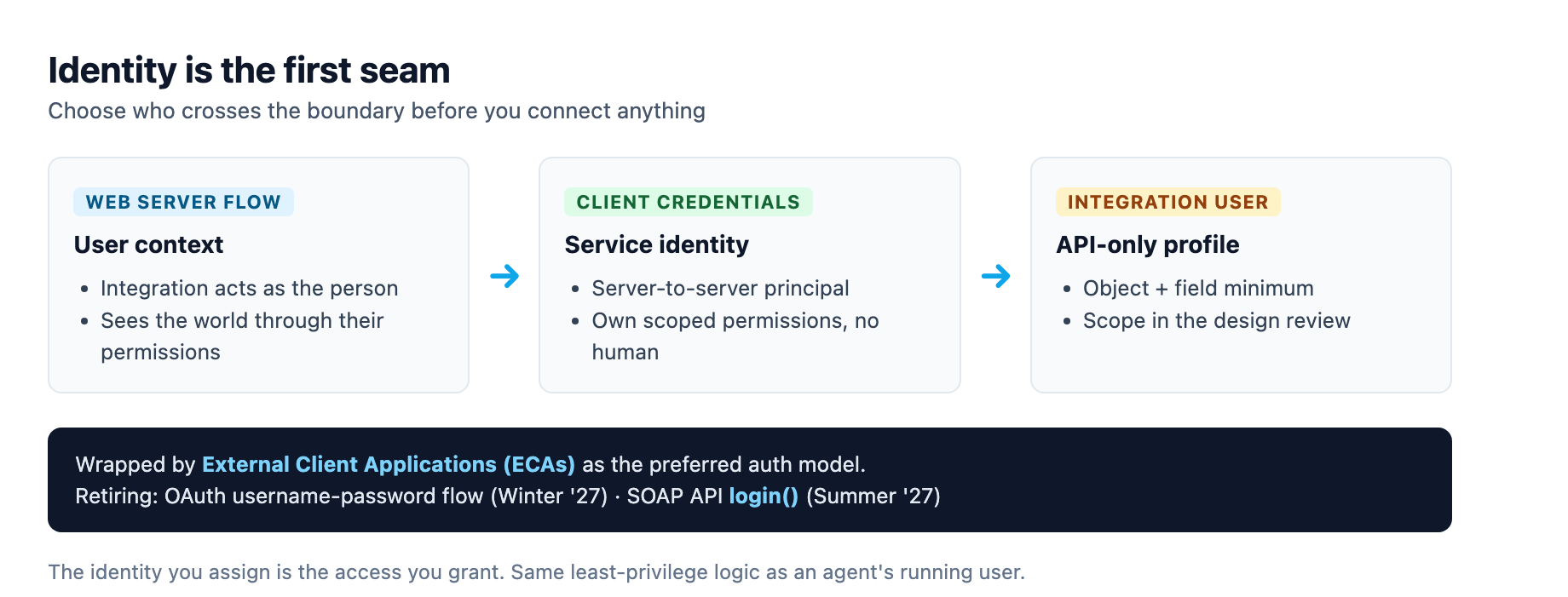
Before you connect anything, decide who you are on the other end. The 2026 posture is unambiguous: an integration should not authenticate as a person's username and password, and it should not authenticate as an undifferentiated shared app. Salesforce is steering every integration toward External Client Applications (ECAs) as the properly permissioned authentication and authorization model, and the older patterns are on retirement dates.12 The OAuth 2.0 username-password flow for connected apps retires in Winter '27, and the SOAP API login() call retires in Summer '27. If your middleware still holds a username and password in configuration, it has a date on it.1
The replacement is an architecture decision, not a trivial swap. The OAuth 2.0 web server flow is for user-facing integrations where the person's context matters, so the integration sees the world through their permissions. The client credentials flow is for server-to-server work, where the integration is its own principal with its own scoped permissions, no human in the loop.1 Get this wrong and every downstream seam inherits the confusion: an agent action that calls out to an external system needs to know whether it is acting as the invoker or as a dedicated service identity, and that choice is exactly what the authentication model encodes.
The operational rule is an integration user with an API-only profile, scoped to the minimum. Salesforce's data integration guidance is direct: use an integration user with an API-only profile for all integrations, and prefer External Client Applications over connected apps or SOAP login.2 The blast radius logic is the same as the agent running-user model we covered in the Agentforce on Experience Cloud guide: the identity you assign is the access you grant, so scope it to the object and field minimum and make that scope part of the design review.
The event fabric is the default transport
The second seam is the message bus, and 2026 made event-driven the default. For external data streams, the direction is Pub/Sub first: platform events carry custom, structured payloads for near-real-time change, Change Data Capture (CDC) publishes record-level create, update, delete, and undelete events without custom payloads, and the Pub/Sub API lets external consumers subscribe over gRPC with replay and durability.123 For internal business logic, the direction is Flow first, and the two meet in the middle.
The reason event-driven won is latency and decoupling. Batch synchronization, the scheduled sweep that was once the default for moving data between Salesforce and an external system, should now be a deliberate choice rather than the path of least resistance. Platform Events, CDC, and Pub/Sub give a continuous, traceable flow of changes with lower latency and better observability than a nightly job.3 Batch is not dead; it stays right for initial data loads, large reconciliation jobs, historical migrations, and downstream systems that cannot consume events at volume.3 But it is no longer the default, and teams that reach for it reflexively are carrying the old architecture.
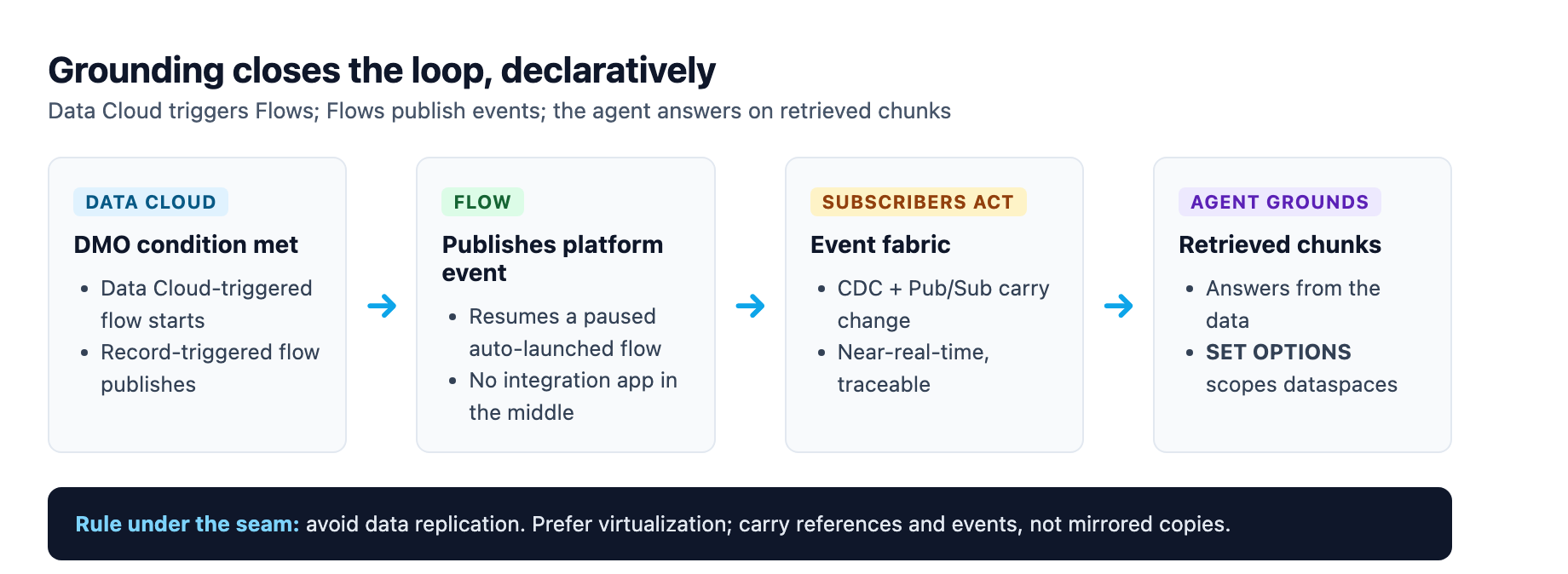
The Salesforce data integration decision guide is blunt about the rule that sits under this: avoid unnecessary data replication. If data does not absolutely need to reside in Salesforce, consider data virtualization with Salesforce Connect instead, because more data in the org means larger data volumes, worse performance, and more technical debt.2 If the data already lives in Salesforce and an external system needs it, do not copy it out; have the external system access it via the APIs.2 The seam should carry references and events, not mirrored copies.
Data Cloud connects into Flow without a code drop
The grounding layer is where Data Cloud feeds the rest of the stack, and the seam here has gone declarative. Data Cloud can trigger Flows directly: a Data Cloud-triggered flow starts when conditions are met in a data model object, and a record-triggered flow in Data Cloud can publish platform events that resume a paused auto-launched flow.4 That closes the loop between external data and internal automation without an integration app in the middle.
The pattern worth internalizing is the direction of the call. Data Cloud is not just a store the agent queries; it is a source of triggers and events that Flows consume. A DMO reaching a condition fires a Flow, that Flow publishes a platform event, and subscribers act. This is the event fabric from the previous section, now with Data Cloud as the publisher. The Summer '26 API change that touches this seam is the new SET OPTIONS clause in SOQL, which lets developers specify Data 360 dataspaces and control how NULL and empty string values are handled when querying Data Cloud data lake objects.5 If you query Data 360 data from Apex, that clause is how you scope the dataspace and normalize null handling precisely, which matters when an agent is about to ground an answer on the result.
The action boundary is where agents touch the world
The seam that decides whether an agent ships or stalls is the action: the callable tool the reasoning engine invokes to execute a step in its plan. The architecture here is well settled. Actions run either inside Salesforce as native operations or in external systems via External Services actions generated from OpenAPI specifications.6 Inside the org, an agent action is built with an Apex @InvocableMethod or with a Flow automation, and the choice is the same logic as the Flow-versus-Apex decision: Apex for complex business logic, external integrations, and multi-object operations requiring transaction control; Flow for admin-maintained processes and rapid iteration.7
The friction arrives when an agent needs to touch the rest of your stack, a Slack channel, a Jira board, a GitHub PR, a PagerDuty incident. The classic patterns all carry real trade-offs. Flow HTTP Callouts plus Apex work for simple system-to-system connections, but they become a management trap at scale: you map inputs and outputs by hand, schema changes break the flow, and per-user Named Credentials multiply across tools.6 Standard Actions cover the top of the common apps but rarely the long tail or the deep endpoints, the "update a custom field" or "fetch transition history" that an enterprise workflow actually needs.6 MuleSoft handles breadth and depth but is heavy for a single long-tail tool.6
The pattern that ships is a curated OpenAPI specification imported into External Services, which creates discoverable Agentforce actions without shipping brittle glue code.6 You expose the specific endpoints the agent needs, typed and minimal, rather than importing a massive raw API definition. This is the same reasoning that pushed MCP adoption into the platform: expose a capability once and let any MCP-compatible agent use it, instead of building one integration artifact per tool per agent.3
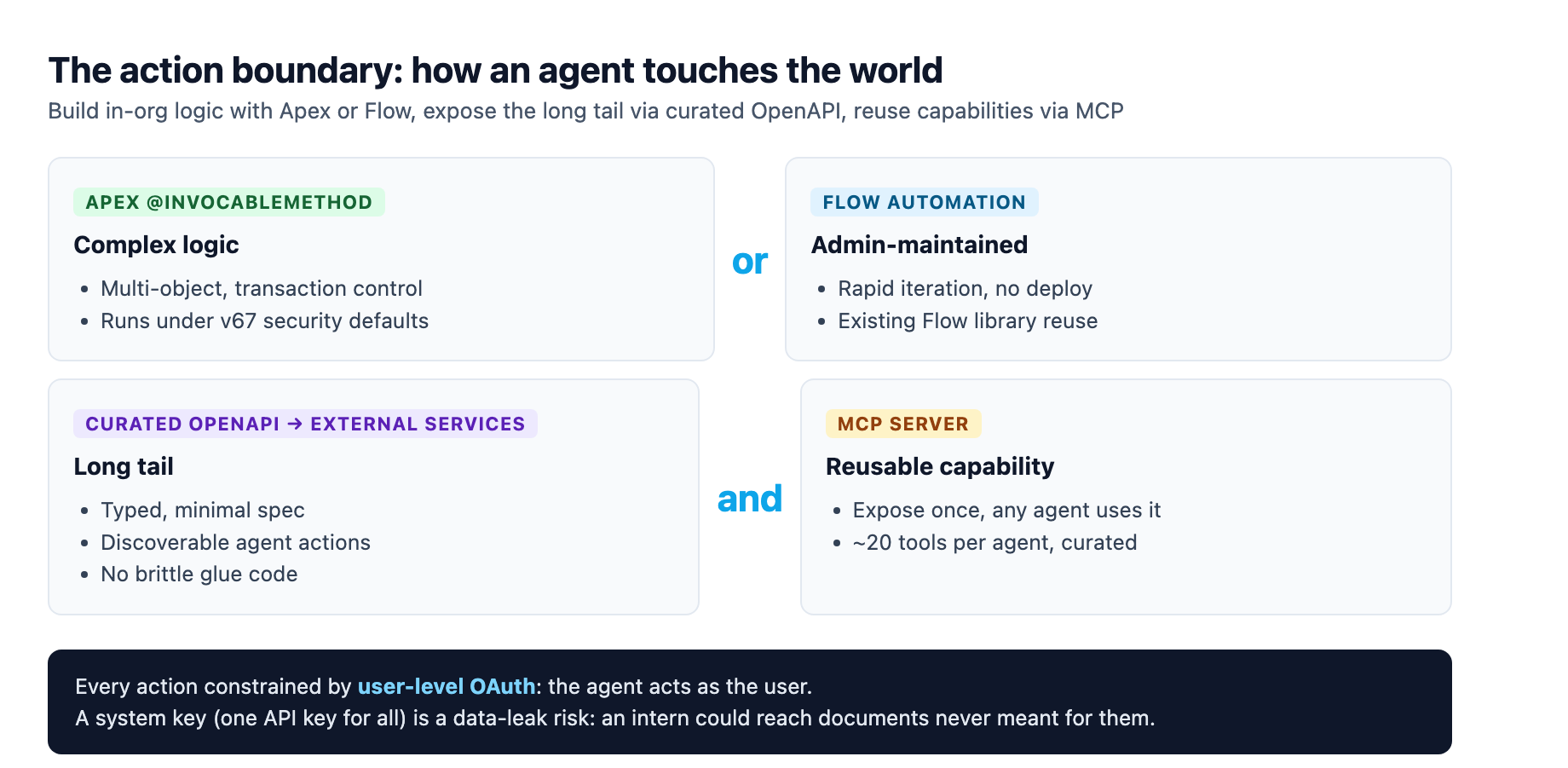
The security fact that dominates this seam is user-level authentication, and it is non-negotiable. A generic iPaaS tool that relies on a system user, one API key that rules them all, is a data-leak waiting to happen: an intern asks an agent a question, the agent reaches for a shared admin key, and the intern sees documents that were never meant for them.6 The agent must act as the user, respecting that user's specific permissions in the external tool. That is the same least-privilege discipline as the running-user model, and it applies one level out: not just what the agent can do in Salesforce, but what it can do in every connected system.6
Experience Cloud is where the seams surface to people
Experience Cloud is the channel, and it is the one layer where every seam above becomes visible to an outsider. The full deployment path, the Omni-Channel routing, the agent's running user, the guest profile, is a routing and security project we covered end to end in the Agentforce on Experience Cloud guide. What the wiring layer adds is the reminder that a public Experience site is the intersection of every seam at once: the identity seam (guest users share a single profile), the event fabric (form submissions and service requests publish events), the action boundary (the agent acts on the visitor's behalf), and the grounding layer (the agent answers from Data Cloud). Each seam's security posture has to hold simultaneously, because a visitor is one bad guest configuration away from crossing a boundary they should not.
The discipline is to design the security model before the site and the agent, not after. Salesforce has documented an active threat-actor campaign exploiting overly permissive guest configurations on public sites, so the guest profile gets restricted to the minimum objects and fields the site requires.8 The agent's running user gets the same treatment, scoped to exactly what it needs. Authentication for the integrations behind the site follows the identity rules from the first section: no embedded passwords, External Client Applications where the pattern applies.
The Apex seam got a security default change
The escape hatch, Apex, is where the Summer '26 changes land hardest, and they hit every seam that crosses through Apex code. In API version 67.0, three changes arrive together and represent the most significant shift to the Apex security model in years: database operations run in user mode by default, enforcing the running user's sharing rules, field-level security, and object permissions; a class with no explicit sharing declaration defaults to with sharing; and the WITH SECURITY_ENFORCED SOQL clause is removed entirely in favor of WITH USER_MODE.9 The full code migration is our Apex v67 migration guide; the wiring takeaway is that any Apex action an agent calls now runs under these defaults.
The practical consequence for the seams is that an Apex action's access mode is now part of its security posture. A database operation in user mode filters results to what the running user can see, which for an integration user with broad access may change nothing, but for a standard end user with restricted visibility will filter records and fields that previously came back.9 If you want system-mode behavior, you must ask for it explicitly with WITH SYSTEM_MODE. Test both scenarios, the integration user and the restricted end user, before you upgrade a class, because tests that passed on 66.0 do not guarantee correct behavior on 67.0.9 This is the load-bearing detail for the action seam: the same Apex action behaves differently depending on which identity crossed the boundary.
Build the seams in a deliberate order
Put the wiring together and an order falls out. Start with identity: audit the authentication model for every integration, retire embedded passwords, scope integration users and agent running users to the minimum. Then build the event fabric: decide what changes are worth publishing as platform events or CDC, and wire Data Cloud as a publisher into Flows. Then build the actions: Apex or Flow for in-org logic, curated OpenAPI into External Services for the long tail, MCP for capabilities you want reusable across tools, each constrained by user-level OAuth. Only then stand up the channel, the Experience Cloud site with its guest profile audited, and wire the agent in last, scoped and grounded.
We have hit the failure mode in our own delivery pipeline: an agent handed a set of integrations without a clear identity model answered confidently and reached for the wrong access, and the fix was exactly this ordering, identity and events and actions before the agent. The five layers are not five products to buy and bolt together. They are one system, and the seams are the system. Summer '26 did not add a feature that changes that; it hardened the seams so the discipline is enforced rather than optional. Build in that order and the stack holds.
Sources
-
Salesforce Architects, "Summer '26 Release Highlights for Salesforce Architects" (2026). salesforce.com ↩ ↩2 ↩3 ↩4
-
Salesforce Architects, "Data Integration with Salesforce" decision guide (2026). architect.salesforce.com ↩ ↩2 ↩3 ↩4 ↩5
-
Grazitti Interactive, "Rethinking Salesforce Integration Architecture in 2026" (updated Jul 13, 2026). grazitti.com ↩ ↩2 ↩3 ↩4
-
Salesforce Help, "Trigger Flows with Data 360 Data". help.salesforce.com ↩
-
Conemis, "Salesforce Summer '26 Release API Updates: What Developers Need to Know About API Version 67.0" (Apr 30, 2026). conemis.com ↩
-
Composio, "Agentforce Actions Guide (2026): Native Flows vs. MuleSoft vs. External Services". composio.dev ↩ ↩2 ↩3 ↩4 ↩5 ↩6 ↩7
-
Digital Applied, "Salesforce Agentforce 2026: CRM Automation Guide". digitalapplied.com ↩
-
Salesforce, "Essential Actions to Secure Experience Cloud Guest User Access". salesforce.com ↩
-
Salesforce, "Database Operations Run in User Mode by Default, Not System Mode" (Summer '26 Release Notes). help.salesforce.com ↩ ↩2 ↩3