


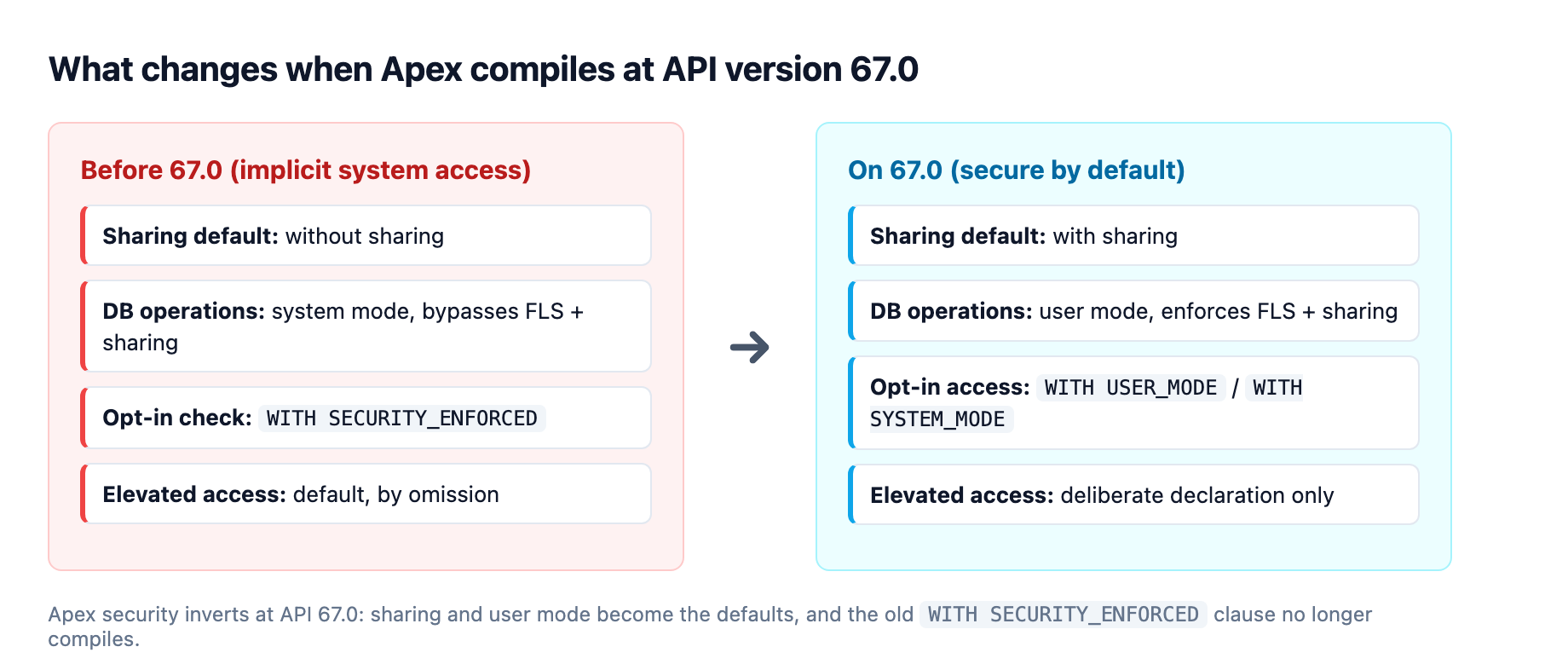
Apex classes compiled against API version 67.0 (the version that ships with Summer '26) behave differently from every class you wrote before, even when the code looks identical. This is not a new keyword you opt into. It is a reversal of the platform's default posture: implicit with sharing, database operations that run in user mode, and a WITH SECURITY_ENFORCED clause that no longer compiles.1
The practical consequence for a consulting team running multiple client orgs is that incrementing an org's API version is now a security migration, not routine maintenance. Code that passed tests on 66.0 can silently return fewer rows, throw access errors that used to be quiet, or refuse to compile. This article is the migration playbook: what changed, what breaks, and how to move an org to 67.0 without a production surprise.
This is the Apex half of the Summer '26 story. If you are here from the Flow or Agentforce side, the security model change lands on your imperative code too, because the Apex actions your agents call and the handler classes your triggers delegate to are exactly what is affected.2
The three changes that arrive together in 67.0
Salesforce describes these as the most significant shift to the Apex security model in years, and they are best understood as one idea applied three ways: the platform no longer assumes that whatever surface sits in front of Apex has already filtered the data.2 Elevated access is now something you opt into explicitly instead of something you get by omission.1
1. Database operations run in user mode by default
Before 67.0, SOQL, SOSL, DML, and Database methods defaulted to system mode, which bypasses the running user's field-level security (FLS), object permissions, and sharing rules. From 67.0 onward, those same operations enforce the running user's permissions by default.12
The behavioral change shows up as data visibility, not as a crash. If the running user is an integration user with broad access, you may not notice anything. If the running user is a standard end user with restricted visibility, records and fields that previously came back are now filtered, or the query surfaces an access error that used to be silent.2 The new default applies to SOQL, SOSL, DML verbs, and the Database methods, which makes it broad.
2. with sharing is the new default, and WITH SECURITY_ENFORCED is retired
A class compiled at 67.0 with no sharing keyword now defaults to with sharing, where it previously defaulted to without sharing in most cases.1 Bypassing sharing is now a deliberate without sharing declaration, which is the posture the security model wants: most code should enforce sharing, and the class that skips it should say so loudly.
The change is not a rename for the sake of a rename. WITH USER_MODE handles polymorphic fields such as Owner and Task.whatId, checks the WHERE clause and not just the SELECT list, and reports every FLS violation instead of only the first, which you can read off the QueryException.1 Queries that genuinely need system-mode execution must now say so with WITH SYSTEM_MODE.2
3. Triggers are the deliberate exception, and the handler pattern needs an audit
Apex triggers always run in system mode and always will; they bypass sharing and FLS and cannot declare a sharing or access mode.12 That exception is intentional, because triggers fire on the platform's behalf rather than a user's. The problem is the pattern most orgs use: the trigger is a thin shell that delegates to a handler class. That handler is exactly the code affected by the new sharing default. Any handler relying on implicit without sharing behavior will behave differently on 67.0, and in some cases may surface access errors that were previously silent.2
The guidance from Salesforce is clear: push security-sensitive logic into a handler class where you control the access mode explicitly, rather than leaving the trigger or handler to inherit a default.12
Why the test suite will not save you
The trap in this release is that your existing Apex test coverage was written against the old security defaults. A test that passes on 66.0 does not guarantee correct behavior on 67.0, because the test's running-user context changed, not the code.2 Most Apex tests run as the running user in a broad-access context, so they mask the very restrictions that now apply in production.
The fix is a deliberate test strategy, not a re-run. Add test scenarios that run as restricted users and assert the correct data visibility before you upgrade any class to the new API version.2 Concretely, that means:
- Create a restricted profile with only the object and field permissions the class should respect.
- Run the class's tests as that user and assert the filtered result set, not just that no exception fired.
- Assert the negative case: that a user without access to a field gets it stripped or rejected, matching what a real end user would see.
For managed packages in particular, this review is non-negotiable before deployment, because your customers run the package under their own user contexts and permission sets.2
The migration checklist for moving to 67.0
The work is mechanical but broad, and most of it is find-and-flag before it is find-and-fix. I would sequence it this way.
Audit Apex for WITH SECURITY_ENFORCED first
This is the only change that is a hard compile failure, so it is the one that stops a deployment. Find every query using the old clause and replace it with WITH USER_MODE, or WITH SYSTEM_MODE where system mode is genuinely required.2
Flag classes with no explicit sharing declaration
These are the silent-behavior changes. Grep for class declarations that omit with sharing or without sharing, and decide per class which the code actually needs. The default is now safe, so most classes are fine as-is, but any class that relied on implicit without sharing must be audited for the access errors it will now surface.12
Update DML to make access mode explicit
The new user-mode default is correct for most writes, but your intent should be visible. Prefer the explicit AccessLevel.USER_MODE form in Database methods rather than relying on the implicit default, and reserve AccessLevel.SYSTEM_MODE for the cases that need it.1 This is the pattern the Agentforce action guidance recommends anyway: run all DML and queries in "with user" mode.3
Watch the trigger-handler boundary
Because triggers cannot declare an access mode, the handler class is where you control it. Any handler counting on implicit without sharing needs an explicit decision.12
Run a second pass for invocable classes
There is a smaller 67.0 change here that bites Agentforce and Flow integrators: any custom Apex type used as an invocable action input must expose a visible no-argument constructor, public for regular classes or global for packaged classes.1 If you have invocable methods with parameter classes that lack one, they stop compiling at 67.0.
The sequencing matters. Compile-fail items (WITH SECURITY_ENFORCED, the constructor rule) are your hard blockers. Behavior-change items (sharing default, user-mode default) are your silent risks that only restricted-user tests catch. Fix the blockers, then build the test matrix before you flip the API version on a class.
The agentic half: Apex actions become the deterministic layer under Agentforce
The security reset is the headline, but it lands inside a release that also repositions Apex as the deterministic backbone of Agentforce. The same version of the platform that tightened Apex security also shipped @IntegrationTest, a Developer Preview annotation that finally lets you test live Agentforce and Data 360 callouts.1 That pairing is not a coincidence: as agents get more autonomy, the platform wants the imperative code they call to be both secure by default and genuinely testable.
The vehicle is the Apex action. When an agent task involves complex business logic, multi-step processes, or strict governance, its capability is encapsulated in an action built with Apex or Flow, giving the agent a secure, reusable interface to update records, trigger platform events, or run an established process.4 The security rules above apply directly here: an action's with sharing and access-mode posture is what stops an agent from touching data the requesting user cannot.
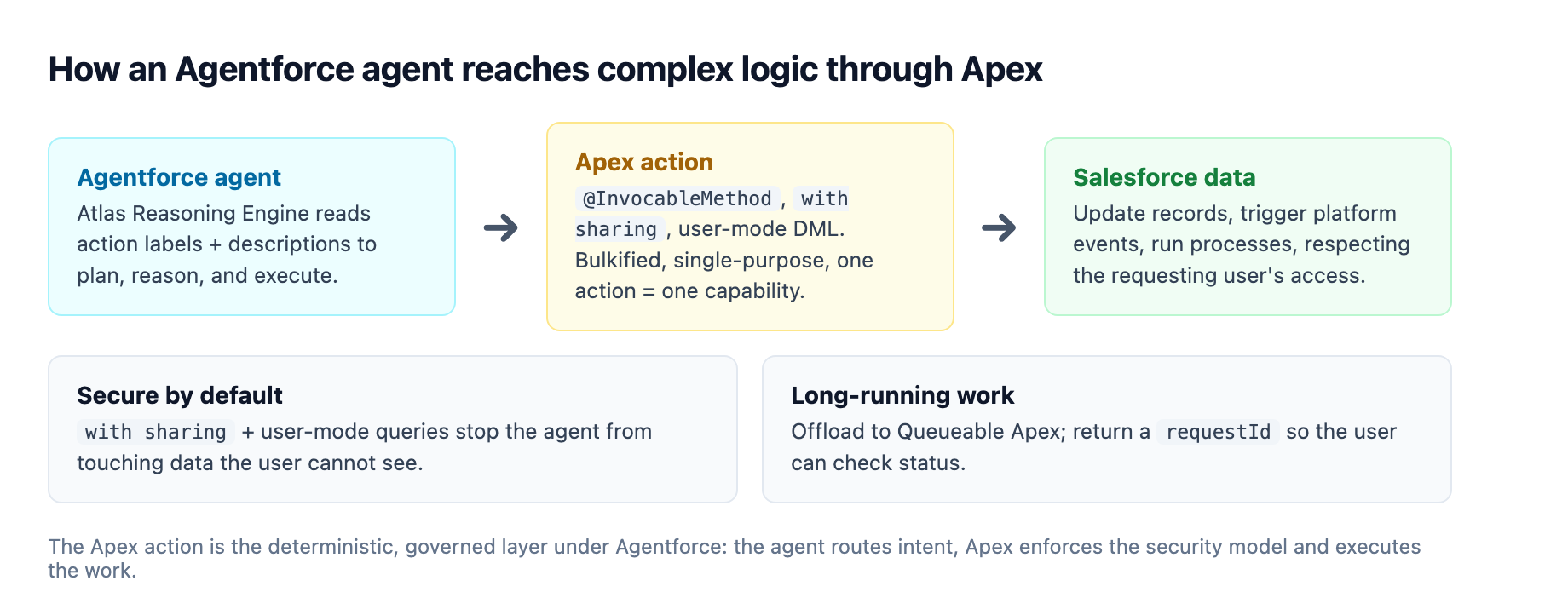
The Agentforce action guidance adds specific patterns on top of the security baseline. For the full production picture, our Agentforce production implementation patterns guide covers the lifecycle end to end. The Atlas Reasoning Engine relies on the labels and descriptions of your invocable methods and their input and output parameters to plan, reason, and execute. Use the same values in the Apex code and the action config, and keep them in sync.3 An action with a vague description is an action the engine mis-selects, so name and describe it as if a non-developer were reading it.
Two more patterns matter in production. First, write bulkified actions. Agentforce actions do not bulkify by default, and each action executes in its transaction; since these are invocable actions you may also reuse them in a flow, bulkify for both callers.3 Second, for partial success, use the Database class with allOrNone set to false instead of DML verbs, so a record that fails does not take down the batch and you can return a per-record message to the user.3 And when an action runs long, offload to Queueable Apex, providing a requestId or a notification so the user can check status, because the action returns before the async work finishes.3
The @IntegrationTest annotation is the tooling that makes all of this verifiable. Standard unit tests mock every callout and roll data back, so they cannot assert on real Agentforce or Data 360 interactions. @IntegrationTest allows live callouts and data commits mid-transaction via IntegrationTest.commitTestOnly(), with cleanup in a @TearDown method. It is Developer Preview and scratch-org only for now, and the tests run asynchronously, one at a time, through the Tooling API's runTestsAsynchronous resource.1
Async at scale: Elastic Limits change the failure mode
One more 67.0 change reshapes how you design for high-volume async work. Elastic Limits for Asynchronous Jobs, now in Beta, lets orgs that exceed their daily async job limit enqueue Queueable and @future jobs up to an elastic ceiling set at twice the licensed daily limit. Jobs above the licensed threshold are processed at a throttled rate rather than failing outright.12 You track usage through the new DailyAsyncApexElasticExecutions and DailyAsyncApexProcessed entries in System.OrgLimits.getMap().1
The design implication is subtler than the feature sounds. The old failure mode was a hard stop, which surfaces immediately and loudly in monitoring. Throttling is quieter: an org running above its licensed limit but below the elastic ceiling keeps processing, just more slowly, and that degradation is easy to miss if your alerting is built around failures rather than throughput.2 If you plan to rely on elastic limits as a buffer, build monitoring around queue depth and processing latency, not just error rates.2 The older responses to async pressure, consolidating jobs, redesigning batch patterns, or routing work through Platform Events, remain valid; the elastic limit just changes how you react near the ceiling.
For teams managing several client orgs, treat the 67.0 migration as a scheduled, scoped piece of work. The compile-fail items are quick to find with a grep; the silent behavior changes demand the restricted-user test matrix. Fix the blockers, build the matrix, then flip the version.
Sources
-
Salesforce Developers Blog, "The Salesforce Developer's Guide to the Summer '26 Release" (June 8, 2026). developer.salesforce.com ↩ ↩2 ↩3 ↩4 ↩5 ↩6 ↩7 ↩8 ↩9 ↩10 ↩11 ↩12 ↩13 ↩14 ↩15
-
Salesforce 360 Blog, "Summer '26 Release Highlights for Salesforce Architects" (2026). salesforce.com ↩ ↩2 ↩3 ↩4 ↩5 ↩6 ↩7 ↩8 ↩9 ↩10 ↩11 ↩12 ↩13 ↩14 ↩15 ↩16 ↩17
-
Salesforce Developers Blog, "Best Practices for Building Agentforce Apex Actions" (July 29, 2025). developer.salesforce.com ↩ ↩2 ↩3 ↩4 ↩5
-
Salesforce Architects, "Agentic Patterns and Implementation with Agentforce" (whitepaper). architect.salesforce.com ↩