

A mid-size company usually comes to us the same way. They bought a bundle of Salesforce and by now have a Flow that routes cases, a half-configured portal, a vague plan to "do AI," and a folder of old integrations nobody can explain. The instinct is to bolt the newest thing on top, usually the agent, because that is what the marketing promised. The fatal move is treating the pieces as independent products to buy. They are one system with an order of construction, and the order decides whether the thing holds together or quietly lets data through the wrong seam.
Two things changed the stakes this year. First, the platform stopped tolerating the lazy foundation: the password-style authentication that a decade of middleware leaned on is on a retirement schedule you can look up right now, and it fails with no warning banner when it lands.12 Second, the genuinely new value, Data Cloud unification, Experience Cloud portals, and Agentforce agents, each assumes the rung below it was built correctly. An agent is only as reliable as the data it grounds on and the access it inherits. This article is the client-facing order of construction: what to build first, why each step is the precondition for the next, and where the firm February 2027 deadline forces your hand.
Rung one: the identity and API foundation, because it now has a date
Most Salesforce migrations that fail in production fail at the first seam, not the flashiest one. The foundation of the whole stack is identity: who is allowed to cross each boundary and with what permission. For years the comfortable answer was an integration that logged in with a username, password, and security token, posted straight to the token endpoint with grant_type=password.2 It was simple, it worked, and it is exactly why Salesforce is retiring it.
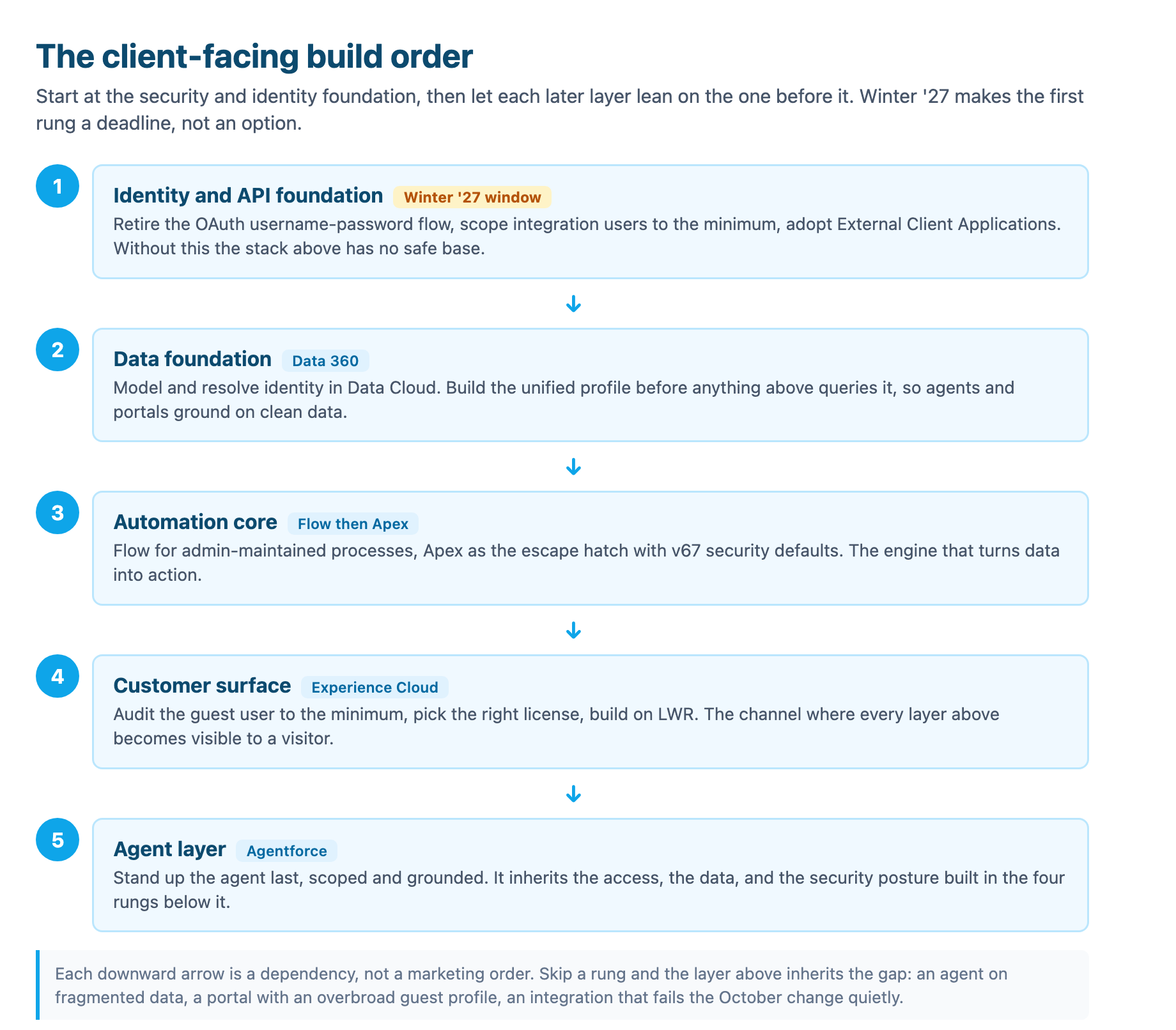
The OAuth 2.0 username-password flow for connected apps is on a firm retirement date. Salesforce first announced the change in Spring '26 and originally scheduled it to enforce with the Winter '27 release, then moved the date. The retirement is a mandatory Release Update, no opt-out, and it is now enforced on a single firm date: February 20, 2027, for every org at once rather than across instance-by-instance upgrade weekends.12 On that date, any integration still posting grant_type=password simply stops receiving a token. There is no error banner, no email, nothing in Setup pointing at the cause. The first sign is usually a failed nightly job.1
The follow-on retirement frames the direction. The SOAP API login() call, versions 31.0 through 64.0, is retired on June 1, 2027.2 Both target the same anti-pattern: credentials passed in the request body over HTTP, which for SOAP also bypasses multi-factor authentication entirely. The replacement is not a secret new trick. The web server flow with PKCE serves user-facing integrations; the client credentials flow and the JWT bearer flow serve server-to-server work.2 If you have a human on the other end, use web server with PKCE. If you are wiring a system to a system, use client credentials or JWT bearer. That one decision carries down the whole stack, because an agent action that calls an external tool needs to know whether it acts as the invoker or as a dedicated service identity, and the authentication model encodes exactly that.
The trick is finding the integrations, because the dangerous ones are the forgotten ones. A quarterly reconciliation job, an annual audit extract, a disaster-recovery script run once, none of those surface in the ordinary report. Three detection methods catch different parts of the estate.2 Login History logs every username-password token request with a login type of Remote Access 2.0 and a login sub-type of OAuth Username-Password, so a filtered export of the last six months finds apps that authenticate regularly. The catch is that Login History retains only six months; a job that runs once a quarter or once a year stays invisible. SOQL against the LoginHistory object accomplishes the same for anything you want to script or hand to an auditor. And the one most teams skip: grep your own middleware, connector configs, and infrastructure-as-code for grant_type=password and security token, then walk the platforms nobody thinks of as integrations, Boomi, MuleSoft configs, Jira, Postman environments, a script on a retired VM.2
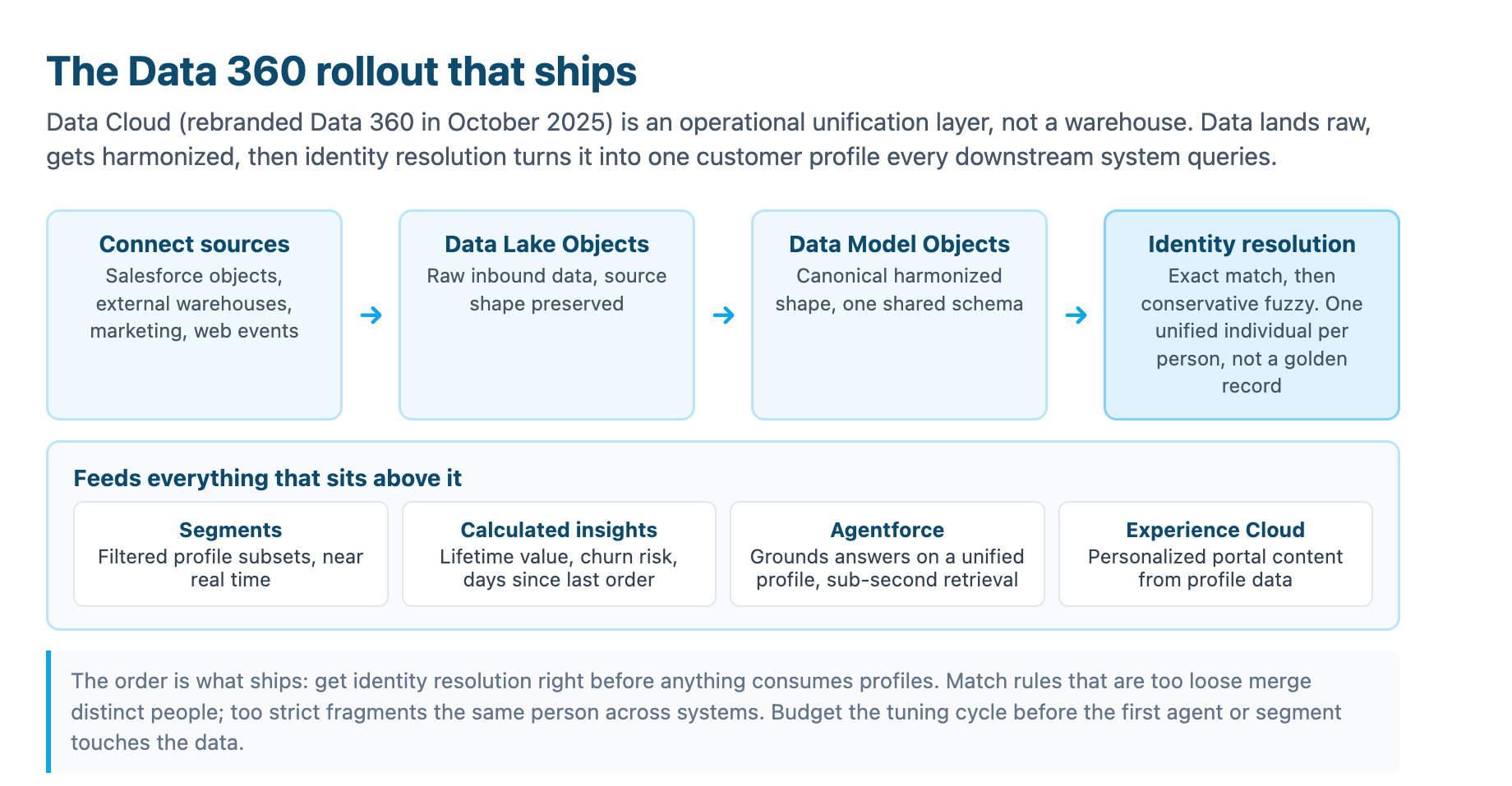
This is the rung that makes the ones above safe. A portal, a Data Cloud pipeline, and an agent all inherit whoever authenticates. If an integration still holds a password in config, that password is a blast radius waiting for the February 20, 2027 enforcement to trip it. Teams that treat this rung as a project rather than a checkbox use the runway the postponed date bought them: they find the three remembered integrations and the two documented nowhere, test their migrations in a sandbox ahead of the deadline, and move the server-to-server ones to JWT bearer. The stack above is only as trustworthy as this seam.
Rung two: Data Cloud, the data foundation every newer layer queries
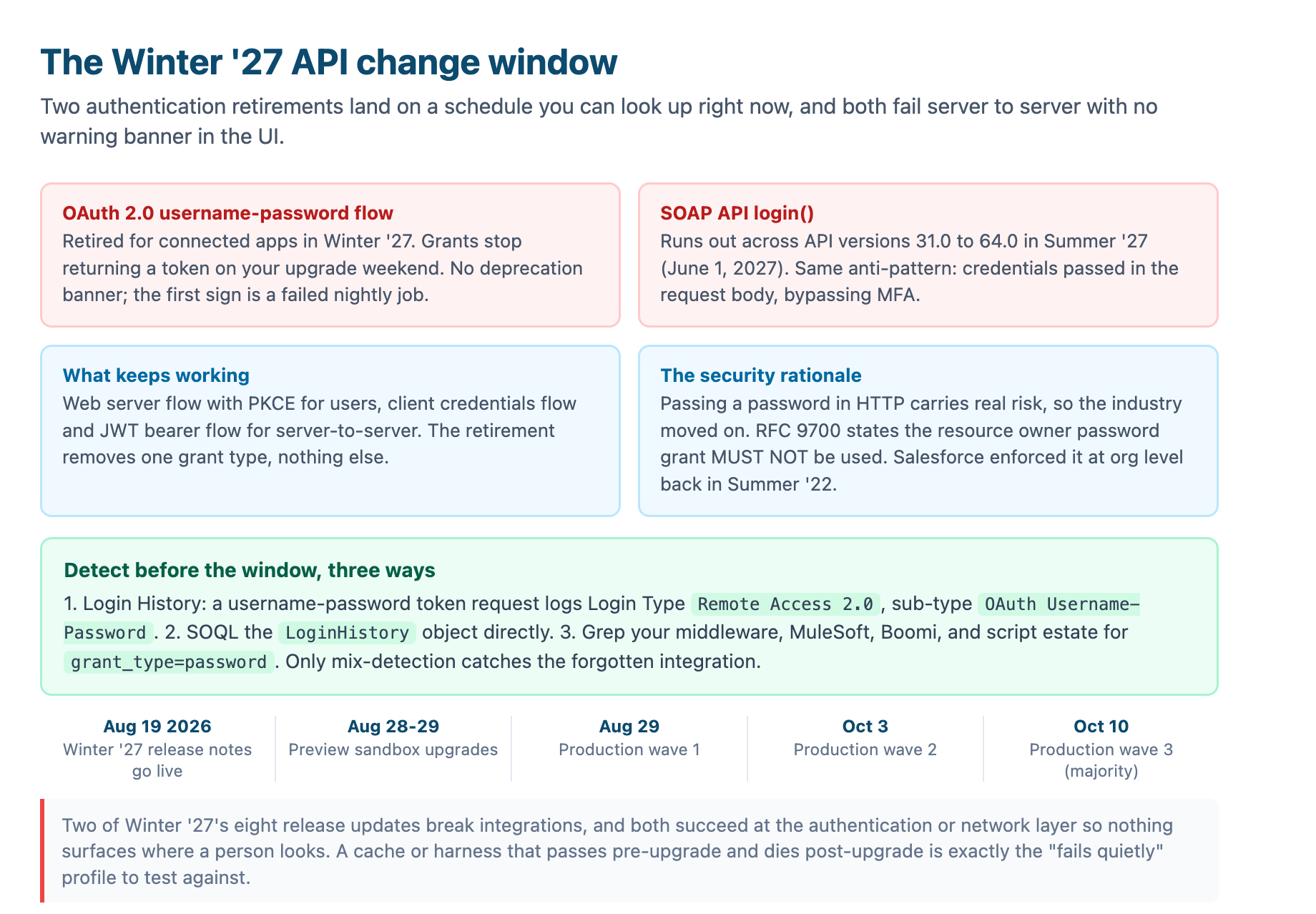
Once identity is settled, the next rung is the data foundation, because every layer above it makes the same assumption: there is a single, current, correct view of the customer to act on. That is the job of Data Cloud, which Salesforce renamed Data 360 in October 2025.3 It is not a data warehouse. It is an operational unification layer that sits between the source systems and every downstream consumer, resolving identity and serving a coherent customer profile to the things that use it.4
The architecture is a deliberate pipeline. Data lands first into Data Lake Objects in its original shape, a safe holding area that preserves source integrity. Then it is mapped into Data Model Objects, the canonical structure where email, phone, and transaction data follow one shared schema regardless of origin.3 Then identity resolution runs: matching rules that decide which records from different systems describe the same person, with exact match on hashed email as the cleanest signal and conservative fuzzy match on name plus address as the secondary layer. The output is a unified profile per person, not a golden record that overwrites sources.43
The order inside Data Cloud is where implementations either ship or stall. Teams that connect every source they can reach, load ten years of history just in case, and then reconcile match rules and credit bills for months are the ones that go wrong.3 The pattern that ships is narrow: define the one or two outcomes first, connect one source per system of record, map to the canonical model, resolve identity conservatively, and only then build the segments, calculated insights, and activations that reach a real workflow.3 Identity resolution is the largest drain on the credit budget and the most common cause of a stalled rollout, so it gets its own tuning cycle before it scales, not after the first agent is live.5
Why this rung matters to the client before the agent and the portal: because both of them read this data. An Agentforce agent answers a customer from a unified profile, or it answers from fragmented records, and the difference is whether the answer is grounded in the person's real history. An Experience Cloud portal personalizes from the same profile and segment data. Data is why the agent is trustworthy at all, and it is why the personalization in the portal is more than cosmetic. This is the foundation that our own Data 360 implementation patterns covers end to end, and the personalization angle in Experience Cloud with Data Cloud.
Rung three: the automation core, Flow first then Apex as the escape hatch
With the data in place, the automation layer turns it into action, and here the 2026 default is unambiguous: Flow first. Flow is the declarative engine that a broad team maintains without a deploy, and it handles the admin-maintained processes that change often. Apex is the escape hatch, the code path for complex business logic, external integrations, and multi-object operations that need real transaction control. The choice between them is its own framework, which we covered in detail in Flow versus Apex, and the agent-facing version in Flow orchestrating Agentforce. For the build-order question, what matters is that the automation core sits below the agent and the portal and above the data, and that it inherits the identity and security defaults settled in rung one.
That inheritance is the subtle part. Summer '26 shipped a change to the Apex security model that lands hardest on code that crosses a seam: database operations run in user mode by default, enforcing the running user's sharing rules, field-level security, and object permissions, and a class with no explicit sharing declaration now defaults to with sharing.6 The practical consequence is that the same Apex action behaves differently depending on which identity crossed the boundary. For an integration user with broad access the change may pass silently; for a restricted end user it filters records and fields that previously came back. If you are building this rung now, after the Summer '26 default, you build Apex under the new defaults from day one rather than retrofitting them.
Rung four: Experience Cloud, the surface where every seam becomes visible
The portal is the first rung an outsider can actually see, which is precisely why it is build step four and not step one. Experience Cloud is not a separate application. It is a rendering layer over the same org your internal users access, the same Case records, the same sharing model, governed by its own external security posture.7 A visitor who logs in reaches records through the standard platform; a visitor who does not log in runs as the Guest User, a single shared identity for every anonymous visitor on the site.7
The client-side decision that usually surprises people is licensing. Experience Cloud has three external license types, each granting different access and cost structure. The Partner Community license gives partners access to Leads, Opportunities, Accounts, Contacts, Cases, and Campaigns, priced per named user. The Customer Community license is for self-service portals, more restricted, access to Accounts, Contacts, Cases, and custom objects, not Opportunities or Campaigns, priced per named user or per login. Customer Community Plus adds record creation and reports for power users.7 The cost gap between per-login and per-named-user for a large customer base is not small; for a B2C client with hundreds of thousands of customers it can be hundreds of thousands of dollars a year. Model both structures against real expected usage before committing to a license type.7
The security posture is where Experience Cloud earns its reputation as a risk surface, and it has a live threat behind it. Salesforce has documented an active campaign in which a known threat actor uses a modified open-source tool to mass-scan public Experience Cloud sites, and in over-permissive guest configurations, to extract data they should not have reached. The mechanism is exploitable only through a customer misconfiguration, not a platform flaw, which is exactly why the audit discipline matters to a client.8 Experience Cloud gates access through four layers, evaluated in sequence: object access, then record access, then field-level security, then field value masking. If any layer denies, access stops there.8
The default posture is now restrictive, and that is good news for new builds. Guest user external org-wide defaults are always set to private, guest users cannot hold more than read access, and they cannot be members of public groups or queues.9 The risk concentrates in orgs built before the tightening, where default permissions may have been expanded during development and left broader than intended. Salesforce's own recommendation is the audit that should ship with any client portal: review the guest profile object by object, set org-wide defaults to private, disable the public guest API toggle, and restore object and field access from zero only where tested functionality requires it.8 A self-service site that must let customers see their own cases does not need guest read on every object in the org.
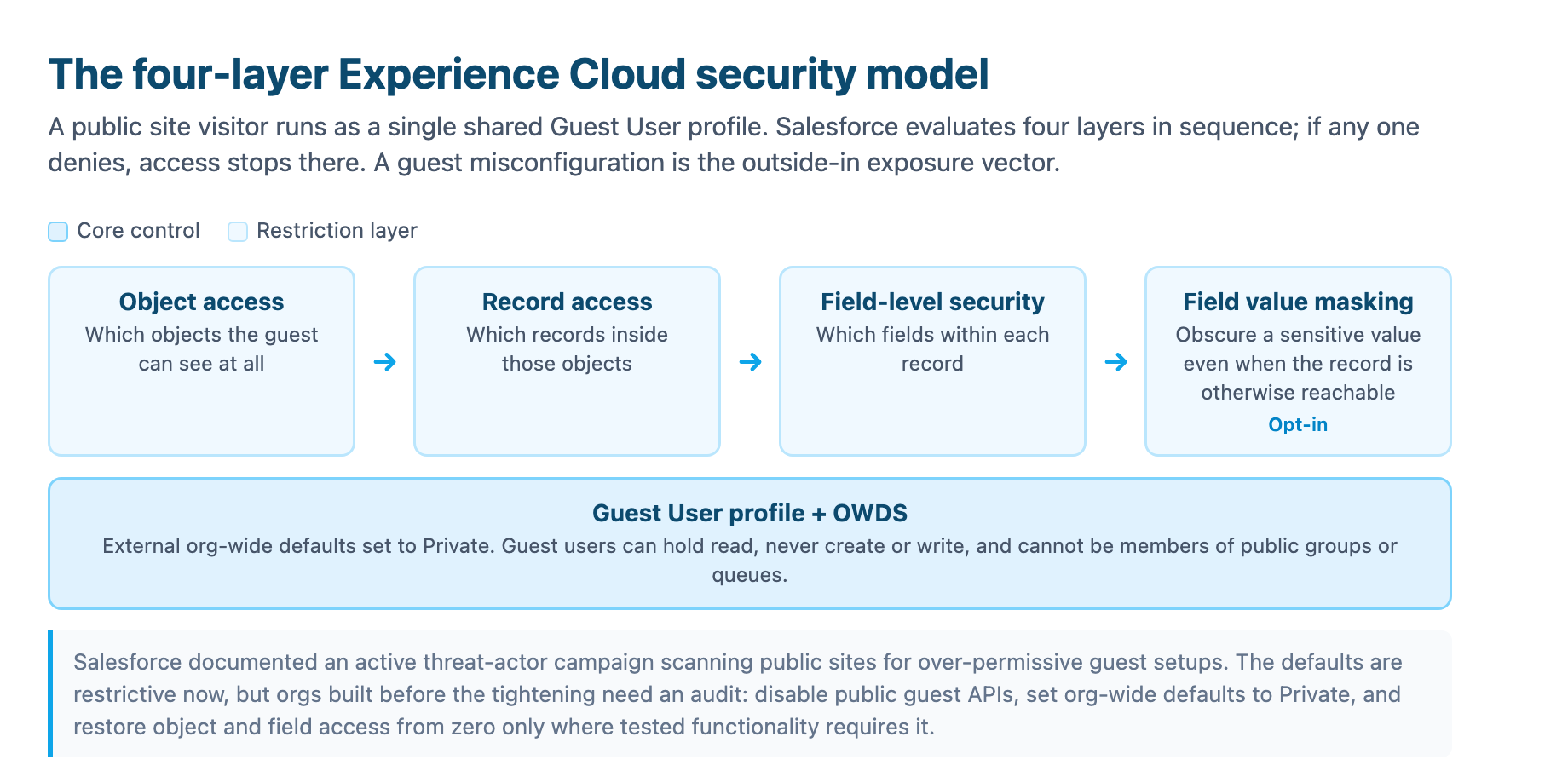
We covered the full portal-agent deployment path in Agentforce on Experience Cloud, because a public site with an agent is a routing and security project in its own right. The build-order takeaway is simpler: stand the surface up only after the identity foundation (rung one) and the data foundation (rung two) are built, so the portal inherits a safe base and clean data rather than importing both as afterthoughts.
Rung five: the agent, on top of everything because it inherits everything
The agent is last for a reason, and it is the inverse of the instinct that makes clients reach for it first. An Agentforce agent is a reasoning engine over the stack you just built. It read the unified profile in rung two, it invokes the automation and actions in rung three, it appears to customers in the portal in rung four, and it runs under an identity scoped in rung one. Get any of those wrong and the agent inherits the gap while answering with total confidence, which is the worst possible failure mode because nothing flags it.
Reliability in an agent is engineered, not prompted, an argument we make in full in the Agentforce determinism ladder. There are six rungs of agentic control, and the top ones, grounding on curated data, running under a scoped identity, retrieving through focused queries, each depends on a foundation this article built. An agent grounded on Data 360 answers from the unified profile; an agent running under a least-privilege user reaches exactly what that user can see; an agent that inherits a misconfigured guest profile in the portal becomes the thing that turns a public site into a leak. Build the stack in order and the agent is the payoff. Build the agent first and it is the first thing that breaks.
The order is the deliverable
Clients come for the AI and the portal. The build that holds together starts with the unglamorous foundation: the password retirement window on a date, the integration estate found by grepping configs, the unified profile built before anyone reads it, the guest profile audited to zero before a single visitor. Then the automation, then the surface, then the agent. Each rung is a precondition for the next, and the firm February 20, 2027 enforcement date is the mechanism that makes the first one non-optional rather than a recommended practice.
The practical first move for a client is concrete and cheap: before February 20, 2027, find every integration that posts grant_type=password, migrate the server-to-server ones to JWT bearer or client credentials, and test the whole estate in a sandbox. That single project clears the foundation the rest of the stack sits on. After that, the data, the automation, the portal, and the agent are each an order-of-operations decision, and the stack finally has the sequence to build them in.
Sources
-
Salesforce Winter '27 Release Notes guide: complete changelog, rollout timeline, and release-update enforcement. sfinterviewpro.com ↩ ↩2 ↩3
-
Salesforce retires the OAuth 2.0 username-password flow on February 20, 2027: enforcement date, what breaks, and the migration playbook. softwareinsights.dev ↩ ↩2 ↩3 ↩4 ↩5 ↩6 ↩7
-
Salesforce Data 360: the complete 2026 implementation guide. salesforcedictionary.com ↩ ↩2 ↩3 ↩4 ↩5
-
Salesforce Data Cloud implementation guide: identity resolution and data graphs. sebastientang.com ↩ ↩2
-
Salesforce Data Cloud (Data 360) implementation guide. noltic.com ↩
-
Salesforce, "Database Operations Run in User Mode by Default, Not System Mode" (Summer '26 Release Notes). help.salesforce.com ↩
-
Experience Cloud architecture and the three external license types. sfvedas.com ↩ ↩2 ↩3 ↩4
-
Salesforce, "Protecting Your Data: Essential Actions to Secure Experience Cloud Guest User Access" (updated March 2026). salesforce.com ↩ ↩2 ↩3
-
Salesforce, "Share Securely with Experience Cloud Sites with Guest Users" (guest user security policies). help.salesforce.com ↩