
Most customer portals are generic by default. Every visitor lands on the same dashboard, sees the same knowledge articles, gets the same hero banner, even though the org already knows who they are, what they own, and what they've been looking at. The data exists. It's just sitting in CRM tables and page-view logs that never meet.
That's the gap this pattern closes. Salesforce's official answer is now a first-class integration: connect an enhanced LWR Experience Cloud site to Data Cloud (renamed Data 360 in October 2025), capture interaction data, unify it into profiles, and drive personalization, including Agentforce grounding, from the same data layer. We've been applying this pattern in client orgs, and this is the implementation playbook, including the parts the marketing pages leave out.
Why this pattern, why now
The integration itself isn't brand new; the Data Cloud connection for LWR sites has been available since Spring '25. What changed is that Summer '26 made it the default path. The release shipped Agentforce Self-Service, including a new Portal experience and a Help Agent that can be set up "in 6 clicks or less," and it frames the portal as the customer-facing surface where data, AI, and self-service converge.
A portal without a data layer is a dead end for that vision. An agent answering questions needs grounding: the visitor's actual product catalog, last support interaction, loyalty tier. That context comes from Data 360, not from the case object alone.
The prerequisite nobody mentions: enhanced LWR sites
You can't connect just any site. The Data Cloud integration applies only to enhanced LWR sites, the unified LWR runtime that consolidates "Build Your Own (LWR)," "Microsite (LWR)," and "Help Center" into one platform. If your site is still on the old LWR or on Aura, you have a prerequisite step first.
The upgrade path: in Experience Builder, go to Settings → Updates → Upgrade. It's recommended (not enforced since Summer '25), but it changes your site's metadata from ExperienceBundle to DigitalExperienceBundle and DigitalExperienceConfig, which affects deployment. Salesforce's own guidance: back up the site and test in a sandbox first. One practical gotcha: sites with /s in the URL must have that removed before upgrading. There is still no automated Aura-to-LWR converter; Aura sites need a re-platform, which is a separate project.
The setup pattern
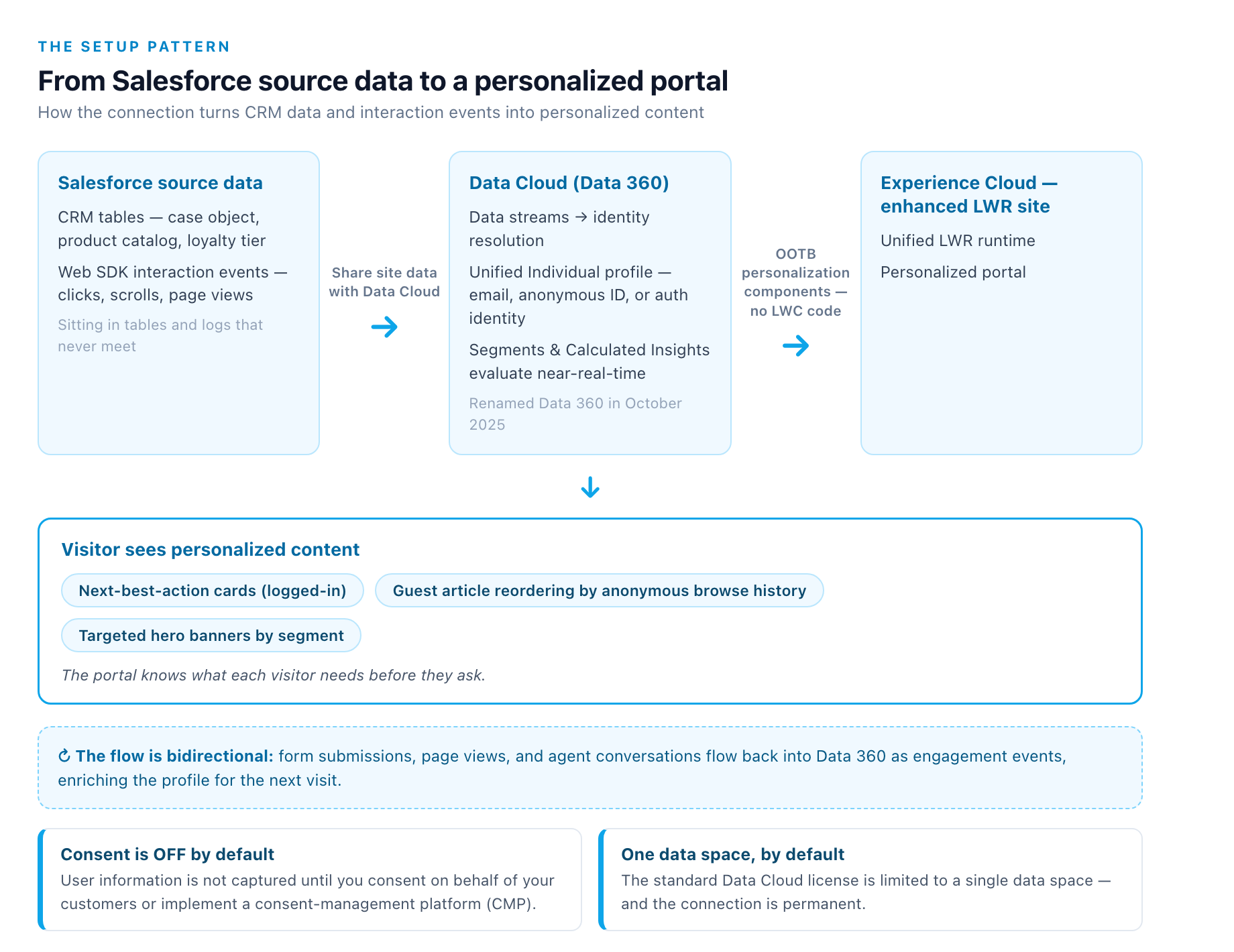
Once the site is enhanced LWR, the connection is declarative:
- Setup → Digital Experiences → All Sites → open the site in Builder
- Settings → Integrations → on the Data Cloud card, select Add to Site
- Click Share site data with Data Cloud
- Wait (the integration can take up to an hour), then check email for confirmation and publish the site
Available in Enterprise, Performance, Unlimited, and Developer editions (not in Developer Edition orgs with a Namespace configured).
Two structural constraints to know before you start:
- One data space, by default. The standard Data Cloud license is limited to a single data space; more require the Data Spaces add-on. And the connection is permanent: you can't point an already-connected site at a different data space. To change it, you delete the site's Data Cloud integration and reconfigure from scratch. Pick your data space deliberately.
- Consent is OFF by default. This is the one that surprises teams. Even after the connection is live, user information is not captured until you consent on behalf of your customers or implement a consent-management platform (CMP). The event mapping is automatic; the permissioning is not. Budget for the consent workstream up front; it's not optional plumbing.
What the data does once it flows
After connection, interaction events (clicks, scrolls, product interactions) are auto-mapped to Data Cloud. The Web SDK fires identity and behavior events; Data Cloud unifies the visitor against an existing Individual profile (matched on email, anonymous ID, or auth identity for logged-in users); segments and Calculated Insights evaluate in near-real-time.
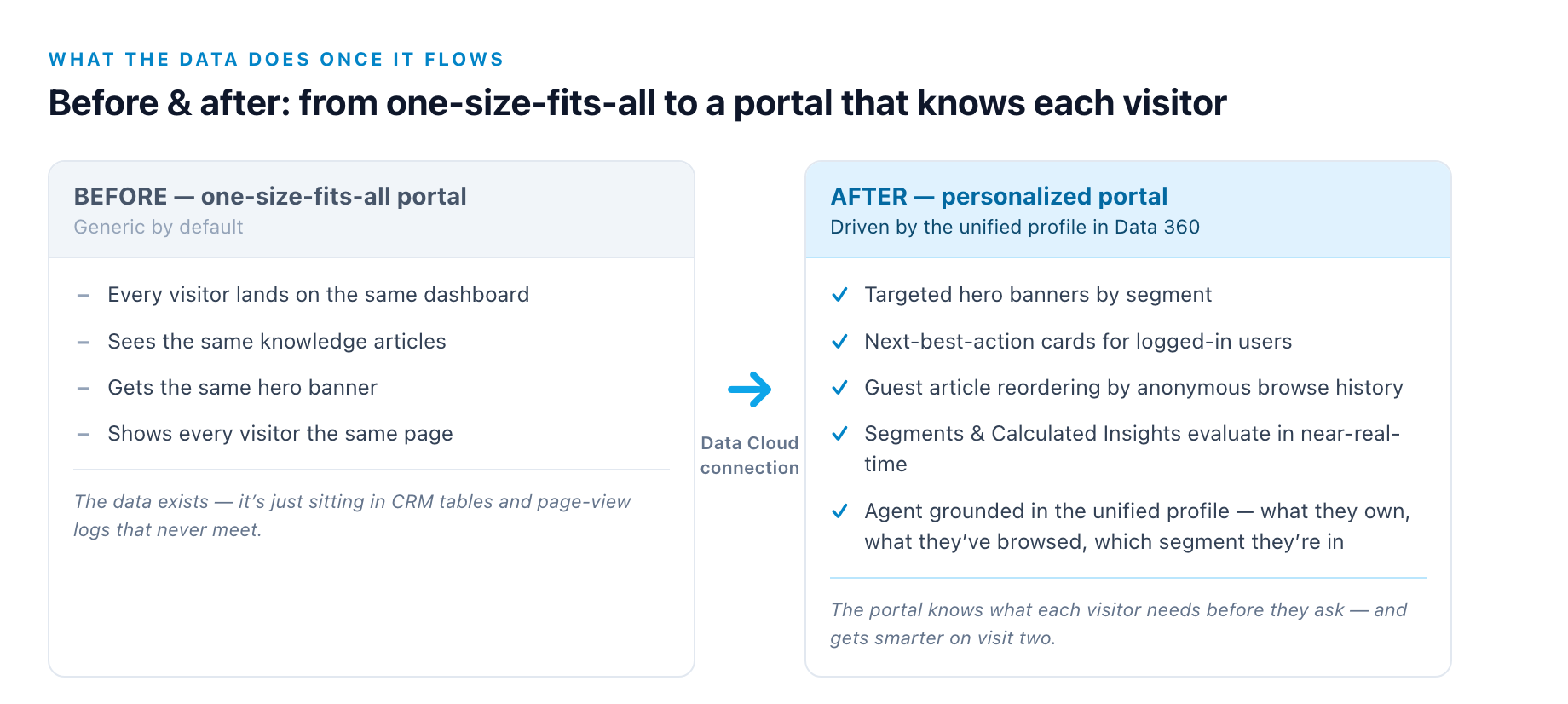
The consumption side is where most implementations underdeliver. Out of the box, Experience Builder now ships personalization components that evaluate Data Cloud segments without writing LWC code. Use those first. Custom LWCs can go deeper (querying segments, scores, and Calculated Insights and rendering conditionally), but the OOTB components cover the 80% case: logged-in next-best-action cards, guest article reordering by anonymous browse history, targeted hero banners by segment.
The data flow is bidirectional: form submissions, page views, and agent conversations flow back into Data 360 as engagement events, enriching the profile for the next visit. That's what makes the portal smarter on visit two than it was on visit one.
The Data 360 context: what you're actually buying into
If Data Cloud is new to your org, the October 2025 rename to Data 360 came with real changes: Zero-Copy Federation (query Snowflake/Databricks/BigQuery/Iceberg in place instead of copying), Tableau Semantics (one shared metric definition across dashboards, segments, and agents), the managed Iceberg lakehouse, and Intelligent Context, the structured-data grounding layer for Agentforce. The practical consequence: if your agents feel "off topic," the fix is usually in the Data 360 setup (identity resolution, data streams, Calculated Insights), not in the prompt. For a wider view of that setup, our Data 360 implementation patterns walk through the same ground.
The cost model deserves planning, because it's credit-based, and the trap is the streaming tier. Per Salesforce Dictionary's Data 360 explainer, real-time streams run roughly 5–10× the credit cost of an hourly batch and 50–100× a daily batch. Use real-time where it pays back (fraud, abandoned-cart recovery); batch the rest. Identity resolution bills on match candidates, not record count, so a poorly tuned matching ruleset can balloon the bill 10×. Tune match rules early, audit them quarterly.
The Summer '26 portal play
This is where the pattern pays off. Summer '26's Agentforce Self-Service Portal gives customers a conversational, agent-first experience: the Help Agent answers from Knowledge, reads the authenticated user's open cases, and hands off to a human queue when confidence drops. On a Data-360-connected LWR site, that agent is grounded in the unified profile: it knows what the visitor owns, what they've browsed, and what segment they're in. The conversation itself becomes another engagement event, closing the loop.
One governance note from the field: agent actions run under the authenticated or guest user with full sharing enforcement; there is no privileged agent identity that bypasses your security model. And since you're opening a portal to the internet, treat the guest user as a hostile actor: lock the guest profile to the minimum, expose records only through explicit guest sharing rules, and use with sharing + Security.stripInaccessible on any custom Apex the page calls.
Checklist before you build
- Confirm the runtime: enhanced LWR or plan the upgrade (backup + sandbox; remove
/sfrom the URL first) - Choose the data space: the connection is permanent; standard licenses get one
- Stand up consent: CMP or org-level consent before you expect any data
- Budget credits: batch what you can; tune identity resolution match rules
- Audit the guest user: least privilege, explicit sharing rules, CSP,
stripInaccessible - Start with OOTB personalization components: write LWCs only for the cases they can't cover
The pattern is declarative, but it's not free: it has prerequisites, a permanent data-space decision, and a credit bill that rewards discipline. Done right, it's the difference between a portal that shows every visitor the same page and one that knows what each visitor needs before they ask.
Sources
-
help.salesforce.com. help.salesforce.com ↩ ↩2 ↩3
-
salesforcedictionary.com. salesforcedictionary.com ↩ ↩2 ↩3
-
salesforce.com. salesforce.com ↩ ↩2
-
salesforcedictionary.com. salesforcedictionary.com ↩ ↩2 ↩3
-
help.salesforce.com. help.salesforce.com ↩