

The Decision That Keeps Coming Up
Every Salesforce team hits the Flow vs Apex question within the first year of building. For a long time, the official guidance was simple: declarative builders used Flow, developers used Apex 1. It served teams fine until orgs grew. The updated Record-Triggered Automation decision guide shifts the decision away from who builds the automation and onto what the object actually carries during a save operation, which Salesforce now calls automation density 2.
This article gives you the practical version: a decision process, the limits that constrain both tools, and the hybrid pattern most teams end up using anyway. For the concrete implementation shapes, our five Flow design patterns show the patterns in practice.
The Tools, Briefly
Salesforce Flow is the point-and-click automation platform. In Flow Builder you assemble screens, decisions, and record operations visually, with no compiler or deployment pipeline. Flow splits into types that match the job: screen flows for user interaction, triggered flows for record and scheduled events 2.
Apex is Salesforce's object-oriented programming language, similar to Java. You reach for it when declarative tools run out of room: custom business logic, complex data structures, integrations that go beyond what clicks can express 2.
Both run inside the same multitenant transaction and burn the same governor limits, so the question is never whether something can be done, but who keeps it alive for five years.
When Flow Wins
Start with the density signal. Record-Triggered Flow is the standard for low-density objects: fewer than 15 automations firing per DML event, user-driven UI edits or small API loads of 1-200 records, and self-contained logic with zero or one downstream DML operation 2. Most business automation lives here.
Within that band, Flow has four concrete strengths.
Same-record updates before save. A before-save record-triggered flow is the most performant declarative option for updating the triggering record before the initial DML commit. It executes before the record hits the database, so it consumes no extra DML and doesn't re-trigger the save order 2. If the work is "when status changes to Approved, stamp the approved date," this is where it belongs.
Scheduled paths with automatic cancellation. Flows can schedule a path for a future, record-specific moment ("fire 3 days before close date") and automatically cancel or reschedule it if the record changes. An Apex trigger can't do this natively; scheduled Apex runs on a clock, not per-record 2.
Admin maintainability. The visual builder lets admins create and modify automation faster than writing, testing, and deploying Apex, reducing dependency on developer resources for simple tasks 2. If the person who will maintain this after launch is an admin, that is a deciding factor on its own.
Built-in safeguards. Flows auto-bulkify queries and DML and offer automatic retries out of the box. In Apex those safeguards must be coded by hand, and forgetting them breaks triggers at scale 2.
Know the ceiling. Flows share the per-transaction limits: 100 SOQL queries, 150 DML statements, 50,000 records retrieved by SOQL, and 10,000 records processed by DML, where each Get Records element costs one query and each Create, Update, or Delete Records element costs one DML statement 3. Flow also has no native Map or Set, so complex data processing turns cumbersome fast 2. When you find yourself joining record sets in your head, think about code.
When Apex Wins
Apex is the standard at the top of the density matrix: more than 30 automations on an object, bulk API loads of 2,000 to 10,000+ records per transaction, and dependency graphs where one save cascades into five or more downstream DML operations 2. Four specific kinds of work push you there.
Bulk operations at real scale. Batch Apex exists for long-running jobs over large data volumes, and it can query more records than a regular transaction allows. Only five batch jobs run at a time in an org, with up to 100 more waiting in the flex queue 4. For jobs that need an ID, complex argument types, or chaining, Queueable Apex is the tool, and Salesforce recommends it over future methods 5. A synchronous transaction can enqueue up to 50 queueable jobs; an asynchronous one can enqueue just one, and missing that distinction causes LimitException errors during data loads 5.
Complex algorithms and data structures. Apex gives you Map, Set, and programmatic loops for bulk-safe manipulation, plus a standard library Flow doesn't have 2. If your logic reads naturally as an algorithm, a scoring model or capacity calculation, write it in Apex.
Serious external integrations. Apex has the full HTTP class, custom authentication, and granular error handling, bounded by 100 callouts per transaction and a 120-second cumulative callout timeout 6. Flow has come a long way: you can register an HTTP callout action in Flow Builder, and the resulting invocable action can be reused across flows and from Apex 7. That is fine for a single simple endpoint. Signed payloads, OAuth flows, retries, and nested response parsing are Apex territory.
Version control and CI/CD. Source-driven development with scratch orgs, disposable deployments of metadata you spin up, test against, and discard, makes version control the source of truth instead of a shared sandbox 8. Apex changes ride that pipeline with automated tests and review gates 9. Flows are metadata too and belong in the same repository; the decision guide recommends Git for Salesforce projects regardless of tool, with Salesforce Code Analyzer in the pipeline to catch SOQL in for loops and Get Records elements in flow loops 2.
The Limits Both Share
Neither tool escapes the governor limits, since both run in the same transaction. The numbers that matter most:
| Resource (per transaction) | Synchronous | Asynchronous |
|---|---|---|
| SOQL queries | 100 | 200 |
| DML statements | 150 | 150 |
| Records retrieved by SOQL | 50,000 | 50,000 |
| Records processed by DML | 10,000 | 10,000 |
| CPU time | 10,000 ms | 60,000 ms |
| Heap size | 6 MB | 12 MB |
| Callouts / cumulative timeout | 100 / 120 s | 100 / 120 s |
Two takeaways fall out of this table. The CPU gap between synchronous and asynchronous contexts, 10 seconds versus 60, is why heavy work should migrate to an asynchronous path: the Run Asynchronously path in flows, Queueable or Batch Apex in code 2. And a limit failure in a synchronous trigger rolls back the user's entire save, so sloppy automation is paid for by whoever clicks Save 2.
The Hybrid: Flow Orchestrates, Apex Computes
The most useful pattern in production is a blend. For medium-density objects, 15-30 automations with coupled parent/child updates and 2-4 downstream DML operations, the decision guide's standard is the hybrid: Record-Triggered Flow as the orchestration layer, with complex operations encapsulated in Invocable Apex 2.
Mechanically it is simple: write a class with a static method annotated @InvocableMethod and it shows up in Flow Builder as a callable action 10. The flow keeps entry conditions, decision logic, and routing, so the process topology stays visible in Flow Trigger Explorer. The Apex does the heavy lifting.
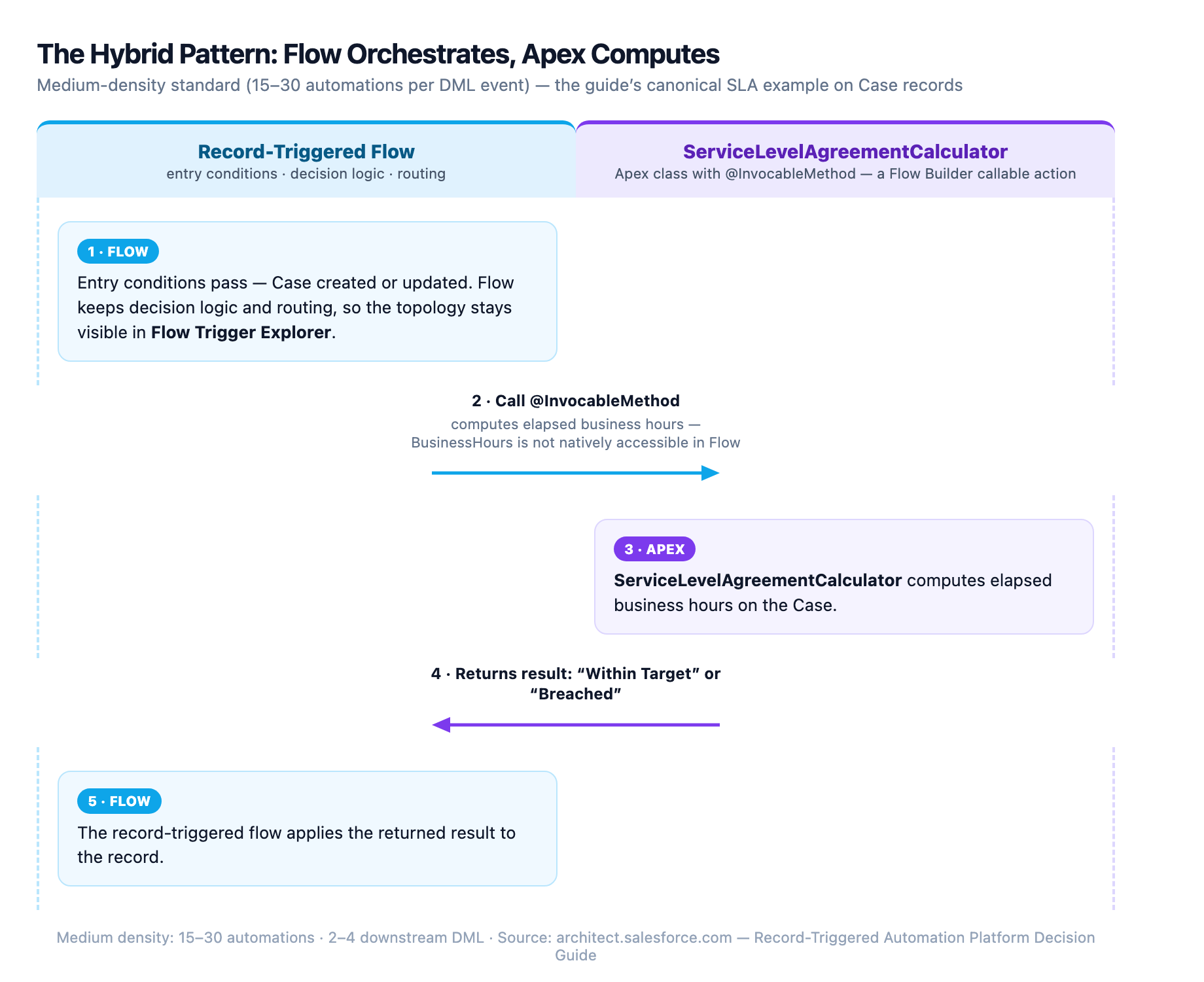
The guide's canonical example is SLA calculation on Case records. BusinessHours is not natively accessible in Flow, so a ServiceLevelAgreementCalculator class with an @InvocableMethod computes elapsed business hours and returns "Within Target" or "Breached," and the record-triggered flow calls it 2. That separation buys modularity, reuse across flows, and an orchestration layer an admin can still read.
The pattern has three limitations. Invocable actions only run after save, so they can't handle same-record field updates; keep that work in a before-save flow or before-context Apex. Record-triggered flows don't support the after-undelete context, so restore-from-recycle-bin logic requires an Apex trigger. And the Flow-to-Apex handoff carries a small runtime cost, negligible at medium density but real at extreme scale 2.
Decision Framework
Start by sizing the object, not the tool. The density matrix is the first filter:
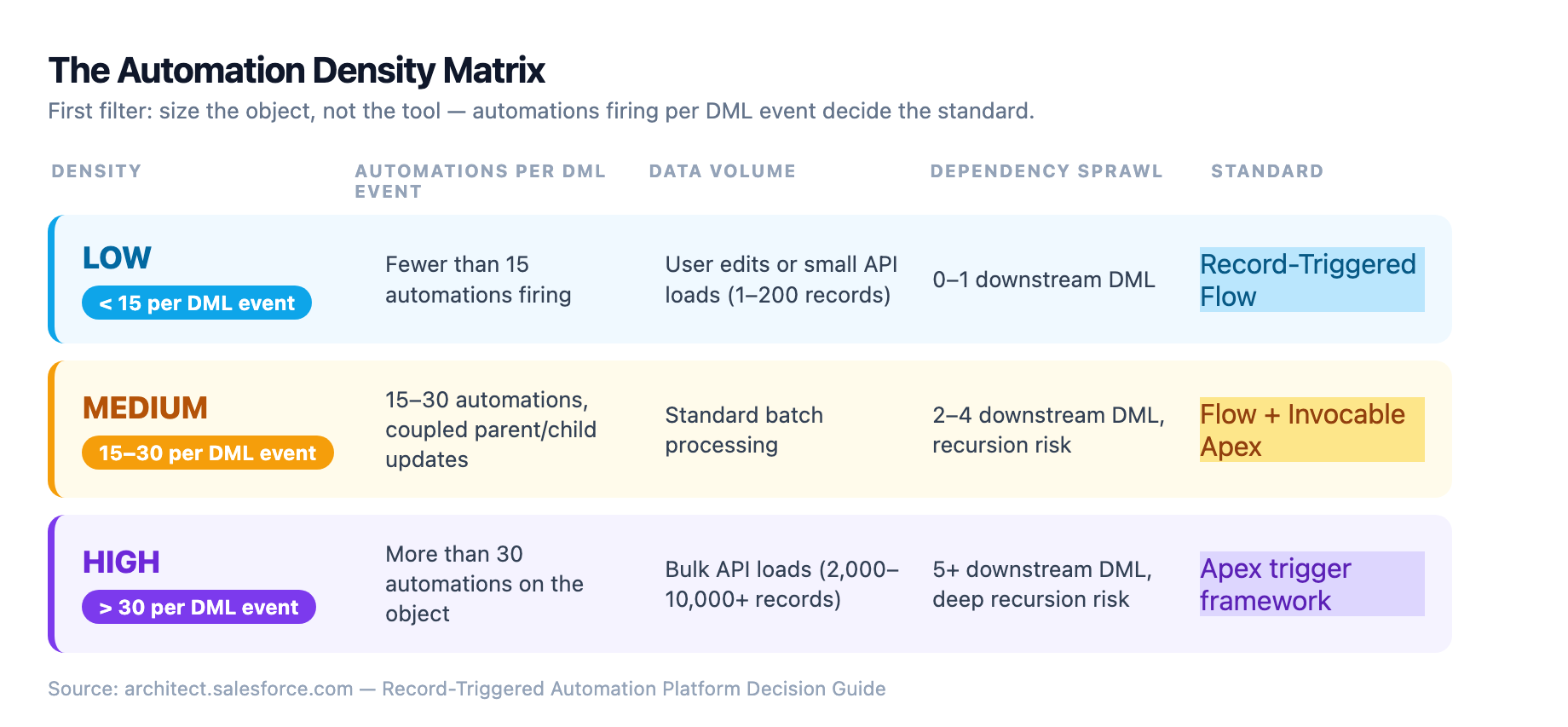
| Density | Automations per DML event | Data volume | Dependency sprawl | Standard |
|---|---|---|---|---|
| Low | < 15 | User edits or small API loads (1-200 records) | 0-1 downstream DML | Record-Triggered Flow |
| Medium | 15-30 | Standard batch processing | 2-4 downstream DML, recursion risk | Flow + Invocable Apex |
| High | > 30 | Bulk API loads (2,000-10,000+ records) | 5+ downstream DML, deep recursion risk | Apex trigger framework |
Then walk the requirement through the practical questions:
| Question | Leans Toward |
|---|---|
| Can an admin maintain this? | Flow |
| Simple sequence, or likely to change often? | Flow |
| Does it need unit tests and CI/CD? | Apex |
| Bulk loads of thousands of records? | Apex |
| Maps, sets, or algorithmic logic? | Apex |
| Custom auth, signatures, retries, nested JSON? | Apex |
| Simple single-endpoint API call? | Flow (HTTP callout action) |
If the answers split evenly, default to Flow plus Invocable Apex for whatever computation the flow can't express cleanly.
Common Pitfalls
Building Apex for everything. A trigger and handler class cost real money to maintain: deployment, tests, code review, and a developer on call. If a flow solves it in an afternoon on a low-density object, build the flow.
Building Flow for everything. The mega-flow anti-pattern is real: one enormous flow doing many unrelated things. Even a single very big flow on an object is a complexity signal, and the guidance is to break it into subflows or convert to Apex 1. Related trap: running flows and Apex triggers as entry points on the same object. The decision guide is explicit that an object should have one entry mechanism; fragmented automation is a governance and debugging nightmare 2.
Ignoring the shared limits. A Get Records element inside a flow loop burns the 100-query budget exactly like SOQL in a for loop. Always test with realistic data volumes, and run Code Analyzer in the pipeline to catch both patterns 2.
Burning the async budget. The daily asynchronous execution limit is shared org-wide, typically 250,000 executions or 200 times your user licenses, whichever is greater 2. A bulk load of 20,000 records fires a trigger 100 times; if each invocation enqueues an async job, one data load can starve every other async process in the org 2.
Real-World Example: Lead Routing
Consider lead routing: a new lead needs an owner chosen by territory, current capacity, and skill match. Lead is a busy object too, with dedupe, enrichment, scoring, and notification flows already firing on it.
Flow-only works at UI scale: validate the lead, look up the territory, assign round-robin. But capacity balancing across a team is a computation, and doing it without maps or sets in a flow gets clumsy. A 5,000-lead import hits the transaction limits and the whole save rolls back.
Apex-only gives full control and great bulk behavior. But every routing tweak runs through the dev pipeline, and the object's automations split across two entry points, which the guide warns against.
The hybrid fits the density: a record-triggered flow owns the entry conditions and routing decisions, excluding non-routable leads and applying the territory filter. It then calls a LeadRouter invocable Apex class that scores capacity and skill match and returns the recommended owner, and the flow applies the assignment. Historical leads needing reassignment go through a scheduled Batch Apex job. Validation and orchestration stay visible in Flow; the algorithm lives where algorithms belong.
Key Takeaways
- Size the object first with the density matrix, then pick the tool
- Flow is the standard for low-density automation, before-save updates, scheduled paths, and admin-owned processes
- Apex is the standard for high density, bulk processing, complex algorithms, and serious integrations
- Both share the same governor limits, so test with realistic volumes no matter which you choose
- The hybrid pattern, Flow orchestrating Invocable Apex, is the medium-density standard and the most common architecture in production
The best architects don't argue Flow versus Apex. They measure the object, pick the entry point, and let each tool do what it does best.
- What Is Low-Code?, salesforce.com
Sources
-
Salesforce Record-Triggered Automation: Apex or Flow?. salesforce.com ↩ ↩2
-
Record-Triggered Automation Platform Decision Guide. architect.salesforce.com ↩ ↩2 ↩3 ↩4 ↩5 ↩6 ↩7 ↩8 ↩9 ↩10 ↩11 ↩12 ↩13 ↩14 ↩15 ↩16 ↩17 ↩18 ↩19 ↩20 ↩21 ↩22
-
Avoid Flow Limits (Trailhead). trailhead.salesforce.com ↩
-
Asynchronous Apex Overview (Apex Developer Guide). developer.salesforce.com ↩
-
Queueable Apex (Apex Developer Guide). developer.salesforce.com ↩ ↩2
-
Execution Governors and Limits (Apex Developer Guide). developer.salesforce.com ↩ ↩2
-
Manage HTTP Callout Actions (Salesforce Help). help.salesforce.com ↩
-
Salesforce DX Developer Guide. developer.salesforce.com ↩
-
Scratch Orgs (Salesforce DX Developer Guide). developer.salesforce.com ↩
-
InvocableMethod Annotation (Apex Developer Guide). developer.salesforce.com Further reading: ↩