


The agent that grew a second head
Every focused agent follows the same arc. You ship one to handle refunds, it works, and then the business asks whether it can also take billing questions, then delivery updates, then onboarding. Before long the single agent is carrying five domains in one set of instructions. That is where the cracks appear, and Salesforce's own admins blog names the failure mode: instructions get long and contradictory, the reasoning engine makes surprising choices because there is too much competing context, and when something breaks you cannot tell where to look.1
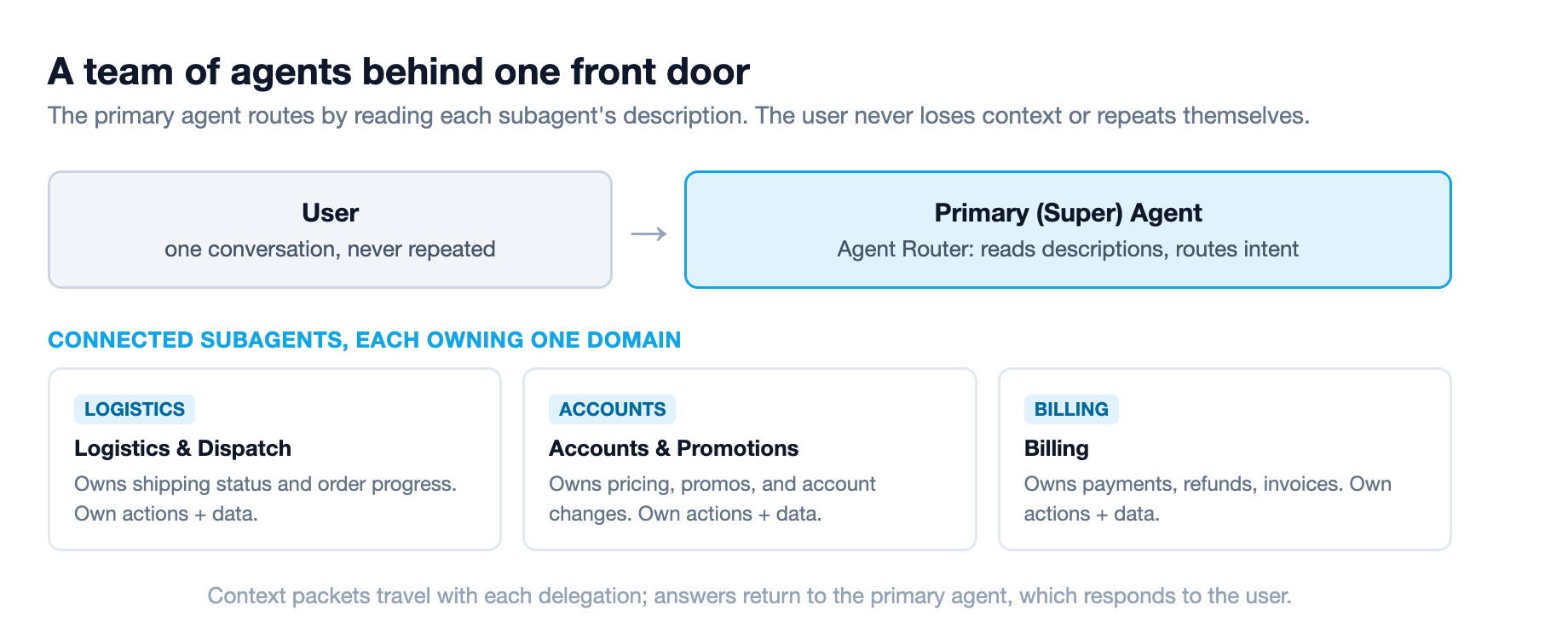
Multi-agent orchestration is the intended fix, and Summer '26 made it generally available on June 15, 2026 after graduating from beta.2 Instead of one agent doing everything, you build a team: a primary agent as the single point of contact routes each request to a specialist agent that owns one domain. The user talks to one agent the whole time and never repeats themselves.3 The production pattern language for getting that team live is a whole topic of its own, which we covered in Agentforce Production Implementation Patterns.
The pitch sounds simple. The practice is not. Reading Salesforce's architect guides, the SOMA (single-org multi-agent) admin series, and the release mechanics, I came away with a specific view: the hard part of multi-agent orchestration is not building agents. It is describing them precisely enough to route, and defending the handoffs where the system silently degrades.
What the GA actually changed
The mental model to start from is primary versus secondary. The primary agent analyzes an incoming query, works out the intent, and routes the task to the specialist agent best equipped for it. The secondary agents run behind the scenes with their own grounded data and their own library of actions, then hand the answer back to the primary agent to present.3
The routing is not a fixed decision tree. Salesforce's Atlas Reasoning Engine reviews each registered agent's description, instructions, and available actions, then decides which specialist fits.3 That single design choice is the whole ballgame, and it is why this is a description problem before anything else. The orchestrator routes by reading descriptions, so those descriptions are load-bearing routing input, not user-facing documentation.2
This landed inside a release with real momentum behind it. Agentforce ARR reached $800 million in Q4 FY26, up 169% year over year and 48% sequentially from $540 million the prior quarter, with combined Agentforce and Data 360 ARR above $2.9 billion.2 These are vendor-stated figures from Salesforce's own earnings, worth reading as adoption context rather than a promise of your results.
The rollout mechanics matter if you are about to touch this. In Agent Builder you open an agent in a draft state, which becomes your orchestrator, then connect other agents as subagents from the Explorer panel. For each connected subagent you customize its description to govern its behavior inside your orchestrator's context, and with Agent Router you reference it with the @ symbol in your instructions.4
SOMA: when one agent is not enough
Salesforce's admin team gives the single-agent-versus-orchestration decision a name: SOMA, single-org multi-agent orchestration, where multiple agents in one Salesforce org are coordinated by a super agent.1 The trigger for moving to it is not ambition; it is three limits that a single agent hits.
The first is architectural boundaries. A single agent cannot cross between orgs to reach data or permissions that live elsewhere. If your HR FAQ agent runs in one org but payroll data sits in a separate finance org, the agent simply cannot reach it.1 The second is context overload. Add enough domains and the instruction set gets so long that the reasoning engine starts skipping guardrails, misrouting, or applying billing logic to a shipping question. The instructions did not get worse; the context window just got crowded.1 The third is specialization collapse. A jack-of-all-trades agent loses precision and misapplies logic because it has to guess which domain a phrase like "I have a question about my account" belongs to.1
There is a sharp distinction in the admin guidance between a subagent and a connected subagent, and conflating them is a common design error. Subagents inside a single agent are capabilities you reuse across a team, like guardrails, compliance filtering, user verification, and disambiguation, the rules that must apply the same way no matter which specialist handles a request.5 A connected subagent is a completely separate agent in your org that the super agent delegates to, passing input variables, waiting while the other agent runs its own reasoning, then taking control back.1
That distinction sets the ceiling on your design. In the current beta of SOMA you can connect a maximum of seven connected subagents to a super agent.1 And a connected subagent responds; it does not route or orchestrate. If one tries to call another connected subagent, that is the signal your architecture is wrong, and the admin guidance is blunt: revisit the architecture, do not patch the instructions.1
The description is the routing input
The single most important design decision in a multi-agent build is how you decompose the work. Salesforce's admin guidance offers three ways to slice scope, ordered from larger to smaller. By functional domain, mirroring how the business is organized: a field service agent, a support agent, and a sales agent each own a slice. By workflow stage, when each stage is substantial and has reusable actions, so a scheduling subagent that books interviews today can book field service appointments tomorrow. And by capability, one agent retrieves, one analyzes, one acts, which can even run in parallel.5
The decomposition gets validated with what the admins team calls the one-sentence test: if you cannot describe a connected subagent cleanly in one sentence without the word "and", split it.5 A subagent whose description is a comma-separated list of jobs is one the orchestrator will misroute. Overlapping and vague descriptions are the most common cause of routing issues, and the guidance is to review subagent descriptions first when the orchestrator keeps picking the wrong specialist.5
The build order is deliberately cautious. Build and test each connected subagent independently before bringing it into the super agent. Create the super agent and configure it to only route to connected subagents, so it is not also making decisions or answering inquiries directly. Before you add your first connected subagent, add at least one deterministic pattern to your Agent Router. Then add subagents one at a time, testing the routing each time before expanding.5
The Agent Router needs deterministic logic
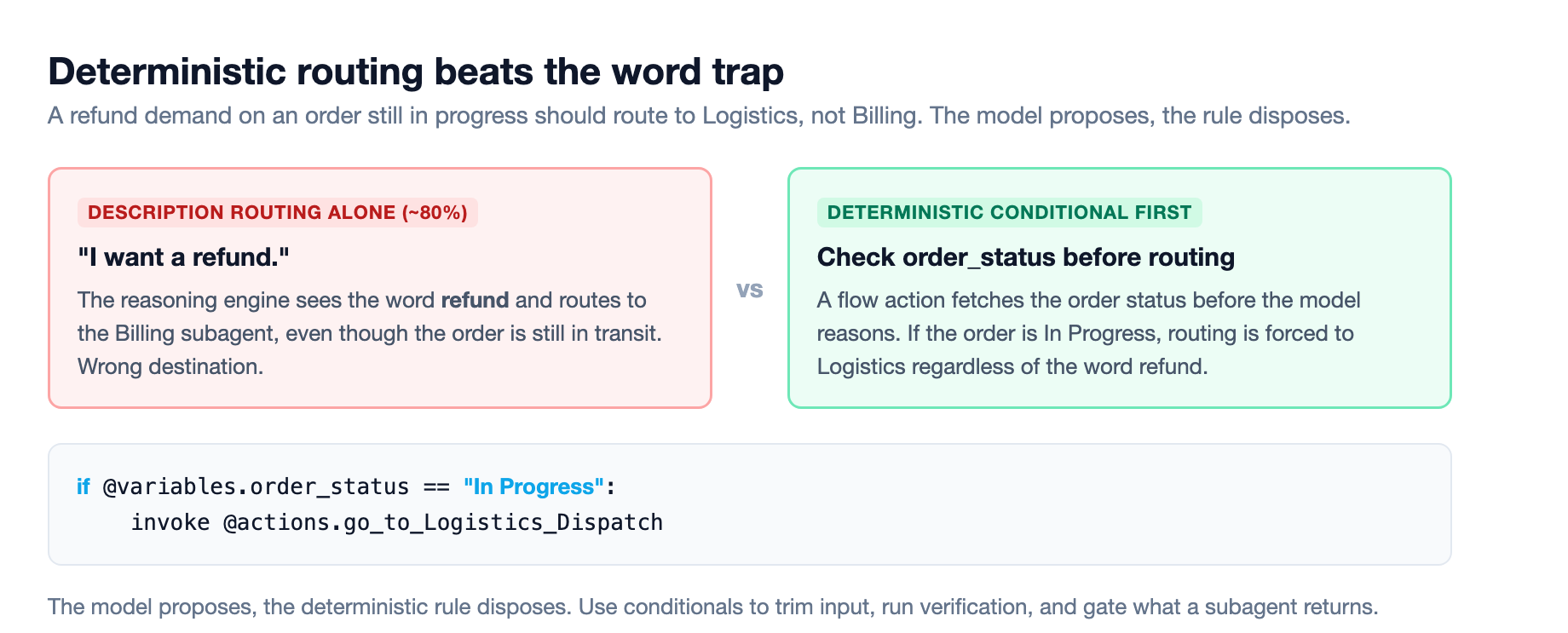
The super agent's Agent Router is the entry point for every user utterance, visible in Agent Script as the start_agent block.5 The aspiration is that it reads each connected subagent's description and routes cleanly. The reality, from the admins' own worked example, is that description-based routing gets you about 80% of the way, and the last 20% needs deterministic control.5
Here is the concrete case that convinced me. A delivery concierge super agent delegates to three connected subagents: logistics and dispatch, accounts and promotions, and billing. A customer says they have waited too long and demands a refund. On pure description routing, the reasoning engine sees the word "refund" and routes to the billing agent. But if the order is still in progress, the correct destination is logistics. The fix is a conditional that checks the order status first, fetched by a flow action before the model reasons, and routes accordingly: if the order status is "In Progress", invoke the logistics action, even with refund sitting right there in the prompt.5
That is the pattern to internalize. The model proposes, the deterministic rule disposes. Use these conditionals to trim user input before a handoff, to run verification first, and to quality-gate what a connected subagent returns before it reaches the user.5
There is also a known limitation to plan around. In a single agent you can use "transition to" in an If/Else statement to move automatically to a subagent. In multi-agent orchestration that does not work; transition to cannot route directly to a connected subagent. Instead you route by invoking the action that calls it.5 Plan for that or you will hit a wall.
The seam problem is where it breaks
Independent analysts describe the real failure mode of multi-agent systems as the seam problem: failure surfaces appear at every handoff point, whether incorrect orchestrator routing, a specialist acting on stale data, context lost in a handoff, or latency between agents causing timeouts.2 The uncomfortable part is that the number of these surfaces grows much faster than the number of agents, closer to quadratic than linear. Adding agents to a poorly described estate makes reliability worse, not better.2
Atlas 3.0's answer is structured context packets that travel with every delegation, so a subagent does not act on a stale or truncated picture of the conversation.2 That is the mechanism behind the promise that the user never repeats themselves.
The other boundary to respect is where orchestration stops. Agent2Agent (A2A) support lets a primary agent connect to and delegate to third-party agents across Google Vertex, Microsoft Azure, and other frameworks, which is what turns this into a true agentic enterprise.3 But advanced cross-platform A2A beyond your own Salesforce org is still in beta, and the deployment guidance is explicit: keep orchestration inside your own agent estate first and treat cross-platform routing as a later experiment.2
Governance rides on top of all of this through Agentforce Observability, which monitors the whole agent team, traces interactions between agents, and enforces security policies across the system.3 If you run a team of agents, you need to see the team, not just the front door.
Sequence it, do not switch it all on
The final lesson is about sequencing, and it cuts against the natural instinct to turn the headline feature on first. Do not deploy multi-agent orchestration on day one just because it is GA.2 The orchestrator's routing quality is bounded by the quality of your agent descriptions and your defenses against handoff failures, so the first phase is the unglamorous work: writing precise, action-accurate descriptions for every agent you intend to register and testing routing with a small set before expanding the roster.2
That sequence mirrors something worth noting for the same release. API version 67.0 flips database operations to user mode by default, makes Apex classes default to with sharing, and removes the WITH SECURITY_ENFORCED clause in favor of WITH USER_MODE.6 Audit legacy Apex before your org reaches GA, because code that quietly relied on system-mode access will behave differently afterward.2 We dug into that migration in detail in Apex Summer '26 Security: The v67 Migration. The orchestration work and the security audit are separate tracks, but they land in the same window and both reward doing the boring work first.
The team, not the agent
Multi-agent orchestration changes the unit you design for. It is no longer "build one agent that does a job well". It is "build a set of agents, each with a precise description and a narrow scope, wire them behind one front door, and defend the seams between them." The routing is dynamic, which is powerful and which is exactly why description quality and deterministic guardrails matter. Get the decomposition right, write descriptions like they are routing logic, because they are, and keep the roster small until the handoffs hold. That is how a team of agents beats a single agent that grew a second head.
Sources
-
What Is SOMA, and When To Build a Super Agent or a Single Agent. admin.salesforce.com ↩ ↩2 ↩3 ↩4 ↩5 ↩6 ↩7 ↩8
-
Salesforce Summer '26: The First-90-Days Agentforce Plan. digitalapplied.com ↩ ↩2 ↩3 ↩4 ↩5 ↩6 ↩7 ↩8 ↩9 ↩10
-
Agentforce Multi-Agent Orchestration. salesforce.com ↩ ↩2 ↩3 ↩4 ↩5
-
Orchestrate Other Agents (Beta), Summer '26 Release Notes. help.salesforce.com ↩
-
How to Set Up a Super Agent with Connected Subagents. admin.salesforce.com ↩ ↩2 ↩3 ↩4 ↩5 ↩6 ↩7 ↩8 ↩9 ↩10
-
Summer '26 Release Highlights for Salesforce Architects. salesforce.com ↩