


In April 2026 Salesforce stopped treating the Model Context Protocol as an experiment. Hosted MCP servers went generally available for every Enterprise Edition org and above, and the pitch is straightforward: any AI client that speaks MCP, whether that is Claude, ChatGPT, Slack, or a client you wrote yourself, can reach into your org and work with its data and logic under your existing security model 1. For a consulting audience that has spent years wiring Named Credentials, Apex callouts, and External Services schema by hand, this is the first real alternative. It is worth understanding what it changes, and where it does not help.
This article is the implementation view of that GA: what the hosted server exposes, how the security model works, how to stand one up in under thirty minutes, and where the outbound direction (Agentforce reaching external tools) still has rough edges. It builds on our earlier pieces on Agentforce in production and Data 360 implementation; this is the integration layer those articles assumed but did not cover.
Two directions, one protocol
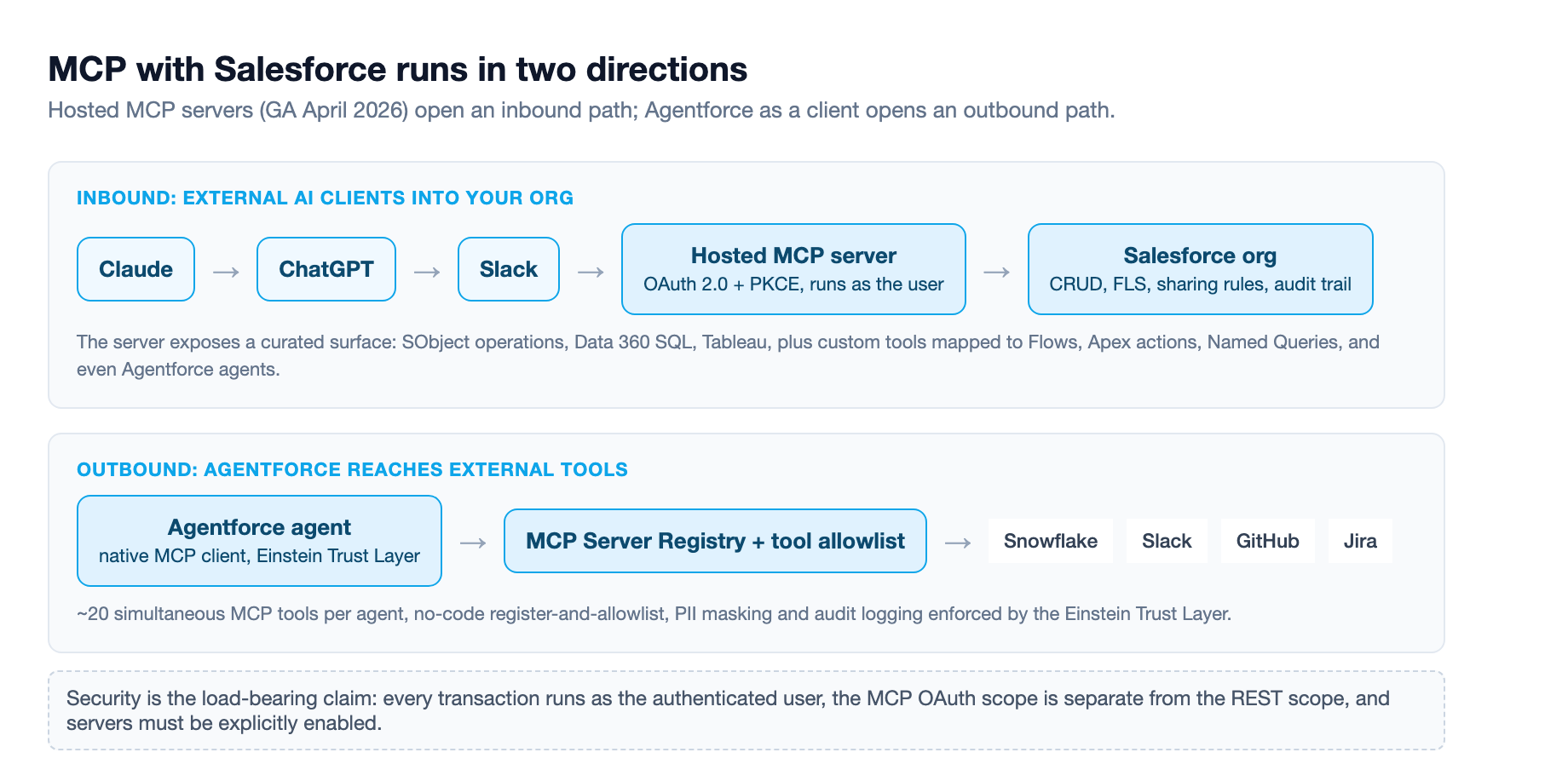
MCP support in the Salesforce world runs in two directions, and it helps to keep them separate because the setup and the risk profile are not the same.
Inbound: external clients into your org. A hosted MCP server is a Salesforce-managed endpoint that exposes your org's assets, meaning data, flows, Apex actions, and named queries, to any MCP-compatible client 1. Salesforce hosts and scales the server the way it hosts your REST APIs. No infrastructure to provision, no uptime to manage. You enable a server in Setup and it is live. A sales rep can stay inside their chat assistant and ask for an account history, open opportunities, recent case activity, and a stakeholder map in one conversation, with the CRM data coming back to them instead of them logging in to build a report 1.
Outbound: Agentforce reaching external tools. The reverse direction. Agentforce operates as a native MCP client, so an agent can discover and invoke tools on MCP servers it does not own, like Snowflake, Slack, GitHub, or Jira, through a standardized interface rather than per-system integration code 2. That direction has been in pilot since July 2025 and beta since January 2026, so it is newer and carries more caveats than the inbound GA 2.
The inbound GA is the mature half and the one with the strongest security story. The rest of this article focuses there first, then circles back to what the outbound direction can and cannot do today.
The security model is the whole pitch
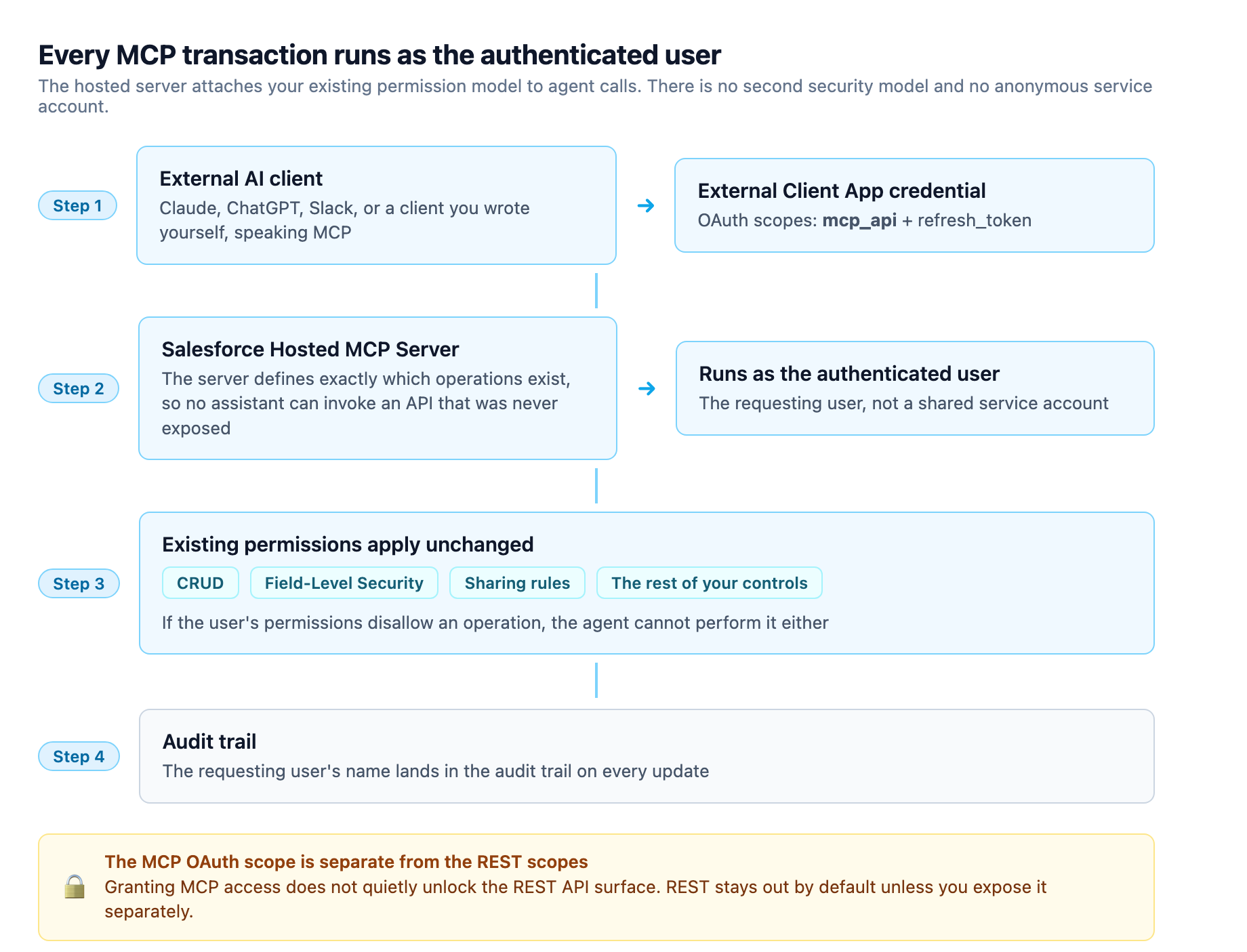
The reason hosted servers matter is not that MCP is a clever protocol. It is that Salesforce bolted its existing permission model onto it. Every MCP transaction runs as the authenticated user. CRUD, field-level security, sharing rules, and the rest of the controls you already enforce apply to agent calls exactly as they do to a person in the UI 1. There are no anonymous service accounts and no second security model to learn. If the agent updates a record, the requesting user's name lands in the audit trail. If that user's permissions do not allow an operation, the agent cannot perform it either 1.
MCP itself is framed as a safety mechanism. Structured tool calls replace unstructured API access, and the server defines exactly which operations exist, so there is no way for an assistant to invoke an API that was never exposed 1. Salesforce also ships a new OAuth scope for MCP access that is separate from the REST API scopes, meaning granting MCP access does not quietly unlock the REST surface 13. Access to the platform's REST APIs is not part of the MCP OAuth scope, and that scoped-access model is the baseline for agent governance on any hosted MCP surface 3. The whole thing is secure by default in the sense that MCP servers must be explicitly enabled before they do anything 1.
That does not make it a no-op. The security boundary now includes the AI client on the other end, and that is where the new risk lives, which I will get to in the pitfalls section.
What the GA actually exposes
The hosted server is not a single thing. You get prebuilt standard servers and you get custom servers, and the two cover different jobs.
The standard servers are the out-of-the-box surface: the Agentforce 360 Platform, Tableau Next, Data 360 SQL, and more 1. These let an external client run SObject operations, query Data 360, and pull Tableau analytics without custom assembly 4. For most teams this is the fastest on-ramp because there is nothing to build.
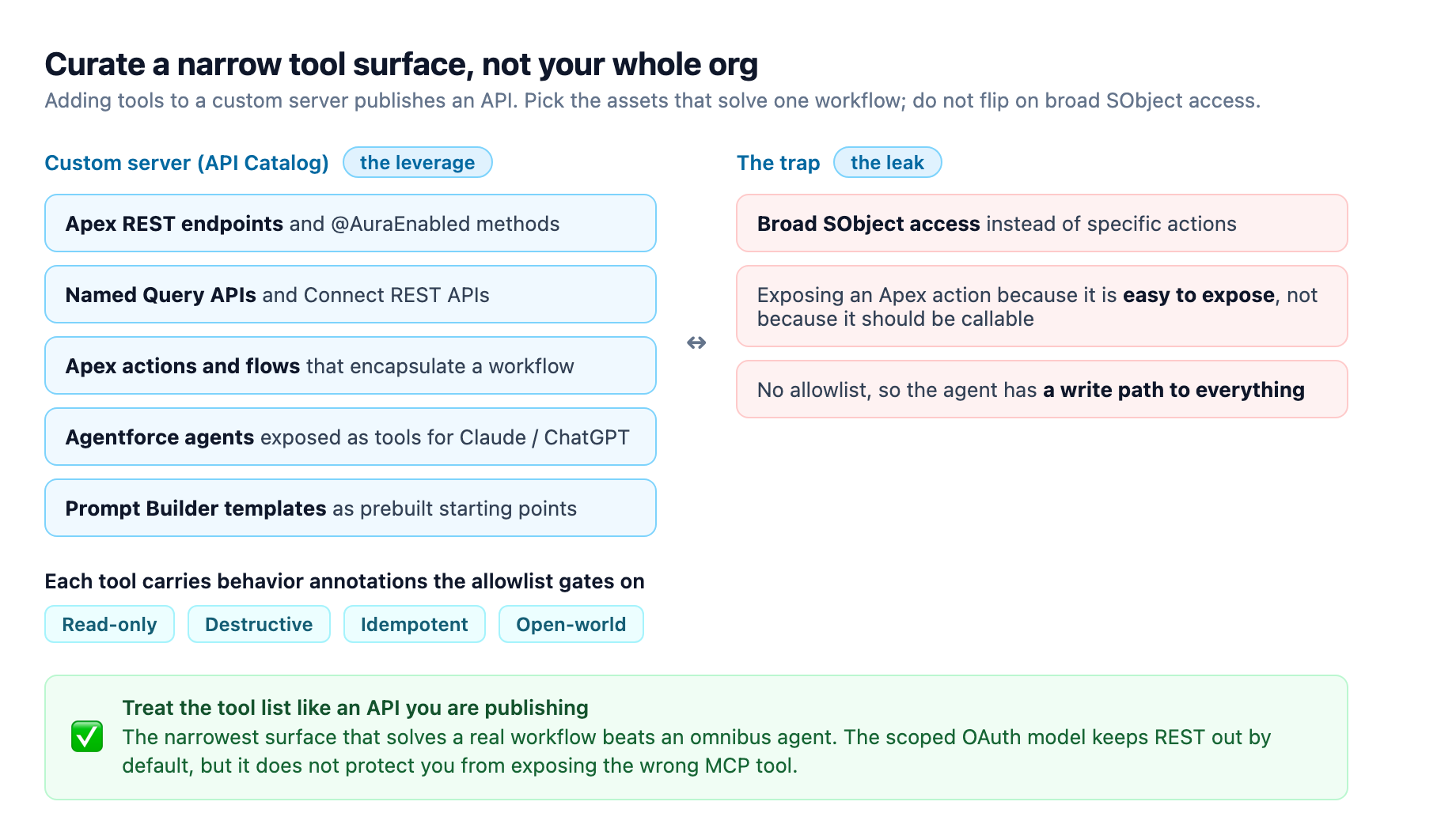
Custom servers are where the real leverage sits. In API Catalog you create a Salesforce MCP server and then add tools that map to specific assets: Apex REST endpoints, @AuraEnabled methods, Connect REST APIs, Named Query APIs, Apex actions, and flows 5. This is the pattern for domain-specific workflows. An ISV partner can expose an invocable Apex action that encapsulates their industry-specific data model, and an end user can then interact with that model through natural language without understanding the schema underneath 1.
You can also add your Agentforce agents themselves as tools on a hosted server, which makes those agents available to external clients like Claude or ChatGPT 5. And you can add prompt templates from Prompt Builder, so a client gets prebuilt starting points for tasks like account review or deal analysis grounded in your org's data 15. Each tool can carry annotations that hint at its behavior, such as Read-only, Destructive, Idempotent, or Open-world 5.
Standing one up in under thirty minutes
Salesforce's own getting-started path claims under thirty minutes, and it is genuinely short 1.
- Enable a server. Go to Setup, then API Catalog, then MCP Servers, and enable a standard server or create a custom one. Custom servers are available in Developer, Enterprise, Performance, and Unlimited editions 5.
- Create an External Client App. This needs the
mcp_apiandrefresh_tokenOAuth scopes 1. This is the credential your client uses, and the scoped-access model means it only unlocks the MCP tools you explicitly exposed, not the REST API. - Connect a client. Start with Postman to test the server returns what you expect, then connect your real client, Claude or ChatGPT or whatever your users already sit in 1.
The recommended first move is the platform/sobject-reads server in a sandbox. It is read-only, so it is risk-free, and it proves the whole loop before you expose anything that writes 1. The docs split cleanly by role: Salesforce Help for admin setup, the developer docs for the technical reference and client connection, and a community wiki for patterns and design rationale 1.
The tool list view matters. When you add tools to a custom server, you are curating a surface, not flipping on your whole org. Picking specific Apex actions and flows rather than broad SObject access is the difference between an agent that does one thing well and an agent with a write path to everything. Treat the tool list like an API you are publishing, because that is exactly what it is.
The outbound direction, and its current limits
Agentforce as an MCP client is the direction consultants get most excited about, and it is worth separating the promise from the present state. The workflow is no-code: in Setup you register an MCP server URL, the enterprise MCP Server Registry validates it and pulls its tool manifest, and then you configure an allowlist to choose which tools and metadata the org exposes 2. In Agentforce Builder those MCP actions appear alongside native agent actions, and you drag them into the relevant topics like any other action 2. The agent discovers available tools automatically, understands their schemas, and invokes them within the Einstein Trust Layer, which applies PII masking, grounding, toxicity detection, and audit logging 2.
The constraints are real. Each Agentforce agent currently supports roughly twenty simultaneous MCP tools, which pushes you toward focused agents with curated tool sets rather than one omnibus agent 2. AgentExchange, the evolved AppExchange, catalogs more than fifty live MCP servers from over two hundred partners, which is healthy but still a catalog, not every tool in your stack 2. The Data 360 MCP server is in developer preview, so connecting Agentforce to Data Cloud and external warehouses like Snowflake is the marquee example but not yet a finished one 2.
When MCP, when REST, when A2A
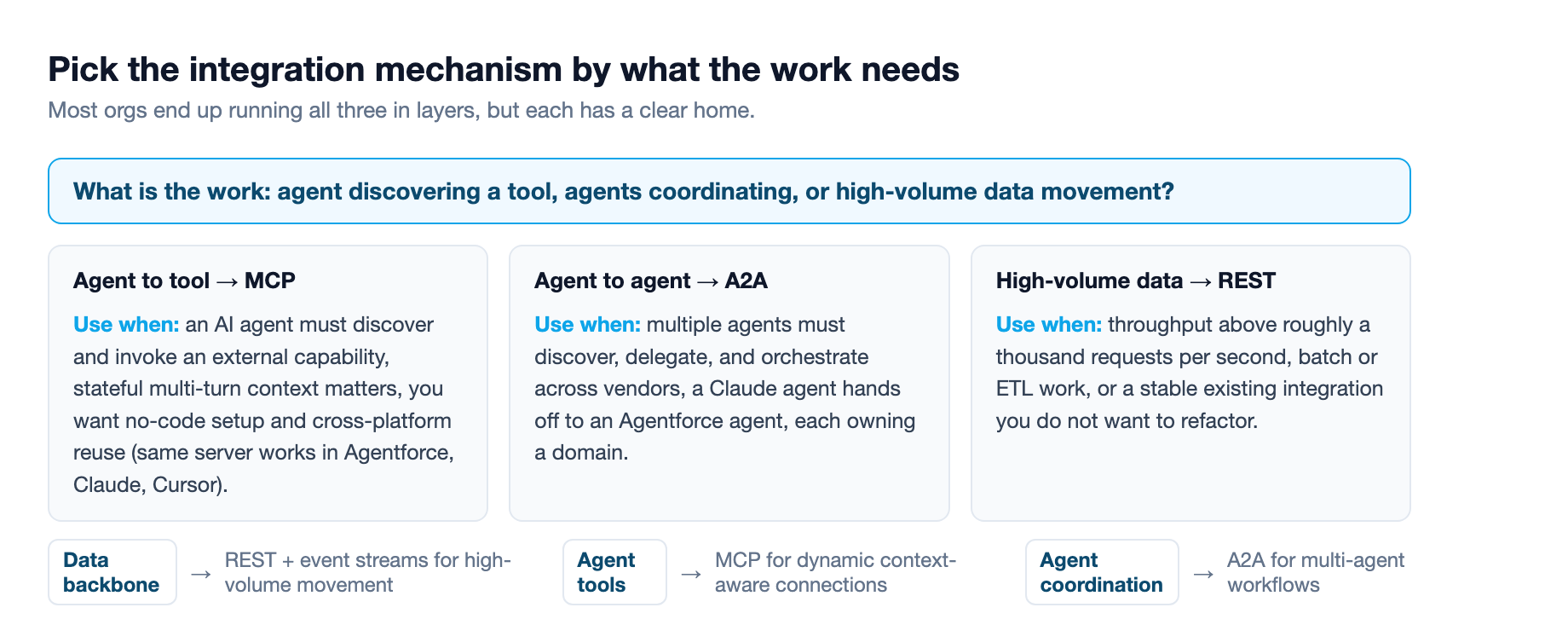
The recurring consulting question is which integration mechanism to reach for, and the honest answer is that you will use all three in a layered architecture. MCP is for agent-to-tool discovery, when an AI agent needs to dynamically find and invoke an external capability, where stateful multi-turn context matters, and where you want no-code setup and cross-platform compatibility so the same server works with Agentforce, Claude, and Cursor 2. REST stays for high-throughput data pipelines above roughly a thousand requests per second, for stable existing integrations you do not want to refactor, and for batch and ETL work where stateful sessions add overhead 2. A2A is for agent-to-agent coordination, when multiple agents need to discover, delegate, and orchestrate across vendors 2.
The pragmatic split: MCP for the new agent-driven connections, REST for the established data plumbing, A2A only when you genuinely have multiple agents that must hand work to each other. Most orgs run the first two today and are still deciding whether they need the third.
The pitfalls that are not hypothetical
The biggest one is indirect prompt injection, specifically tool poisoning. In April 2025 the security research firm Invariant Labs published a bulletin on a new class of attack where a malicious MCP server returns poisoned tool descriptions that redirect an agent's behavior 6. Because your agent trusts the tool manifest it discovers, a compromised server can steer it. The defense is the admin control Salesforce built: closely vet and manage every server you register, and curate the tool allowlist so agents can only reach what you explicitly approved 2. This is why the registry-plus-allowlist model is the load-bearing part of the design, not a convenience.
The second pitfall is governance at enterprise scale. Salesforce's hosted servers handle governance within their own perimeter, but a company running MCP across multiple vendors needs a control plane that spans all of them. That is the emerging category of MCP gateways, products like MuleSoft AI Gateway that provide centralized access control across all your MCP servers, not just the Salesforce ones 1. If you are deploying MCP beyond a single vendor, budget for one.
The third is the trap of the tool surface. Exposing an Apex action because it is easy to expose, without thinking about whether that action should be callable from an arbitrary AI client, is how a write path leaks. The annotations exist to flag destructive operations, and the allowlist exists to gate them. Use both. The scoped OAuth model keeps REST out by default, but it does not protect you from exposing the wrong MCP tool.
The one-line version
Salesforce hosted MCP servers are GA, they run inside your existing permission model, and the thirty-minute setup is real. Start read-only in a sandbox, expose the narrowest tool surface that solves a real workflow, keep the allowlist tight, and treat every registered server as a trust decision, because that is precisely what it is. For the agent-to-tool direction the pattern is proven but the ecosystem is still filling in. For getting your org's data and logic in front of the AI clients your users already sit in, there is no reason to wait.
Sources
-
Salesforce Developers Blog, "Salesforce Hosted MCP Servers Are Now Generally Available" (April 29, 2026). developer.salesforce.com ↩ ↩2 ↩3 ↩4 ↩5 ↩6 ↩7 ↩8 ↩9 ↩10 ↩11 ↩12 ↩13 ↩14 ↩15 ↩16 ↩17
-
Vantage Point, "How Agentforce Uses MCP: Connecting External Systems." vantagepoint.io ↩ ↩2 ↩3 ↩4 ↩5 ↩6 ↩7 ↩8 ↩9 ↩10 ↩11 ↩12
-
Atlan, "MCP Server for Salesforce: Deployment Options Explained 2026." atlan.com ↩ ↩2
-
Salesforce Developers, "Hosted MCP Servers" documentation. developer.salesforce.com ↩
-
Salesforce Help, "Create Custom Salesforce MCP Servers in API Catalog." help.salesforce.com ↩ ↩2 ↩3 ↩4 ↩5
-
Invariant Labs, "MCP Security Notification: Tool Poisoning Attacks." invariantlabs.ai ↩