


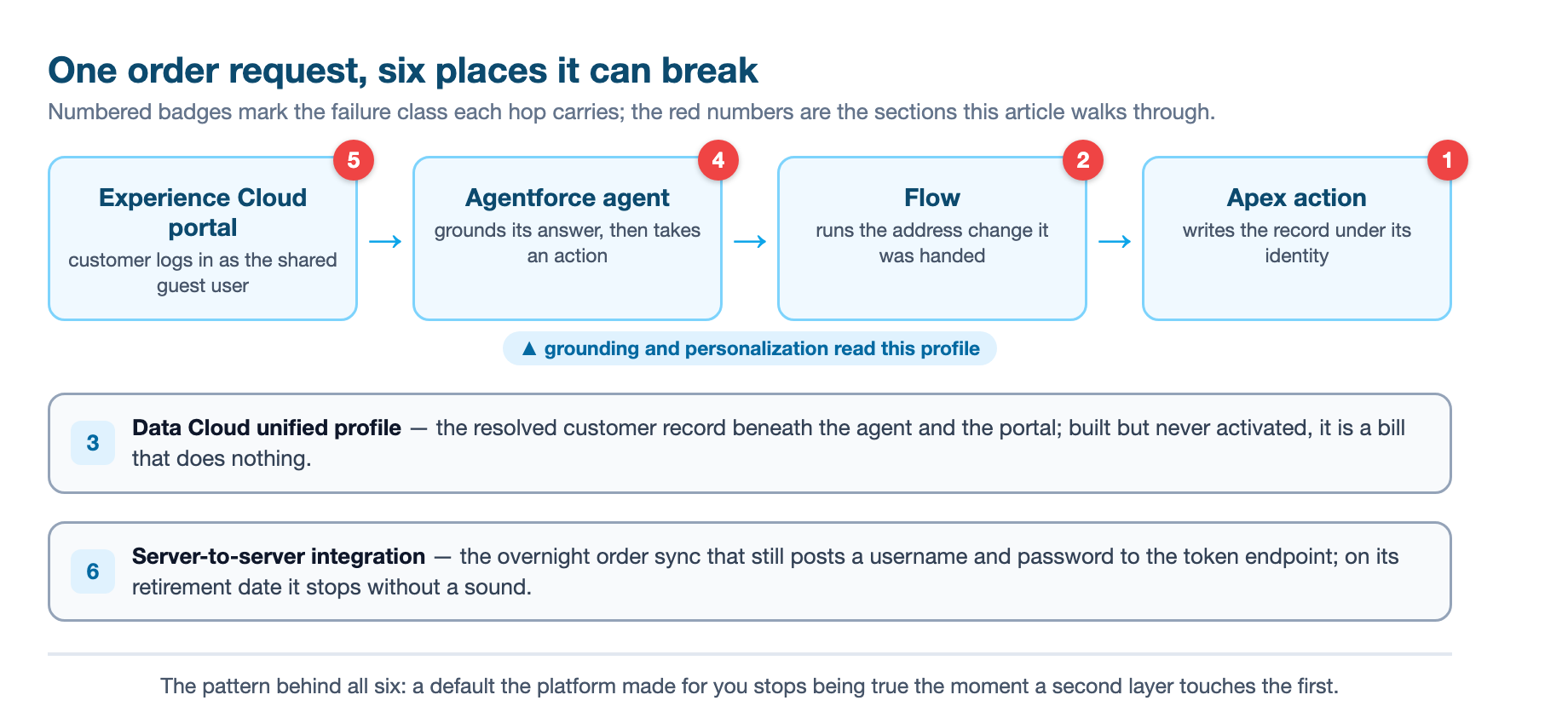
A service organization rarely buys one Salesforce product. It buys a bundle, then wires the pieces together over a couple of years, and by the time anyone steps back the platform is a Flow that routes cases, an Apex handler underneath it, a Data Cloud instance holding a customer profile, an Experience Cloud portal, an Agentforce agent that greets portal visitors, and a handful of server-to-server integrations syncing orders at night. That is the 2026 shape of the platform, and it is genuinely powerful. It is also where a specific kind of failure shows up, one that looks random on the surface but is not.
Take a concrete workflow and run it through a build: a customer signs into an Experience Cloud portal to ask where their order is. An Agentforce agent answers, pulling the order and the customer tier out of the unified profile in Data Cloud. To correct a shipping address the agent calls a Flow, which triggers an Apex invocable action that writes the change. Overnight, a middleware job syncs new orders in over the API. Every one of those hops is a seam where a build can break, and in our experience the breakages are not evenly distributed. They cluster into a small set of recurring classes. Each one traces back to a default the platform made for you, an assumption about how a piece behaves that stops being true the moment another piece touches it. This article names the six places a combined build fails, and the implementation pattern that keeps each from firing.
One: Apex that returns rows nobody is allowed to see
The first failure is the quietest, because nothing crashes. Apex code written before Summer '26 assumed a default that no longer exists. Historically, Apex ran database operations in system mode, bypassing the running user's field-level security and object permissions, and a class without an explicit sharing declaration defaulted to without sharing. That meant code could reach records and fields that the person triggering it could not actually see, and it returned them anyway.
API version 67.0 flipped that assumption. In v67.0 and later, database operations run in user mode by default, enforcing the current user's sharing rules, field-level security, and object permissions, and a class with no explicit sharing declaration now defaults to with sharing.12 The behavioral shift is exactly the failure mode: a piece of Apex that used to return a full set of rows now returns only what the running user may see, or none at all. For an integration user with broad access nothing changes, which is why it sails through a demo. For a restricted end user, the same action silently returns less. The worst version is the class that quietly leaks, because that one changes behavior in the other direction and does not announce itself either.
The trap in a combined build is where the code sits. Apex triggers are a deliberate exception and always run in system mode, but the handler classes they call are not protected.1 The standard pattern of delegating trigger logic to a handler class carries the exposure: the trigger runs in system mode, the handler it calls does not, and if that handler was written with no sharing declaration and compiled at v67.0 it now runs with sharing. Meanwhile any class still using the retired WITH SECURITY_ENFORCED clause will not even compile at v67.0; the replacement is WITH USER_MODE, and code that genuinely needs system-level access must say WITH SYSTEM_MODE explicitly.12
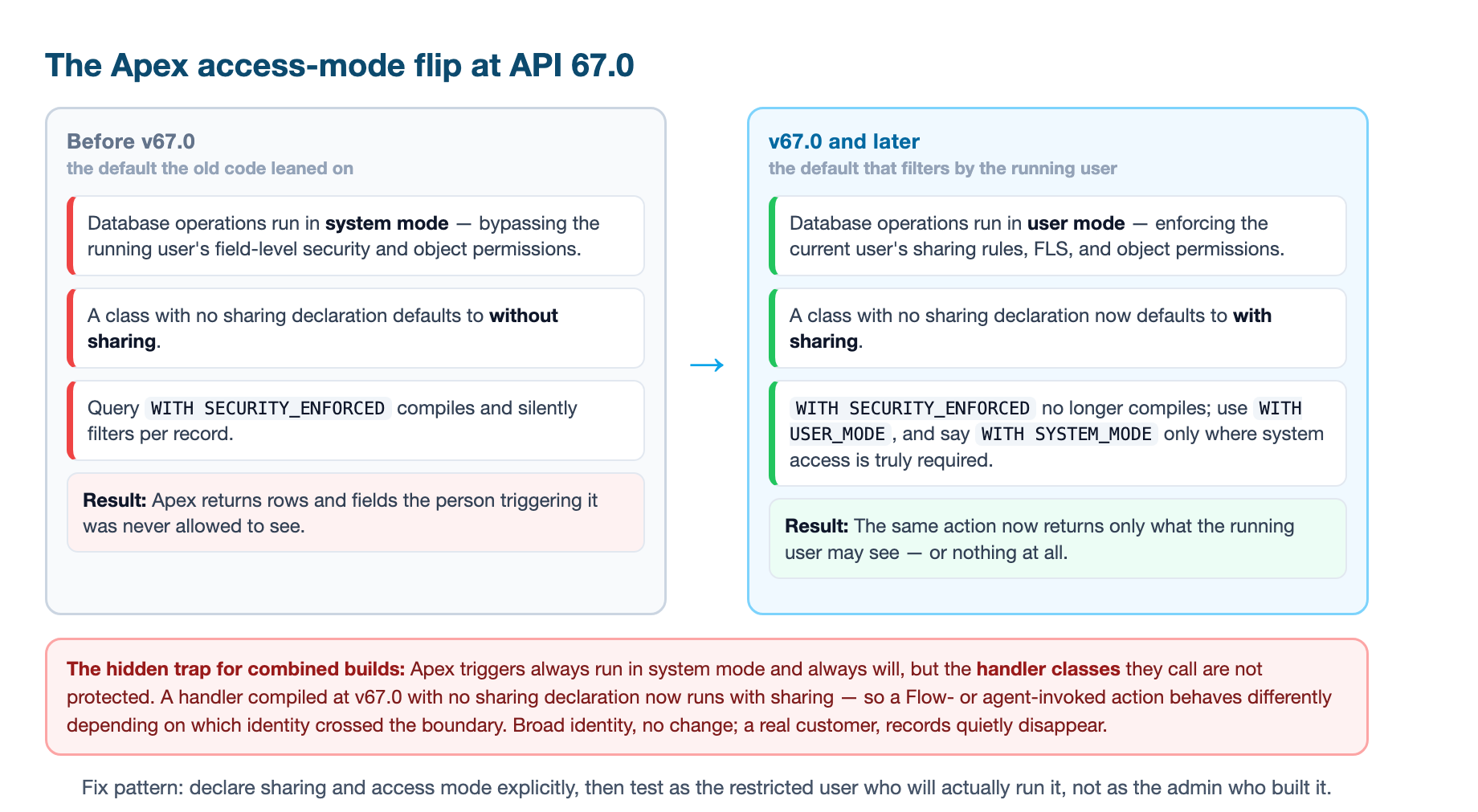
The pattern that prevents this failure is to stop relying on defaults altogether. Declare the sharing mode and the access mode on every class you touch, so the intent is in the code and not in whatever version the class happens to be compiled at. Then test as the person who will actually run it, not as an admin. A v66-era test suite passing does not prove a v67 class is correct, because the tests were written against the old defaults; add scenarios that run as a restricted user and assert exactly what rows and fields come back.1 This matters most for the code an agent or a Flow invokes, because those run under whatever identity crossed the boundary. An agent acting for a customer triggers Apex under a customer-scoped context, which is precisely where a system-mode assumption used to hide. We laid out the full migration in Apex security defaults flip at API 67.0; the short version for a combined build is that every Apex action reachable by a Flow or an agent needs an explicit access-mode audit before it ships.
Two: Flow written for one record that meets a collection
The second failure is the mirror image, and it happens in Flow. A record-triggered Flow is validated by one test case, a single case being created, and it passes. Then a real event fires it across a batch, a data import creating four hundred cases at once, and the Flow stumbles. The hidden default is that Flow bulkifies. When a record-triggered Flow runs, Salesforce groups the triggering records and runs one Flow interview per record as part of the same transaction, which is the platform bulkifying your automation for you.3 A Flow authored around a single-record mental model does not survive contact with a collection.
The common failures all follow from that single-record assumption. A Flow that updates the same record more than once in one pass, or issues DML inside a loop, or updates the triggering record in an after-save Flow, each of these is an anti-pattern that a one-record validation never catches.3 The after-save update is the sneakiest: updating the triggering record after the save can trigger the Flow again or fight the transaction, and the guidance is to do that kind of update in a before-save Flow instead.3 The same bulk discipline applies to the Apex actions a Flow calls. An invocable action operates on a collection of records, where each element represents one Flow interview, and an action that works only on the first element, or performs DML per element without batching, becomes the bottleneck the moment more than a handful of records come through.3
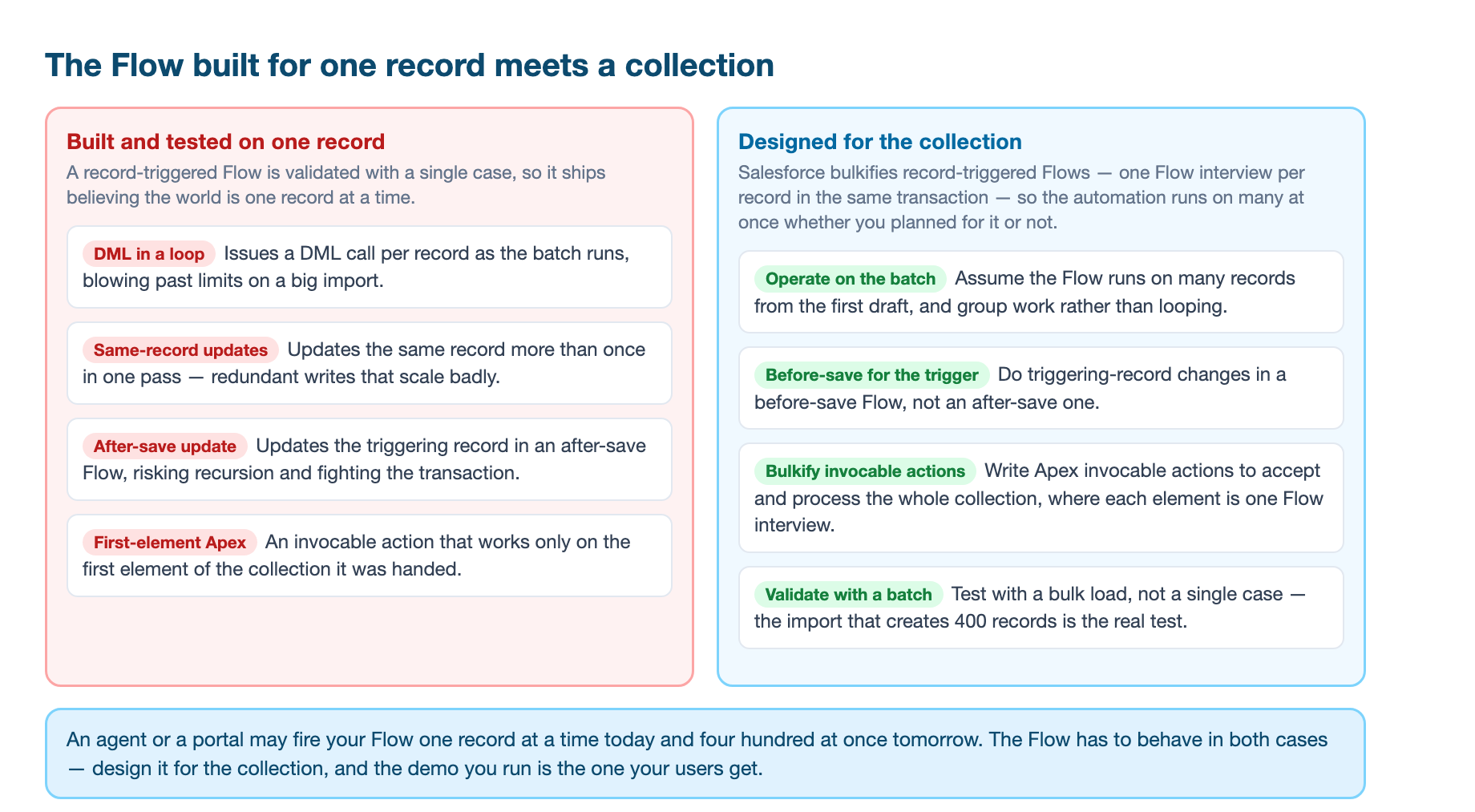
The pattern that prevents this is to design for the collection from the first draft. Assume the Flow runs on many records, keep updates out of loops, prefer before-save for triggering-record changes, and write invocable actions that accept and process the whole batch rather than one element. Then validate with a bulk test, not a single case. This is the discipline our Salesforce Flow patterns covers pattern by pattern, and the choice of whether the automation belongs in Flow at all is the Flow-versus-Apex decision. For a combined build the rule is short: an agent or a portal may fire your Flow one record at a time today and four hundred records at once tomorrow, and the Flow has to behave in both cases.
Three: the profile nobody activates
The third failure happens a layer below, in Data Cloud. It is the most expensive one, because it costs money while it does nothing. Data Cloud exists to unify scattered customer data into a single, resolved profile that other systems can act on. It ingests from every source, harmonizes the fields into one shared model, resolves which records describe the same person, and serves the result to the consumers above it. A perfectly built unified profile that no workflow reads just sits in a table.4 That is the failure: the org builds unification as an end in itself, pays the credit cost month after month, and never wires the output to a workflow a human or an agent actually runs.
The cost is not abstract. Identity resolution, the step that decides which records belong to one person, is the largest drain on the credit budget in a Data Cloud rollout, and it is the most common cause of a stalled one. Tune it wrong and you pay twice: rules too loose merge two different customers into one profile, rules too strict leave one customer split across several, and either way every consumer above the profile inherits the error.4 A customer whose records never unified does not get grounded answers from the agent or coherent personalization in the portal; a customer who got merged with a stranger gets answers about someone else's account.
The pattern that prevents this is to start from the workflow, not from the data. Define the one or two outcomes the profile must serve first, connect one source per system of record, resolve identity conservatively and tune that step before you scale it, and only then build the segments, calculations, and activations that reach a real workflow. A profile that feeds an agent's grounding and a portal's personalization is a working asset. A profile that feeds nothing is a bill. Our Data 360 implementation patterns walks the whole rollout sequence, and the portal personalization pattern shows the same data feeding Experience Cloud. For a combined build the test is blunt: name the workflow that reads the profile, and if you cannot name one, you are building cost, not capability.
Four: the agent that answers from data it was never given
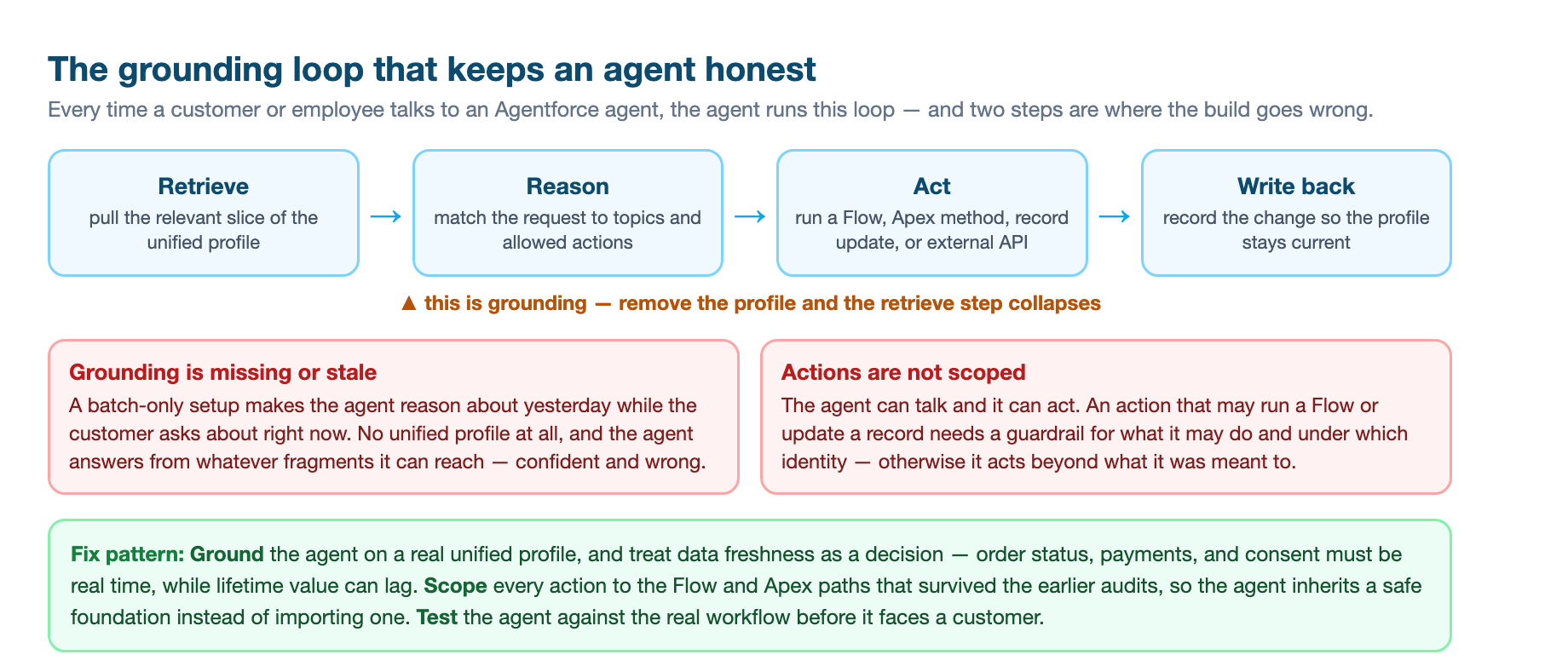
The fourth failure is what the third one causes upstream. An Agentforce agent is only as honest as the data it retrieves before it speaks. The mechanism is grounding: before the agent answers, it pulls the relevant slice of the customer's unified profile, the order in question, the tier, the recent interactions, and reasons from that slice rather than from a guess.4 Remove the unified profile and the retrieval step collapses, and the agent starts answering from whatever fragments it can reach, which is how a customer gets a confident wrong answer about an order that was already canceled or a purchase that happened yesterday. A batch-only data setup makes it worse, because the agent reasons about yesterday while the customer is asking about right now.4
The hidden default is that grounding exists and is current. It does not exist until you build it, and it is only as current as the ingestion feeding it. The teams that get the most from an agent treat freshness as a design decision, not a default: they map which data must be real time, order status, payments, consent, and which can lag a few hours, lifetime value scores, and they prioritize the real-time set so the agent stays accurate where it matters without paying for streaming everywhere.4
The second part of this failure is the action, not the answer. An agent does not just talk, it acts, and an action can run a Flow, call an Apex method, update a record, or hit an external API.4 The assumption that bites is that the actions are scoped. An agent allowed to issue a refund within policy should not also be able to close an account, and every action needs the guardrail that says what it may do and under which identity. This is the whole subject of our Agentforce production implementation patterns and the determinism ladder. For a combined build the pattern is to treat the agent as the consumer of everything beneath it: ground it on the unified profile from failure three, point its actions only at Flow and Apex paths that survived failures one and two, and test the agent against the real workflow before it faces a customer.
Five: the portal guest who can see too much
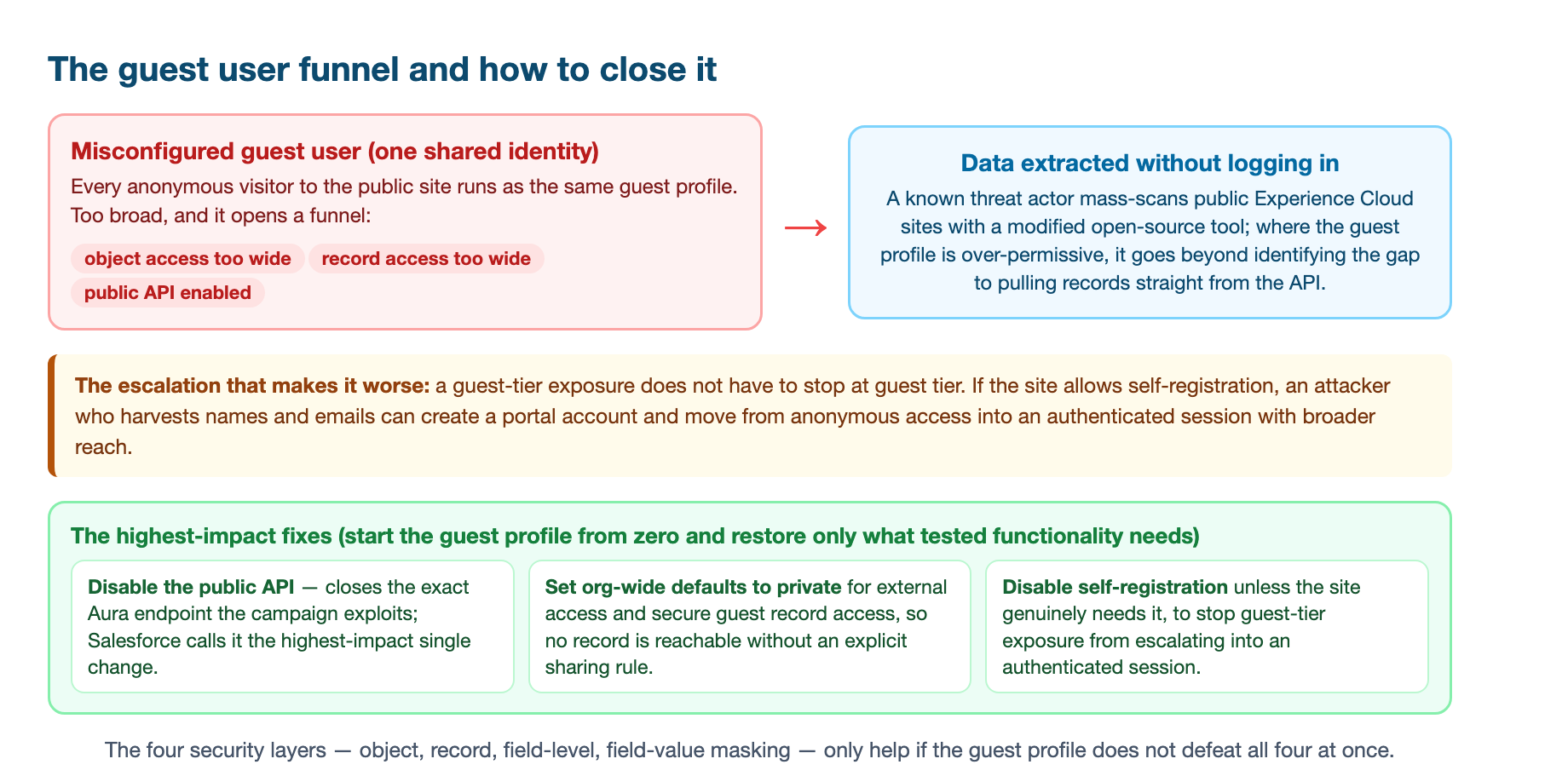
The fifth failure is on the surface, and it is the one with a live threat behind it. Experience Cloud sits in front of the same org your internal users use, the same records, the same sharing model, but it is governed by an external security posture. A visitor who does not log in runs as the Guest User, a single shared identity for every anonymous visitor on the site. That shared identity is the hidden default, and it is the one that gets misconfigured, because during development it is easiest to widen the guest profile so the demo works, and it never gets narrowed again.
The failure is an over-permissive guest user funneling data that was never meant to be public. Salesforce's security team has documented an active campaign in which a known threat actor mass-scans public Experience Cloud sites using a modified open-source tool, and in over-permissive guest configurations the tool goes beyond identifying weaknesses to actually extracting data without logging in.5 The mechanism only works through a customer misconfiguration, not a platform flaw, which is exactly why the audit is the fix.5 Experience Cloud gates access through four layers in sequence, object access, then record access, then field-level security, then field value masking, and if any layer denies, access stops there. But a guest profile that grants object access too broadly, or leaves the public API enabled, defeats all four layers at once.5
The escalation path makes it worse. A guest-tier exposure does not have to stop at guest tier. If the site allows self-registration, an attacker who harvests names and emails through a guest misconfiguration can create a portal account and move from anonymous access into an authenticated session with broader reach.5 That is why Salesforce's own recommended action list is so pointed: disable public API access for guest users, which it calls the highest-impact single change because it closes the exact endpoint the campaign exploits, set org-wide defaults to private, and disable self-registration unless the site genuinely needs it.5 For a combined build the pattern is the audit that ships with the portal, not after it: start the guest profile from zero access and restore object and field permissions only where tested functionality requires them. A self-service site that must let customers see their own cases does not need guest read on every object in the org. The portal-and-agent deployment path is covered in full in Agentforce on Experience Cloud.
Six: the integration that stops without a sound
The sixth failure is a schedule, and it is the one clients can actually put a date on. A combined build leans on server-to-server integrations that have run the same way for years, and a large share of them authenticate by sending a username, a password, and a security token straight to the token endpoint with grant_type=password. That flow is being retired, and the enforcement date is firm: February 20, 2027, for every org at once, not spread across instance-by-instance upgrade weekends.6 On that date, any integration still posting the password grant simply stops receiving a token. There is no error banner in the UI, because the failure happens server to server, and the first sign is usually a nightly job that quietly did not run.6
The hidden default is that an integration that has worked for years will keep working. The password grant was popular precisely because it was the least setup, no certificate, no redirect, and the cost of that convenience is that the integration holds a real user's password in its config.6 The retirement is already blocked by default in newly created orgs, which means the exposure is concentrated in the older orgs and the legacy integrations nobody remembers, the quarterly reconciliation job, the annual audit extract, the script on a retired VM.6
Finding them is the first half of the fix, and it is more work than the migration. Login History records every password-grant token request with a login type of Remote Access 2.0 and a login sub-type of OAuth Username-Password, so a filtered export finds the apps that authenticate regularly, with one catch, Login History only retains about six months, so a job that runs quarterly or yearly stays invisible.6 SOQL against the LoginHistory object does the same thing for anything you want to script or hand an auditor. And the step most teams skip is grepping their own middleware, connector configs, and infrastructure-as-code for grant_type=password, then walking the platforms nobody thinks of as integrations.6 Migrating each found integration to the client credentials flow, which runs as a designated integration user, or to the JWT bearer flow, which uses a certificate and no stored password, is an afternoon of work per integration once it is found, and the replacement secret belongs in a Named Credential, not in a script.6 The whole sequencing, and why the identity layer is the foundation everything else inherits, is the subject of our build-order article, and the broader wiring in the seams are the system.
The audit that covers all six
What the six failures share is the mechanism. Each one is a default the platform made for you, and each one stops being true when a second piece touches the first. Apex assumed system mode until v67.0 flipped it. Flow assumed you would validate on one record. Data Cloud assumed you would activate the profile. Agentforce assumed grounding and scoped actions existed. Experience Cloud assumed the guest profile was narrowed. The API layer assumed your credentials would outlast the grant type. None of those assumptions survives a combined build untouched.
So the practical pattern is not six separate fixes. It is one habit applied at six layers: name the default, then verify it against your real org. Run the agent and Flow paths as the restricted user who will actually use them, not as the admin who built them. Name the workflow that reads the unified profile, or do not build it. Decide which data the agent needs in real time and which can lag. Audit the guest profile from zero access. And put a date on the credential migration, because February 20, 2027 is on the calendar and it does not move.
Run that audit before a combined build ships and most of the failures never reach a customer. Skip it and you will meet all six in production, one per quarter, each one wearing the costume of a new problem when it is really the same old default finally being tested.
Sources
-
Salesforce, "Summer '26 Release Highlights for Salesforce Architects," salesforce.com ↩ ↩2 ↩3 ↩4
-
Salesforce Developers, "Apex Versioned Behavior Changes" (API version 67.0), developer.salesforce.com ↩ ↩2
-
Adam Osiecki, "Bulkification in Flows," Beyond The Cloud, March 2025, blog.beyondthecloud.dev ↩ ↩2 ↩3 ↩4
-
Sajiv Narayanan, "Agentforce Data Cloud: How AI Agents Turn Unified Customer Profiles Into Action," Minuscule Technologies, August 2026, minusculetechnologies.com ↩ ↩2 ↩3 ↩4 ↩5 ↩6
-
Salesforce, "Protecting Your Data: Essential Actions to Secure Experience Cloud Guest User Access," updated March 2026, salesforce.com ↩ ↩2 ↩3 ↩4 ↩5
-
Software Insights, "Salesforce Retires the OAuth Username-Password Flow on 20 February 2027," updated August 2026, softwareinsights.dev ↩ ↩2 ↩3 ↩4 ↩5 ↩6 ↩7